
Skylark
Generation and utility mod for Fabric sky block games
Screenshots
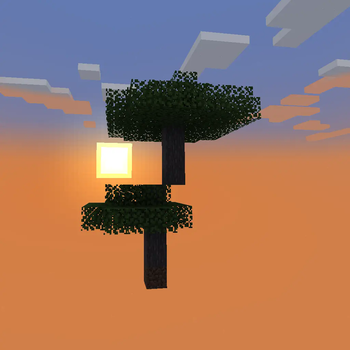
About this Mod
Skylark
Generation and utility mod for Fabric sky block games.
You do not need to ask me in order to use this mod in a modpack or to use
this code in your own mod. However, I would love to hear about it so I can
check it out.
See the wiki for configuration and details.
What does Skylark do today?
Currently implemented features:
- Disable all Overworld generation.
- Preserve the distribution of biomes.
- Allow generation of any starting feature (trees, etc.), or
- At a configurable height, and
- Randomized from a configured list, which
- Defaults to (most of) the Minecraft trees
- Allow generation of most structures.
- There is no ground layer, so
- Many vanilla structures will have some defects.
- Some vanilla structures override the height (-63 is common).
- A few custom structures are available; see the wiki.
- Generate a single chest at the spawn point with configurable items.
- Spawn the player on the generated feature or structure.
- Option to distribute multiple players either:
- All at (0, 0) on a shared spawn feature, or
- In a ring of configurable radius centered on (0, 0), or
- Based on their Minecraft scoreboard team.
- Track and persist player default spawn location individually.
What might Skylark do eventually?
Currently planned features:
- Maybe add bonus things specific to finding different biomes?
I will generally add any features I find useful for sky block play but which
are not already available via other Fabric mods. Suggestions are welcome.
Available Versions
How to Install Skylark on Your Server
Order Server
Order a Minecraft Java server with at least 4 GB RAM (6 GB recommended).
Set fabric Loader
In the panel under "Egg", select the fabric loader and matching Minecraft version (1.21.1).
Install Mod
Open the mod browser in the dashboard and search for "Skylark". Click "Install" – done! Alternatively, upload the .jar via SFTP to the /mods folder.
Compatibility
Mod Loaders
Minecraft Versions
1.21.1, 1.21, 1.20.4 (+10 more)
Server-side
✓ RequiredRecommended RAM
6 GB(min. 4 GB)Frequently Asked Questions
Skylark server crashes on startup – what to do?
Most common cause: wrong fabric version or insufficient RAM. Check the server log (latest.log) for "OutOfMemoryError" or "Mixin" errors. With Mado Hosting: ensure at least 4 GB RAM is allocated and the loader matches the mod version (1.21.1). You can switch loaders with one click in the panel.
Is Skylark compatible with fabric?
Skylark officially supports fabric for Minecraft 1.21.1, 1.21, 1.20.4. The Mado dashboard automatically detects incompatible loader combinations.
Server lagging with Skylark – how to optimize performance?
Recommended RAM: 6 GB (per 5 players). Use /spark profiler to check if Skylark consumes the most tick time. Common fixes: reduce server view-distance to 8-10, install "performant" or "starlight" as supplementary mods on Forge. With Mado Hosting, your server runs on NVMe SSDs with dedicated CPU cores for minimal latency.
Similar Mods




Rent Modded Server
Install Skylark with just one click on your server.