
SpawnerLoader9000
Loads your spawner even if you're far away.
Screenshots
About this Mod


SpawnerLoader9000 (SL9K)
Loads your spawner even when you're far away.
Why?
This is specifically useful for spawner farms when you want to move them far away from the spawner!
I got the motivation to create this mod because the mod Scarecrows' Territory, isn't Vanilla compatible.
How do I use it?
First, you need to craft the block.
Crafting Recipe
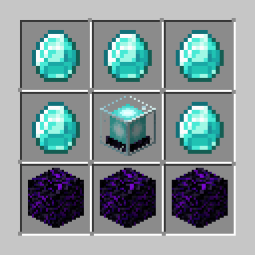
(you can make a suggestion in Github if you think that the recipe is very expensive!)
Then, what?
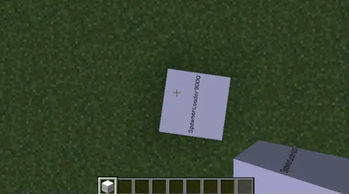
Just place the block on top of a mob spawner and watch the magic happen!
Extras!
The block can also load a 3x3 chunk area around itself so the spawned entities dont unload immediately.
• This feature only works if the block itself is above a spawner and theres no presence of itself in a 5x5 chunk radius.
Note!
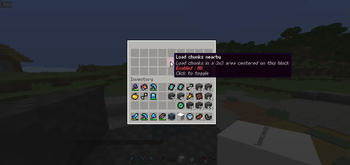
Remember that this feature is automatically turned off but, you can enable it by right clicking the block and clicking the item in the middle. (Don't forget to click apply in the bottom right corner of the GUI!) (takes a while to actually load the 3x3 chunk area)Compatibility
This mod should be compatible with all mods (atleast I think it is), feel free to make a Github Issue if there's any mod incompatibility issue.
Vanilla client compatibility
This mod supports Vanilla clients if you install the optional server-side mod, Polymer! (HUGE THANKS TO PATBOX AND ITS CONTRIBUTORS‼️‼️)
Tutorial! (all of this is on the server-side)
Download Polymer and install it in your server 'mods' folder.
Run the Minecraft Server to generate Polymer configs.
Go to
config/polymerOpen
auto-host.jsonAnd change the value of
"enabled"and"required"(<- this one is optional) totrue.
The config file should now look like this:

Lastly, save the config and restart your server!
You can also install Polymer in the client-side for an overall better experience!
Available Versions
How to Install SpawnerLoader9000 on Your Server
Order Server
Order a Minecraft Java server with at least 3 GB RAM (4 GB recommended).
Set fabric Loader
In the panel under "Egg", select the fabric loader and matching Minecraft version (1.21.3).
Install Mod
Open the mod browser in the dashboard and search for "SpawnerLoader9000". Click "Install" – done! Alternatively, upload the .jar via SFTP to the /mods folder.
Compatibility
Mod Loaders
Minecraft Versions
1.21.3, 1.21.2, 1.21.1 (+1 more)
Server-side
✓ RequiredRecommended RAM
4 GB(min. 3 GB)Frequently Asked Questions
SpawnerLoader9000 server crashes on startup – what to do?
Most common cause: wrong fabric version or insufficient RAM. Check the server log (latest.log) for "OutOfMemoryError" or "Mixin" errors. With Mado Hosting: ensure at least 3 GB RAM is allocated and the loader matches the mod version (1.21.3). You can switch loaders with one click in the panel.
Is SpawnerLoader9000 compatible with fabric?
SpawnerLoader9000 officially supports fabric for Minecraft 1.21.3, 1.21.2, 1.21.1. The Mado dashboard automatically detects incompatible loader combinations.
Server lagging with SpawnerLoader9000 – how to optimize performance?
Recommended RAM: 4 GB (per 8 players). Use /spark profiler to check if SpawnerLoader9000 consumes the most tick time. Common fixes: reduce server view-distance to 8-10, install "performant" or "starlight" as supplementary mods on Forge. With Mado Hosting, your server runs on NVMe SSDs with dedicated CPU cores for minimal latency.
Similar Mods





Rent Modded Server
Install SpawnerLoader9000 with just one click on your server.