
Slot Jam
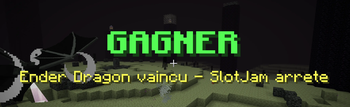
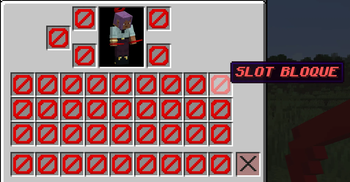
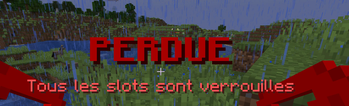
At a configurable interval, some slots become unusable.
Screenshots
About this Mod
🛡️ SlotJam: The Ultimate Inventory Challenge
Do you think Minecraft survival is getting too easy? SlotJam is here to disrupt your routine and put your organizational skills (and your nerves) to the test! The concept is simple yet ruthless: your inventory is closing in on you.
🕹️ How does it work?
Every few seconds, a random slot in your inventory locks automatically. If you don’t stay on top of it, you’ll eventually find yourself unable to pick up even a single block of dirt. Resource management just became a high-stakes race against the clock!
💎 Reclaim Your Space
Desperately need that specific slot for your Netherite sword? Don't panic. You can buy back your locked slots in exchange for diamonds. It’s time to make a choice: do you save your precious gems for your armor, or for the right to actually carry your loot?
⚙️ Fully Configurable
The mod adapts to your specific playstyle. Through the configuration file, you can customize:
The Delay: The time interval between each slot lock.
The Cost: The amount of diamonds required to unlock a slot.
The Locking Mode: Choose between Random or Progressive locking.
🌐 Multiplayer Compatible
Want to suffer together? The mod is 100% multiplayer compatible. Organize survival challenges with your friends or install it on your server to add a brand-new layer of difficulty. Who will be the richest (or the most organized) player to keep their inventory open?
Why install this mod?
It’s the perfect addition for "Hardcore" modpacks or content creators looking for an original video concept. It’s simple, effective, and completely changes the game dynamic!
Ready to sacrifice your diamonds for a little elbow room? Download SlotJam now!
Commande
/slotjam show/slotjam menu/slotjam start/slotjam stop/slotjam reset- `/slotjam interval
/slotjam count <0..36>- `/slotjam armorCount <0..4>
/slotjam mainInventory <true|false>/slotjam armor <true|false>/slotjam offhand <true|false>
Available Versions
How to Install Slot Jam on Your Server
Order Server
Order a Minecraft Java server with at least 3 GB RAM (4 GB recommended).
Set neoforge Loader
In the panel under "Egg", select the neoforge loader and matching Minecraft version (1.21.8).
Install Mod
Open the mod browser in the dashboard and search for "Slot Jam". Click "Install" – done! Alternatively, upload the .jar via SFTP to the /mods folder.
Compatibility
Mod Loaders
Minecraft Versions
1.21.8, 1.21.4, 1.21.1
Server-side
✓ RequiredRecommended RAM
4 GB(min. 3 GB)Frequently Asked Questions
Slot Jam server crashes on startup – what to do?
Most common cause: wrong neoforge version or insufficient RAM. Check the server log (latest.log) for "OutOfMemoryError" or "Mixin" errors. With Mado Hosting: ensure at least 3 GB RAM is allocated and the loader matches the mod version (1.21.8). You can switch loaders with one click in the panel.
Is Slot Jam compatible with neoforge?
Slot Jam officially supports neoforge for Minecraft 1.21.8, 1.21.4, 1.21.1. The Mado dashboard automatically detects incompatible loader combinations.
Server lagging with Slot Jam – how to optimize performance?
Recommended RAM: 4 GB (per 8 players). Use /spark profiler to check if Slot Jam consumes the most tick time. Common fixes: reduce server view-distance to 8-10, install "performant" or "starlight" as supplementary mods on Forge. With Mado Hosting, your server runs on NVMe SSDs with dedicated CPU cores for minimal latency.
Rent Modded Server
Install Slot Jam with just one click on your server.