
Smart Arrows
Arrow mechanics ricochet and teleportation system
Screenshots

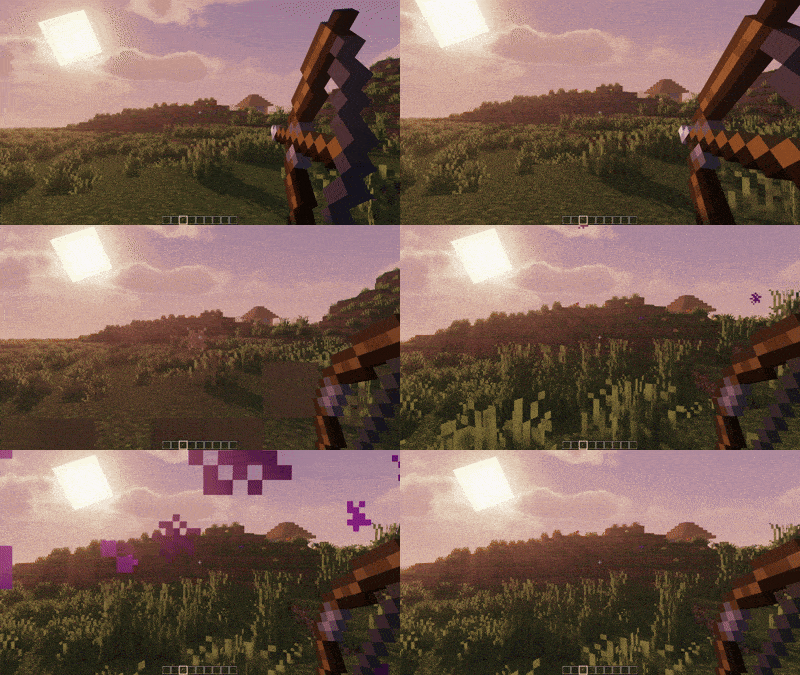
About this Mod



Smart Arrows - Enhanced Arrow Physics for Minecraft
Transform your archery experience with intelligent arrow mechanics!
✨ Features
🎯 Ricochet System
- Smart Bouncing: Arrows ricochet off surfaces at shallow angles
- Configurable Angle Threshold: Adjust ricochet sensitivity (5-45 degrees)
- Multiple Bounces: Set maximum ricochet count (1-8 bounces)
- Realistic Physics: Energy loss with each bounce for authentic feel
🌟 Teleportation
- Crouch-to-Teleport: Hold crouch while shooting to mark arrows for teleportation
- Smart Positioning: Automatically finds safe teleport locations
- Instant Travel: Teleport to your arrow's landing spot instantly
- Safety Checks: Prevents teleporting into walls or dangerous areas(lava, water)
🎮 How to Use
Ricochet Arrows
Toggle G(press G) to open Menu
- Enable ricochet in the config menu (default: ON)
- Shoot arrows at walls at shallow angles
- Watch them bounce off surfaces realistically!
Teleport Arrows
- Hold Crouch while drawing your bow
- Shoot the arrow to your desired location
- You'll instantly teleport when the arrow lands!
Configuration
- Press
Gto open the configuration menu in-game - Adjust ricochet angles and maximum bounces
- Toggle features on/off as needed
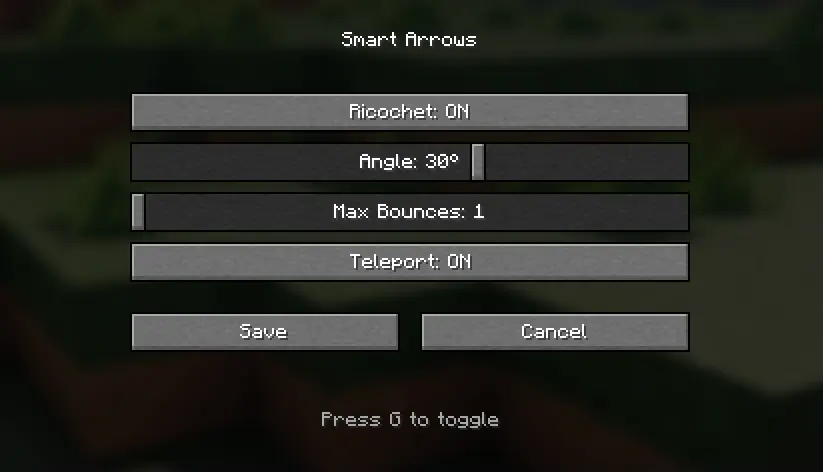
⚙️ Configuration Options
| Setting | Default | Description |
|---|---|---|
| Ricochet Enabled | true |
Enable/disable arrow ricocheting |
| Angle Threshold | 15° |
Minimum angle for ricochet (5-45°) |
| Max Ricochets | 3 |
Maximum number of bounces (1-8) |
| Teleport Enabled | true |
Enable/disable teleportation feature |
🔧 Technical Details
- Client-Side Configuration: Smooth GUI with real-time updates
- Server-Safe: Works on multiplayer servers
- Performance Optimized: Minimal impact on game performance
- Vanilla-Friendly: Preserves normal arrow physics when features are disabled
📋 Requirements
- Minecraft: 1.21.x
- Mod Loader: Fabric
- Fabric API: Latest version for 1.21.5 and >= 1.21.1
🚀 Installation
- Install Fabric Loader for Minecraft 1.21.x
- Download and install Fabric API
- Download Smart Arrows from Modrinth
- Place the mod file in your
modsfolder - Launch Minecraft and enjoy enhanced archery!
Available Versions
How to Install Smart Arrows on Your Server
Order Server
Order a Minecraft Java server with at least 3 GB RAM (4 GB recommended).
Set fabric Loader
In the panel under "Egg", select the fabric loader and matching Minecraft version (1.21.5).
Install Mod
Open the mod browser in the dashboard and search for "Smart Arrows". Click "Install" – done! Alternatively, upload the .jar via SFTP to the /mods folder.
Compatibility
Mod Loaders
Minecraft Versions
1.21.5, 1.21.4, 1.21.3 (+2 more)
Server-side
✓ RequiredRecommended RAM
4 GB(min. 3 GB)Frequently Asked Questions
Smart Arrows server crashes on startup – what to do?
Most common cause: wrong fabric version or insufficient RAM. Check the server log (latest.log) for "OutOfMemoryError" or "Mixin" errors. With Mado Hosting: ensure at least 3 GB RAM is allocated and the loader matches the mod version (1.21.5). You can switch loaders with one click in the panel.
Is Smart Arrows compatible with fabric?
Smart Arrows officially supports fabric for Minecraft 1.21.5, 1.21.4, 1.21.3. The Mado dashboard automatically detects incompatible loader combinations.
Server lagging with Smart Arrows – how to optimize performance?
Recommended RAM: 4 GB (per 8 players). Use /spark profiler to check if Smart Arrows consumes the most tick time. Common fixes: reduce server view-distance to 8-10, install "performant" or "starlight" as supplementary mods on Forge. With Mado Hosting, your server runs on NVMe SSDs with dedicated CPU cores for minimal latency.
Similar Mods




Rent Modded Server
Install Smart Arrows with just one click on your server.