
Smart Trading
The best Fabric villager trading quality of life mod. Name villagers, favorite trades, search librarians by enchantment, and track zombie cures. No server install needed.
Screenshots
About this Mod
Smart Trading
Manage your villagers like never before with this powerful quality of life trading mod for Fabric! Perfect for organizing trading halls, finding librarians, and keeping track of your best trades across any world or server.
What This Mod Does
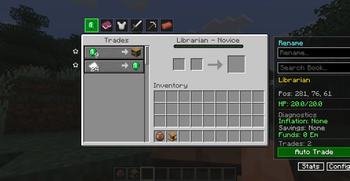
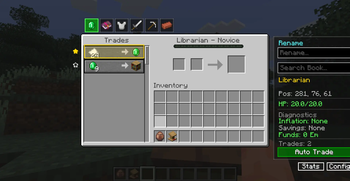
Smart Trading adds a clean side panel directly into the vanilla trading screen, giving you tools to name your villagers, mark favorite trades, search librarians by enchantment, and track zombie villager cures in real time. Everything works on any server without any server side installation required.
Features
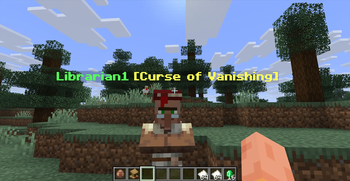
- Custom Villager Nicknames - Assign a permanent name to any villager that shows above their head and in the trading screen
- Favorite Trades - Click the star next to any trade to highlight it in gold for quick access
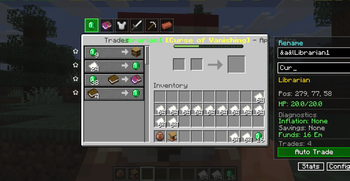
- Librarian Enchantment Search - Type any enchantment name and every matching librarian gets highlighted across your trading hall
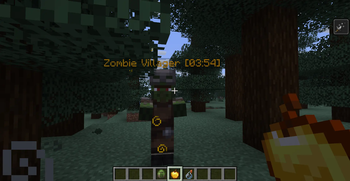
- Zombie Villager Cure Timer - A live countdown appears above zombie villagers being cured, adjusted for nearby iron bars and beds
- Locked Trade Overlay - Out of stock trades get a red tint so you know instantly what is unavailable
- Color Code Support - Use ampersand color codes in villager names for custom color coded trading halls
- Settings Panel - Toggle every feature on or off directly inside the trading screen
How to Use
Quick Start:
- Walk up to any villager and open the trading screen
- The Smart Trading panel appears automatically on the side
- Type a name in the name field and press Enter to nickname that villager
- Click the star next to any trade to mark it as a favorite
- Type in the search bar to find librarians by enchantment name
Perfect For
- Trading Hall Builders - Keep track of dozens of villagers with custom names and colors
- Librarian Hunters - Find that specific enchantment book in seconds across your entire hall
- Survival Players - Know exactly when your zombie villager cure is finished
- Multiplayer Servers - Works on any server without admin permission or server mods
Technical Details
- Client side only - works on any server
- Lightweight - no performance impact on normal gameplay
- Safe - makes no changes to server data or game mechanics
- All data saved locally - names and favorites persist across sessions and mod updates
Installation
Requirements:
- Minecraft 1.21.x to 26.1.x
- Fabric Loader
- Fabric API
Steps:
- Get Fabric Loader from https://fabricmc.net/use/installer
- Download Fabric API from https://modrinth.com/mod/fabric-api
- Download Smart Trading from this page
- Place both jar files into your mods folder
- Launch using the Fabric profile and enjoy!
Need Fabric API? Get it from the official Fabric project linked above. It is required for this mod to work properly!
Available Versions
How to Install Smart Trading on Your Server
Order Server
Order a Minecraft Java server with at least 3 GB RAM (4 GB recommended).
Set fabric Loader
In the panel under "Egg", select the fabric loader and matching Minecraft version (26.1.2).
Install Mod
Open the mod browser in the dashboard and search for "Smart Trading". Click "Install" – done! Alternatively, upload the .jar via SFTP to the /mods folder.
Compatibility
Mod Loaders
Minecraft Versions
26.1.2, 26.1.1, 26.1 (+12 more)
Server-side
✗ UnsupportedRecommended RAM
4 GB(min. 3 GB)Frequently Asked Questions
Smart Trading server crashes on startup – what to do?
Most common cause: wrong fabric version or insufficient RAM. Check the server log (latest.log) for "OutOfMemoryError" or "Mixin" errors. With Mado Hosting: ensure at least 3 GB RAM is allocated and the loader matches the mod version (26.1.2). You can switch loaders with one click in the panel.
Is Smart Trading compatible with fabric?
Smart Trading officially supports fabric for Minecraft 26.1.2, 26.1.1, 26.1. The Mado dashboard automatically detects incompatible loader combinations.
Server lagging with Smart Trading – how to optimize performance?
Recommended RAM: 4 GB (per 8 players). Use /spark profiler to check if Smart Trading consumes the most tick time. Common fixes: reduce server view-distance to 8-10, install "performant" or "starlight" as supplementary mods on Forge. With Mado Hosting, your server runs on NVMe SSDs with dedicated CPU cores for minimal latency.
Similar Mods


Rent Modded Server
Install Smart Trading with just one click on your server.