
SmartBooks
Create fully customizable books with images, custom fonts, and templates right inside Minecraft! A modern, canvas-based book editor.
Screenshots
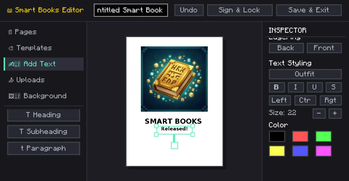
About this Mod
SmartBooks is an advanced, in-game book creation and editing mod that takes Minecraft's traditional book and quill to a whole new level. Whether you are creating a detailed server guide, a rich quest log, a comic book, or an encyclopedia, SmartBooks provides a modern, canvas-like editor directly in the game.
✨ Key Features
- Modern Canvas Editor: Move, resize, and rotate text and image elements anywhere on the page, just like professional design software.
- Rich Text Formatting: Choose from built-in fonts, change font sizes, colors, and apply formatting (bold, italics, underline, strikethrough). Supports left, center, and right text alignment.
- Custom Images: Upload images directly from your computer or import them using a URL! Adjust image opacity, add rounded corners, and customize border styles.
- Page Backgrounds & Colors: Customize each page with specific background colors or styles like lined paper, grid, or classic parchment.
- 10+ Pre-made Templates: Don't want to start from scratch? Use built-in templates like Comic, Magazine, Guide, Encyclopedia, Quest Log, Manual, and Newspaper to instantly format your pages.
- Layering System: Bring elements to the front or send them to the back with a simple click.
- Multiplayer Compatible: Fully synchronized with the server. Books are saved on the server and safely sent to clients.
📖 How to Use
- Get a Smart Book.
- Right-click to open the editor. (If the book is empty, or you sneak-right-click an unsigned book, the editor opens. Otherwise, it opens in reader mode).
- Use the left sidebar to add text, images, pages, or apply templates.
- Use the right inspector panel to customize the properties of the selected element.
- Click Save to keep your progress or Sign to lock the book permanently!
⚙️ Technical Details
- Version: Minecraft 1.20.1
- Loaders: Available natively for both Fabric and Forge.
- Client & Server: Needs to be installed on both the client and the server for multiplayer synchronization to work correctly.
NOTE: THERE ARE NO RECIPE FOR NOW. IN NEXT UPDATE
Available Versions
How to Install SmartBooks on Your Server
Order Server
Order a Minecraft Java server with at least 3 GB RAM (4 GB recommended).
Set fabric Loader
In the panel under "Egg", select the fabric loader and matching Minecraft version (1.20.1).
Install Mod
Open the mod browser in the dashboard and search for "SmartBooks". Click "Install" – done! Alternatively, upload the .jar via SFTP to the /mods folder.
Compatibility
Mod Loaders
Minecraft Versions
1.20.1
Server-side
✓ RequiredRecommended RAM
4 GB(min. 3 GB)Frequently Asked Questions
SmartBooks server crashes on startup – what to do?
Most common cause: wrong fabric version or insufficient RAM. Check the server log (latest.log) for "OutOfMemoryError" or "Mixin" errors. With Mado Hosting: ensure at least 3 GB RAM is allocated and the loader matches the mod version (1.20.1). You can switch loaders with one click in the panel.
Is SmartBooks compatible with fabric and forge?
SmartBooks officially supports fabric, forge for Minecraft 1.20.1. Note: Forge and Fabric mods are NOT cross-compatible – pick one loader and stick with it. The Mado dashboard automatically detects incompatible loader combinations.
Server lagging with SmartBooks – how to optimize performance?
Recommended RAM: 4 GB (per 8 players). Use /spark profiler to check if SmartBooks consumes the most tick time. Common fixes: reduce server view-distance to 8-10, install "performant" or "starlight" as supplementary mods on Forge. With Mado Hosting, your server runs on NVMe SSDs with dedicated CPU cores for minimal latency.
Rent Modded Server
Install SmartBooks with just one click on your server.