
Sneaky Server
Anonymise your server from scanners like Copenheimer and ServerSeeker. With options to disable logging spam logins and rate limit new connections.
Screenshots
About this Mod
Sneaky
⚠️ Versions 1.0.11 to 1.0.13 have an oversight allowing unwhitelisted or banned players to still see MOTD and player list. This only affects servers with whitelist on. I made a mistake in adding players to the allowed list too early in the signin process. It's unlikely that this was abused on a wide scale as it still required successful authentication with Mojang (on Online-Mode servers). 1.0.14.1 is available for all affected Minecraft versions
Sneaky anonymises your server from server scanners like Copenheimer, Shodan or ServerSeeker by only showing server info to players who have previously joined.
Sneaky has other options to protect your server including disabling logs for unauthorised players, and ratelimiting the creation of new connections.
Configuration
The configuration is stored in config/sneakyserver/config.properties
hide-server-ping-data: (Default: true) Only sends server ping data to known players
hide-player-list: (Default: false) Sends server ping data to unknown players, but doesn't send a user list. Only works when "hide-server-ping-data" is false.
dont-log-unauthed-client-disconnects: (Default: false) Prevents the server from logging failed offline-mode player logins. Prevents logs when the client closes the connection. Example of a server being spammed with offline mode logins: https://www.reddit.com/r/Minecraft/comments/12ip3gd/who_is_shepan/
dont-log-unauthed-server-disconnects: (Default: false) Prevents the server from logging failed offline-mode player logins. Prevents logs when the server closes the connection
rate-limit-new-connections: (Default: true) Enables a rate limit for clients creating new connections.
new-connection-rate-limit: (Default: 7) Connection limit over 15 seconds. If a client exceeds this limit new connections will be closed.
disable-query-until-login: (Default: false) shows the server as offline before the first time a player joins
disable-legacy-query: (Default: true) disables legacy ping used by clients older than Minecraft 1.6
disable-connections-from-banned-ips: (Default: false) closes connections from banned IPs before reaching login logic. May be incompatible with BungeeCord or Velocity
Hiding ping data
Sneaky hides server info by keeping a list of IP addresses of known players and their last join date, only allowing known players to receive the real server info, and appearing as an unconfigured server with no player activity to server scanners and players who have never joined. this feature is meant to be a no compromise alternative to vanilla's hide-online-players feature, allowing members of a server to see relevant information without leaking that information to scanners or un-whitelisted players (in the case of a whitelisted server)
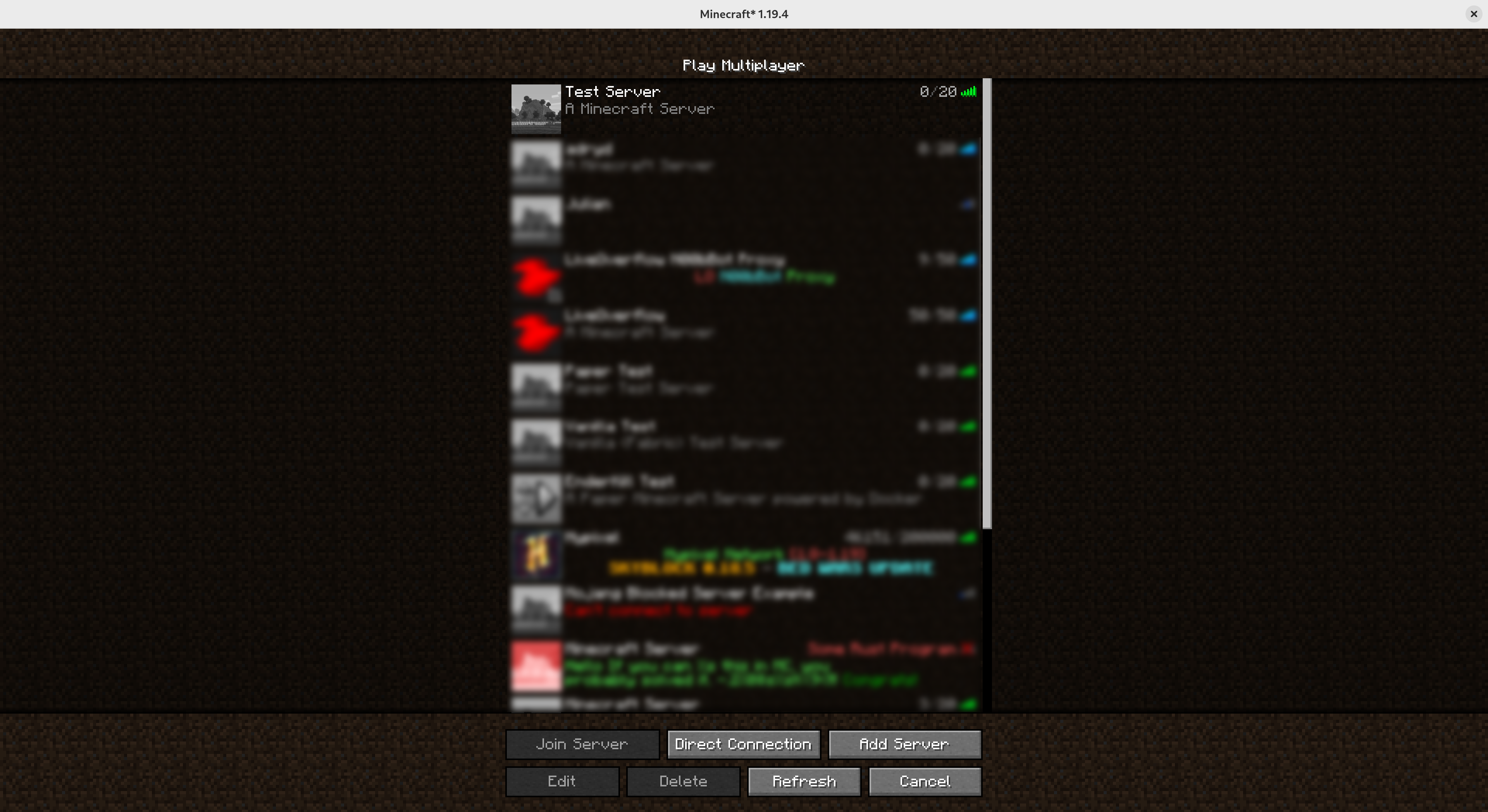
Before joining
Before first joining, players and server scanners see a generic, unconfigured server with no player activity
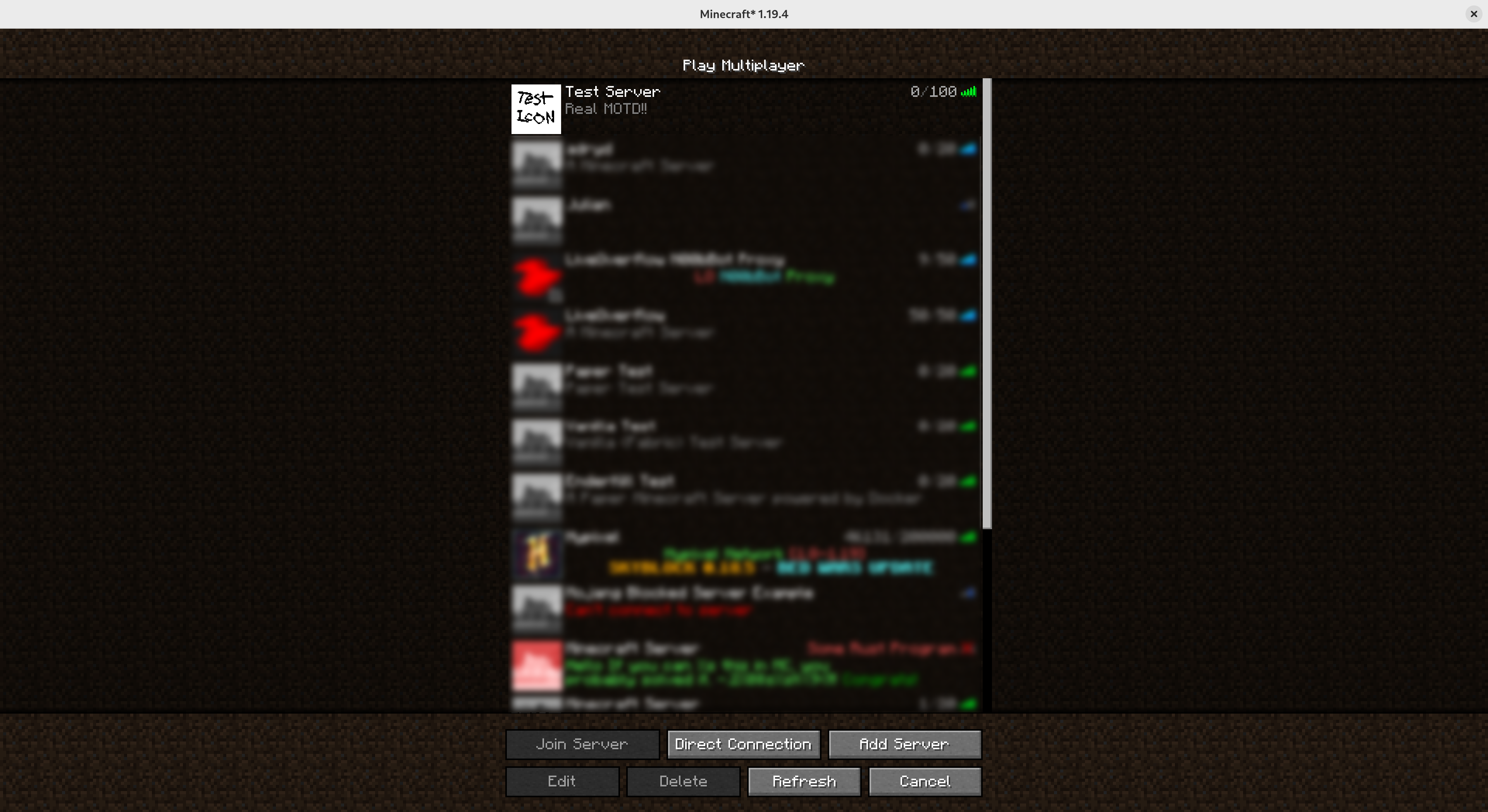
After joining
After their first join, players will see the real MOTD, server icon, and online players list
Available Versions
How to Install Sneaky Server on Your Server
Order Server
Order a Minecraft Java server with at least 3 GB RAM (4 GB recommended).
Set fabric Loader
In the panel under "Egg", select the fabric loader and matching Minecraft version (1.21.10).
Install Mod
Open the mod browser in the dashboard and search for "Sneaky Server". Click "Install" – done! Alternatively, upload the .jar via SFTP to the /mods folder.
Compatibility
Mod Loaders
Minecraft Versions
1.21.10, 1.21.8, 1.21.5 (+14 more)
Server-side
✓ RequiredRecommended RAM
4 GB(min. 3 GB)Frequently Asked Questions
Sneaky Server server crashes on startup – what to do?
Most common cause: wrong fabric version or insufficient RAM. Check the server log (latest.log) for "OutOfMemoryError" or "Mixin" errors. With Mado Hosting: ensure at least 3 GB RAM is allocated and the loader matches the mod version (1.21.10). You can switch loaders with one click in the panel.
Is Sneaky Server compatible with fabric and quilt?
Sneaky Server officially supports fabric, quilt for Minecraft 1.21.10, 1.21.8, 1.21.5. The Mado dashboard automatically detects incompatible loader combinations.
Server lagging with Sneaky Server – how to optimize performance?
Recommended RAM: 4 GB (per 8 players). Use /spark profiler to check if Sneaky Server consumes the most tick time. Common fixes: reduce server view-distance to 8-10, install "performant" or "starlight" as supplementary mods on Forge. With Mado Hosting, your server runs on NVMe SSDs with dedicated CPU cores for minimal latency.
Similar Mods






Rent Modded Server
Install Sneaky Server with just one click on your server.