
so much stuff!
adds a bunch of stuff to Minecraft, including emerald armour and tools fireflies and many more
Screenshots
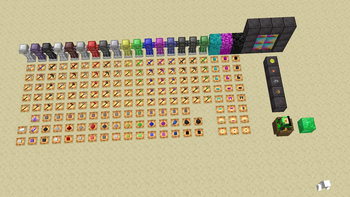
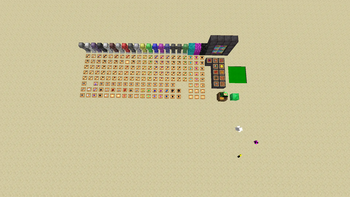
About this Mod
This mod significantly enhances your Minecraft experience by introducing a wide array of new features, including:
- Emerald Armor and Tools: Craft powerful armor and tools using emeralds, providing better protection and durability compared to standard options.
- Additional Armor Sets: Discover new types of armor that offer unique benefits and styles, catering to various play styles.
- More Tools: Utilize an expanded selection of tools that improve efficiency in mining, building, and combat.
- 2 New Mob: 2 new exciting mobs that add fresh challenges and interactions to your gameplay.
- A New Dimension: Explore a completely new dimension filled with unique landscapes, resources, and secrets waiting to be uncovered.
- 2 New Potions: Brew 2 new potion that grants special abilities, enhancing your survival strategy and adventure.
- a new boss: that brings an exciting blend of challenging yet enjoyable gameplay.
- And So Much More: Enjoy a plethora of additional features and enhancements that bring diversity and excitement to your Minecraft world.
Dive in and discover how these additions can transform your gameplay!
Available Versions
How to Install so much stuff! on Your Server
Order Server
Order a Minecraft Java server with at least 3 GB RAM (4 GB recommended).
Set neoforge Loader
In the panel under "Egg", select the neoforge loader and matching Minecraft version (1.21.10).
Install Mod
Open the mod browser in the dashboard and search for "so much stuff!". Click "Install" – done! Alternatively, upload the .jar via SFTP to the /mods folder.
Compatibility
Mod Loaders
Minecraft Versions
1.21.10, 1.21.9, 1.21.8 (+4 more)
Server-side
✓ RequiredRecommended RAM
4 GB(min. 3 GB)Frequently Asked Questions
so much stuff! server crashes on startup – what to do?
Most common cause: wrong neoforge version or insufficient RAM. Check the server log (latest.log) for "OutOfMemoryError" or "Mixin" errors. With Mado Hosting: ensure at least 3 GB RAM is allocated and the loader matches the mod version (1.21.10). You can switch loaders with one click in the panel.
Is so much stuff! compatible with neoforge?
so much stuff! officially supports neoforge for Minecraft 1.21.10, 1.21.9, 1.21.8. The Mado dashboard automatically detects incompatible loader combinations.
Server lagging with so much stuff! – how to optimize performance?
Recommended RAM: 4 GB (per 8 players). Use /spark profiler to check if so much stuff! consumes the most tick time. Common fixes: reduce server view-distance to 8-10, install "performant" or "starlight" as supplementary mods on Forge. With Mado Hosting, your server runs on NVMe SSDs with dedicated CPU cores for minimal latency.
Similar Mods



![[TaCZ] Timeless and Classics Zero](https://cdn.modrinth.com/data/SzzJttH8/fd27766d2bb8390d284696b1dbd358f87e081439_96.webp)


Rent Modded Server
Install so much stuff! with just one click on your server.