
Society Trading
A data-driven trading mod for Modpack developers
Screenshots
About this Mod
Society Trading
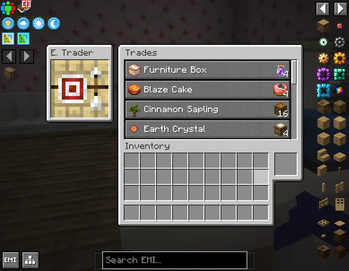
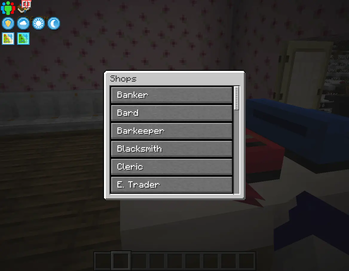
Society Trading is a data-driven trading mod for modpack makers that allows any number of custom shops to be created. These shops can be bound to certain villager professions, entities, and blocks. A tag can also be set to open up the shop selector, allowing convenient viewing of all shops in one list.
This mod does not come with any trades! It is intended for modpack makers!
Features
Customizable Shops
Shops can be customized with a variety of properties for fine-tuned control in modpacks. They can accept an unlimited amount of trades, and certain entities, blocks, or Villagers with professions can be designated to open up a specific shop.
More information on creating shops can be found on the wiki: https://github.com/Chakyl/society-trading/wiki/Tutorial:-Creating-and-Using-Shops
Better Trading
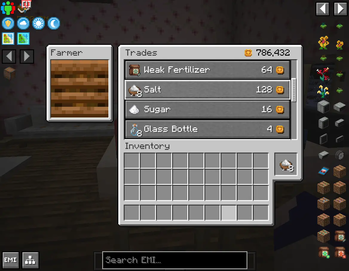
The trading screen for each shop is an upgrade from vanilla's trading UI, allowing trading items to be directly taken from the player's inventory rather than clumsily moving items into slots. A stack of items can be traded with by shift+clicking on the trade output slot
Create: Numismatics Support
When Create: Numismatics is installed, trades can be set to automatically draw currency from a player's bank account.
This can be augmented further with Create: Numismatics Utils by allowing traders to access balances from shared accounts using Blaze Bankers.
KubeJs & Serene Seasons Support
When KubeJs is installed, trades or shops can be restricted using stages. A season restriction can be set in a similar way when Serene Seasons is installed.
Dependencies
Required
Optional
- JEI or equivalent for trade viewing.
- KubeJs for KubeJs stage restrictions.
- Serene Seasons for season restrictions.
- Create: Numismatics for bank account purchasing.
- Create: Numismatics Utils for bank account purchasing from shared accounts.
Support
Questions? Comments? Suggestions? Join our Discord!
Available Versions
How to Install Society Trading on Your Server
Order Server
Order a Minecraft Java server with at least 3 GB RAM (4 GB recommended).
Set forge Loader
In the panel under "Egg", select the forge loader and matching Minecraft version (1.20.1).
Install Mod
Open the mod browser in the dashboard and search for "Society Trading". Click "Install" – done! Alternatively, upload the .jar via SFTP to the /mods folder.
Compatibility
Mod Loaders
Minecraft Versions
1.20.1
Server-side
✓ RequiredRecommended RAM
4 GB(min. 3 GB)Frequently Asked Questions
Society Trading server crashes on startup – what to do?
Most common cause: wrong forge version or insufficient RAM. Check the server log (latest.log) for "OutOfMemoryError" or "Mixin" errors. With Mado Hosting: ensure at least 3 GB RAM is allocated and the loader matches the mod version (1.20.1). You can switch loaders with one click in the panel.
Is Society Trading compatible with forge?
Society Trading officially supports forge for Minecraft 1.20.1. The Mado dashboard automatically detects incompatible loader combinations.
Server lagging with Society Trading – how to optimize performance?
Recommended RAM: 4 GB (per 8 players). Use /spark profiler to check if Society Trading consumes the most tick time. Common fixes: reduce server view-distance to 8-10, install "performant" or "starlight" as supplementary mods on Forge. With Mado Hosting, your server runs on NVMe SSDs with dedicated CPU cores for minimal latency.
Similar Mods




![CobbleDollars [Cobblemon Addon]](https://cdn.modrinth.com/data/s7N7AsqL/684040a264fc1d7f9b856ec5d2da39767398c7ad.png)
Rent Modded Server
Install Society Trading with just one click on your server.