Screenshots
About this Mod
Sodiboost mod





This mod adds a few items, mostly related to Sharkey boosts and a fedizen named Sodiboo. They are infamous on the fediverse for boosting absolutely every single post.
Items
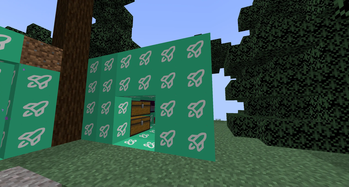
- The Sodiboo block - The base of this mod. Currently it doesn't naturally generate, that's planned together with animations for 1.1.0.
- Sodiboost item - Dropped from the Sodiboo block, can be used to craft a few items.
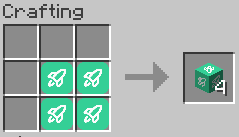
- The Sodiboost block - Not to be confused with the Sodiboo block
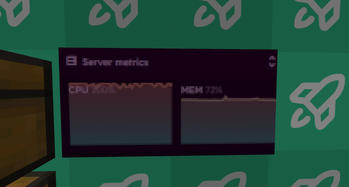
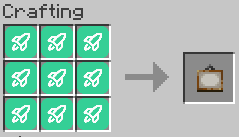
- An "Instance Moment" painting - This is the result of what happens when Sodiboo boosts all of your posts on your fedi instance. Peak 100% CPU moment.
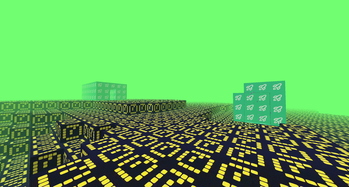
- Sodiboost dimension, where all block are Sodiboo's.
- The Sodiboo biome, only spawning in the Sodiboost dimension.
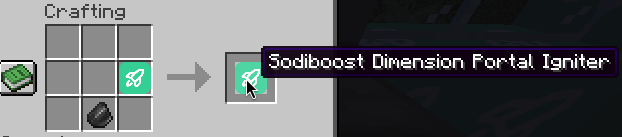
- The Sodiboost igniter
- Sodiboost Liquid in the new dimension
Recipes
Here are a few recipes used to craft the items:
A painting recipe to get the "Instance Moment" painting can be crafted like this
A Sodiboost Block recipe
Sodiboost portal igniter
Videos
Please refer to these fedi posts:
What is Sharkey? (Unrelated to the mod)
Sharkey is a federated social network software forked from Misskey. It builds on top of Misskey. You can find a Sharkey instance and check it out or start your own Sharkey instance.
The fediverse is a collection of social networks interconnected using a common protocol. Here belong Mastodon, Misskey, Sharkey, Friendica, Akkoma, Pleroma, Iceshrimp, GoToSocial and many more.
Available Versions
How to Install Sodiboost on Your Server
Order Server
Order a Minecraft Java server with at least 3 GB RAM (4 GB recommended).
Set neoforge Loader
In the panel under "Egg", select the neoforge loader and matching Minecraft version (1.21.4).
Install Mod
Open the mod browser in the dashboard and search for "Sodiboost". Click "Install" – done! Alternatively, upload the .jar via SFTP to the /mods folder.
Compatibility
Mod Loaders
Minecraft Versions
1.21.4
Server-side
✓ RequiredRecommended RAM
4 GB(min. 3 GB)Frequently Asked Questions
Sodiboost server crashes on startup – what to do?
Most common cause: wrong neoforge version or insufficient RAM. Check the server log (latest.log) for "OutOfMemoryError" or "Mixin" errors. With Mado Hosting: ensure at least 3 GB RAM is allocated and the loader matches the mod version (1.21.4). You can switch loaders with one click in the panel.
Is Sodiboost compatible with neoforge?
Sodiboost officially supports neoforge for Minecraft 1.21.4. The Mado dashboard automatically detects incompatible loader combinations.
Server lagging with Sodiboost – how to optimize performance?
Recommended RAM: 4 GB (per 8 players). Use /spark profiler to check if Sodiboost consumes the most tick time. Common fixes: reduce server view-distance to 8-10, install "performant" or "starlight" as supplementary mods on Forge. With Mado Hosting, your server runs on NVMe SSDs with dedicated CPU cores for minimal latency.
Similar Mods





Rent Modded Server
Install Sodiboost with just one click on your server.