
Sodium Blending Registry
This is a plugin for sodium, that fixes a sodium "color blending bug", and adds a dynamic way to register blocks for blending.
Screenshots
About this Mod
Sodium Blending Registry
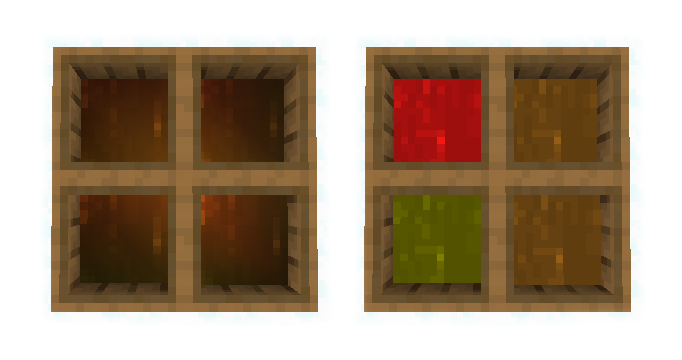
This is a Sodium plugin designed to address a known bug in the Sodium graphics engine that causes incorrect color blending, resulting in visual inconsistencies in many Minecraft mods which make use of color providers.
The bug is described in issue 895.
Additionally, it introduces a new tag c:blendable that allows custom blocks or fluids to be registered to use the Sodium blending system.
❗IMPORTANT NOTE❗
Starting from Sodium 0.5, this plugin is a part of Sodium itself, and is not required anymore.
If you use this with Sodium 0.5 or newer releases the game will crash!
Examples of the bug


Installation
To install the mod, follow these steps:
- Make sure you have Fabric and Sodium installed.
- Download the correct release of the mod file from Modrinth, for the specific Minecraft and Sodium releases.
- Move the downloaded mod file into the mods folder.
Usage of the tag
The c:blendable tag can be particularly useful for mod developers when they introduce a block or fluid that utilizes color providers based on the biome.
By applying the tag, the new block or fluid will make use of Sodium blending system instead of the vanilla one.
To use the tag, add a new file named blendable.json into resources/data/c/tags/blocks for blocks, or resources/data/c/tags/fluids for fluids.
The file should be similar to this:
{
  "replace": false,
  "values": [
	"testmod:newleaveblock"
  ]
}
Please note that this feature is intended for mod developers and not for end users.
Bug Reporting
Note that this mod fixes only the blending bug of Sodium.
For other Sodium bugs, please open an issue on Sodium instead and not here!
To ensure accurate bug reporting, please follow these steps:
- Verify that you are using the correct version of the plugin for the specific Minecraft and Sodium release.
- Reproduce the issue, noting down any specific steps or circumstances that trigger the bug.
- Provide any relevant information, including your Minecraft version, Fabric version, Sodium version, and any other mods you have installed.
- Provide the logs if they are relevant.
References
- Sodium issue 895: The issue describing the bug.
- Sodium pull request 1360: The code is taken from here.
License
Copyright (C) 2023 devpelux (Salvatore Peluso)
Licensed under MIT license.
Available Versions
How to Install Sodium Blending Registry on Your Server
Order Server
Order a Minecraft Java server with at least 3 GB RAM (4 GB recommended).
Set fabric Loader
In the panel under "Egg", select the fabric loader and matching Minecraft version (1.20).
Install Mod
Open the mod browser in the dashboard and search for "Sodium Blending Registry". Click "Install" – done! Alternatively, upload the .jar via SFTP to the /mods folder.
Compatibility
Mod Loaders
Minecraft Versions
1.20, 1.19.4, 1.19.3 (+3 more)
Server-side
✗ UnsupportedRecommended RAM
4 GB(min. 3 GB)Frequently Asked Questions
Sodium Blending Registry server crashes on startup – what to do?
Most common cause: wrong fabric version or insufficient RAM. Check the server log (latest.log) for "OutOfMemoryError" or "Mixin" errors. With Mado Hosting: ensure at least 3 GB RAM is allocated and the loader matches the mod version (1.20). You can switch loaders with one click in the panel.
Is Sodium Blending Registry compatible with fabric and quilt?
Sodium Blending Registry officially supports fabric, quilt for Minecraft 1.20, 1.19.4, 1.19.3. The Mado dashboard automatically detects incompatible loader combinations.
Server lagging with Sodium Blending Registry – how to optimize performance?
Recommended RAM: 4 GB (per 8 players). Use /spark profiler to check if Sodium Blending Registry consumes the most tick time. Common fixes: reduce server view-distance to 8-10, install "performant" or "starlight" as supplementary mods on Forge. With Mado Hosting, your server runs on NVMe SSDs with dedicated CPU cores for minimal latency.
Similar Mods





Rent Modded Server
Install Sodium Blending Registry with just one click on your server.