
SolarForge
Adds a bunch of new armor and weapon items to make Minecraft progression just that more complicated and customizable
Screenshots
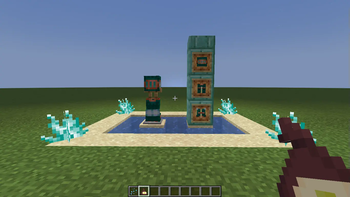


About this Mod
Hello and welcome to SolarForge!
in this mod you will be crafting a mulitude of items ranging form armor to spears, battleaxes and swords
currently in the mod:
- Effects
- Light Headed
- Overheated
- Paniced
- Famished
- Blocks
- Alloy Smithery
- Tungsten (AKA bootleg netherite)
- tungsten tools
- tungsten armor
- tungsten Block (with redstone compatibility)
- Bark
- Bark Armor
- Far too many crafting recipes for turning a striped log back into its normal veriant
- Black smithing templates for swords, battle axes, and spears
- Copper
- Copper Darts
- Copper Armor
- Copper-knuckles
- lightning Wand
- Copper-Tungsten alloy
- Copper-Tungsten Alloy armor
- Skull Spliter
plans for future updates:
- The aquatic update
- new effects related to the ocean
- a new use for prismarine
- possibly new mobs (not guaranteed)
- the calling of the void update
- a new dimension
- hollow ore
- possibly unstable soul fragments (not guaranteed)
Available Versions
How to Install SolarForge on Your Server
Order Server
Order a Minecraft Java server with at least 4 GB RAM (6 GB recommended).
Set forge Loader
In the panel under "Egg", select the forge loader and matching Minecraft version (1.20.1).
Install Mod
Open the mod browser in the dashboard and search for "SolarForge". Click "Install" – done! Alternatively, upload the .jar via SFTP to the /mods folder.
Compatibility
Mod Loaders
Minecraft Versions
1.20.1
Server-side
✓ RequiredRecommended RAM
6 GB(min. 4 GB)Frequently Asked Questions
SolarForge server crashes on startup – what to do?
Most common cause: wrong forge version or insufficient RAM. Check the server log (latest.log) for "OutOfMemoryError" or "Mixin" errors. With Mado Hosting: ensure at least 4 GB RAM is allocated and the loader matches the mod version (1.20.1). You can switch loaders with one click in the panel.
Is SolarForge compatible with forge?
SolarForge officially supports forge for Minecraft 1.20.1. The Mado dashboard automatically detects incompatible loader combinations.
Server lagging with SolarForge – how to optimize performance?
Recommended RAM: 6 GB (per 5 players). Use /spark profiler to check if SolarForge consumes the most tick time. Common fixes: reduce server view-distance to 8-10, install "performant" or "starlight" as supplementary mods on Forge. With Mado Hosting, your server runs on NVMe SSDs with dedicated CPU cores for minimal latency.
Similar Mods



![[TaCZ] Timeless and Classics Zero](https://cdn.modrinth.com/data/SzzJttH8/fd27766d2bb8390d284696b1dbd358f87e081439_96.webp)


Rent Modded Server
Install SolarForge with just one click on your server.