
Solar Helmet
Every helmet can be solar!
About this Mod
Solar Helmet
Support
| Version | Modloader | Support-Status |
|---|---|---|
| 1.21.8 | NeoForge | ✅ |
| 1.21.3 | NeoForge | ⚠️ |
| 1.21 / 1.21.1 | NeoForge | ⚠️ |
| 1.20.6 | NeoForge | ❌ |
| 1.20.4 | NeoForge | ❌ |
| 1.20.2 | NeoForge | ❌ |
| 1.20.1 | Forge | ❌ |
| 1.19.x | Forge | ❌ |
| 1.18.x | Forge | ❌ |
| 1.17.x | Forge | ❌ |
| 1.16.x | Forge | ❌ |
| 1.15.x | Forge | ❌ |
⚠️: bug fix only
About
This mod adds a little item, the "Solar helmet module", which can be applied to any helmet, that uses the default implementation from Minecraft.
When crafting together with a helmet, the helmet gets a new tooltip text and while you're wearing it in your helmet slot, it produces energy.
The energy is internally stored and automatically applied to any item in you inventory that can hold FE (Forge Energy).
The helmet itself can't be used as battery and the only way to extract the energy is by putting a energy consuming one, eg.: a battery, in your inventory.
The helmet has no transfer limit, so it can be discharged as fast as possible (the real transfer rate depends on the energy consumer).
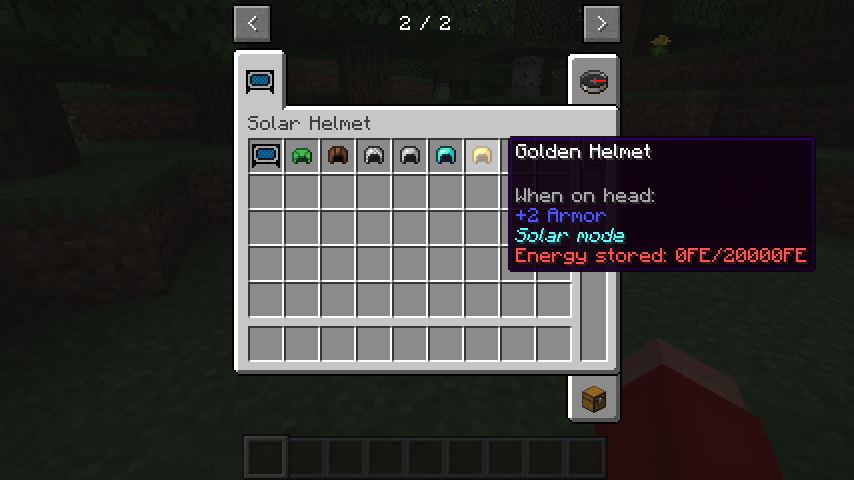
Crafting
| Version | How |
|---|---|
| >= 1.21.3 | Right click with the feeder module, while wearing the desired helmet. |
| 1.19.4 - 1.21.1 | Craft module and helmet together in a smiting table. |
| <= 1.19.4 | Craft module and helmet together in any crafting grid (shapeless). |
Solar production
Since version 40.1.0 (1.18.2 backport) and 45.1.0, a new calculation is used for determining a multiplier based on daytime.
For simplicity the here shown graph uses the default base energy value for easier readability: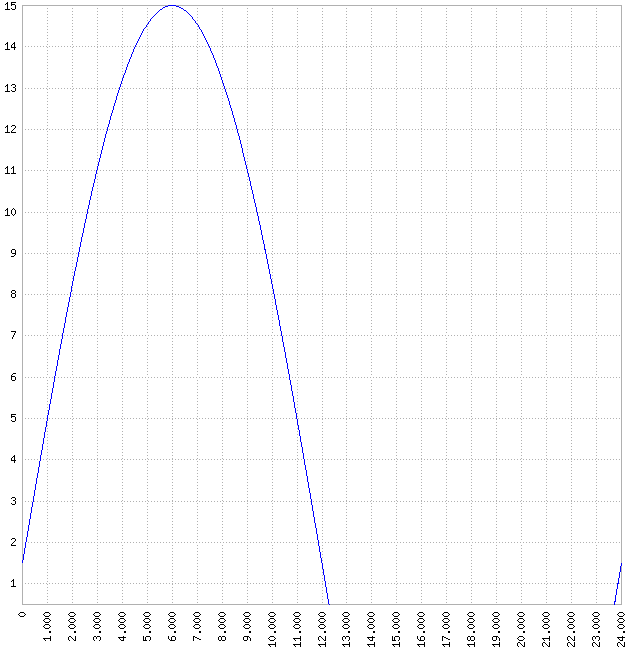
x-axis: Minecraft ingame daytime, value between 0 and infinite (every 24000 is one day), every day starts at (daycount*24000)+6000
y-axis: energy production FE/t, if in direct sunlight, and with the default value of 15FE/t max
Formula:
f(x)=0.9*\sin((\tfrac{\pi}{12000})*x)+0.1

Available Versions
How to Install Solar Helmet on Your Server
Order Server
Order a Minecraft Java server with at least 3 GB RAM (4 GB recommended).
Set forge Loader
In the panel under "Egg", select the forge loader and matching Minecraft version (1.21.8).
Install Mod
Open the mod browser in the dashboard and search for "Solar Helmet". Click "Install" – done! Alternatively, upload the .jar via SFTP to the /mods folder.
Compatibility
Mod Loaders
Minecraft Versions
1.21.8, 1.21.1, 1.21 (+12 more)
Server-side
✓ RequiredRecommended RAM
4 GB(min. 3 GB)Frequently Asked Questions
Solar Helmet server crashes on startup – what to do?
Most common cause: wrong forge version or insufficient RAM. Check the server log (latest.log) for "OutOfMemoryError" or "Mixin" errors. With Mado Hosting: ensure at least 3 GB RAM is allocated and the loader matches the mod version (1.21.8). You can switch loaders with one click in the panel.
Is Solar Helmet compatible with forge and neoforge?
Solar Helmet officially supports forge, neoforge for Minecraft 1.21.8, 1.21.1, 1.21. The Mado dashboard automatically detects incompatible loader combinations.
Server lagging with Solar Helmet – how to optimize performance?
Recommended RAM: 4 GB (per 8 players). Use /spark profiler to check if Solar Helmet consumes the most tick time. Common fixes: reduce server view-distance to 8-10, install "performant" or "starlight" as supplementary mods on Forge. With Mado Hosting, your server runs on NVMe SSDs with dedicated CPU cores for minimal latency.
Similar Mods




![[TaCZ] Timeless and Classics Zero](https://cdn.modrinth.com/data/SzzJttH8/fd27766d2bb8390d284696b1dbd358f87e081439_96.webp)

Rent Modded Server
Install Solar Helmet with just one click on your server.