
Sonicraft: Lively Zones
An addon for Sonicraft that adds various generation features to its biomes.
Screenshots
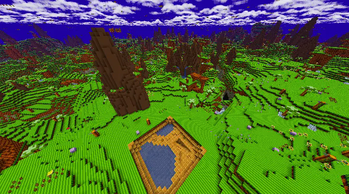
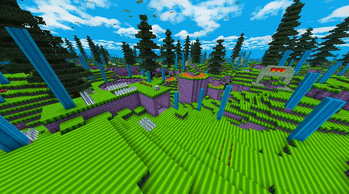
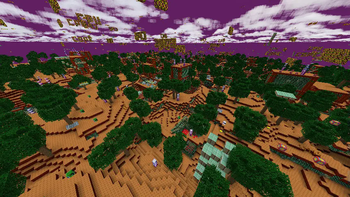
About this Mod
Sonicraft: Lively Zones is an addon that adds generation features to biomes from Sonicraft.
These can include:
- Small features like spikes, rings, etc.
- Loops
- Platforming areas based on those in the original games
- Trees and mountains
- Dungeons
These are added to make the biomes more interesting and varied, since I grew bored of Sonicraft due to many of them feeling like glorified plains (this was made pre-evolution update). Additionally, badniks are sped up and unused bosses are implemented.
Completion
✔️ = Filled with content
🚧 = Has some special content, but not considered finished
❌ = Either nothing or only the bare minimum (small features, loops and vegetation)
- Green Hill Zone ✔️
- Marble Zone ✔️
- Spring Yard Zone ✔️
- Labyrinth Zone ❌
- Star Light Zone ❌
- Scrap Brain Zone ❌
- Emerald Hill Zone ❌
- Chemical Plant Zone ❌
- Aquatic Ruin Zone ❌
- Casino Night Zone ❌
- Studiopolis Zone ❌
- Press Garden Zone ❌
- Night Carnival Zone ❌
- Angel Island Zone ❌
- Scorched Angel Island Zone ❌
- Hydrocity Zone ❌
- Marble Garden Zone ❌
- Carnival Night Zone ❌
- Ice Cap Zone ❌
- Launch Base Zone ❌
- Mushroom Hill Zone ❌
- Sandopolis Zone 🚧
- Lava Reef Zone ❌
- Sky Sanctuary Zone ❌
- Seaside Hill Zone ❌
Available Versions
How to Install Sonicraft: Lively Zones on Your Server
Order Server
Order a Minecraft Java server with at least 4 GB RAM (6 GB recommended).
Set forge Loader
In the panel under "Egg", select the forge loader and matching Minecraft version (1.20.1).
Install Mod
Open the mod browser in the dashboard and search for "Sonicraft: Lively Zones". Click "Install" – done! Alternatively, upload the .jar via SFTP to the /mods folder.
Compatibility
Mod Loaders
Minecraft Versions
1.20.1
Server-side
✓ RequiredRecommended RAM
6 GB(min. 4 GB)Frequently Asked Questions
Sonicraft: Lively Zones server crashes on startup – what to do?
Most common cause: wrong forge version or insufficient RAM. Check the server log (latest.log) for "OutOfMemoryError" or "Mixin" errors. With Mado Hosting: ensure at least 4 GB RAM is allocated and the loader matches the mod version (1.20.1). You can switch loaders with one click in the panel.
Is Sonicraft: Lively Zones compatible with forge?
Sonicraft: Lively Zones officially supports forge for Minecraft 1.20.1. The Mado dashboard automatically detects incompatible loader combinations.
Server lagging with Sonicraft: Lively Zones – how to optimize performance?
Recommended RAM: 6 GB (per 5 players). Use /spark profiler to check if Sonicraft: Lively Zones consumes the most tick time. Common fixes: reduce server view-distance to 8-10, install "performant" or "starlight" as supplementary mods on Forge. With Mado Hosting, your server runs on NVMe SSDs with dedicated CPU cores for minimal latency.
Similar Mods




Rent Modded Server
Install Sonicraft: Lively Zones with just one click on your server.