
Sort that kit!
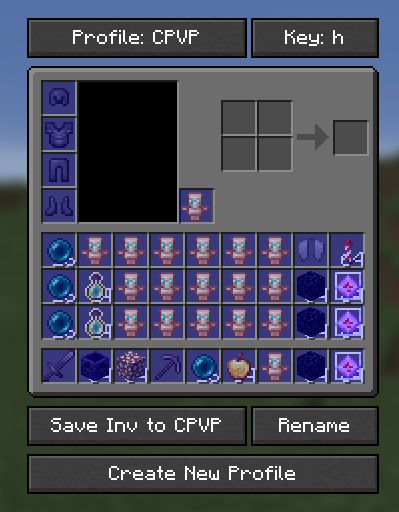
Sort that kit! is a client-only mod that instantly organizes your inventory 🎒 and hotbar 🔥 with custom keybinds 🎮 and visual previews 👀. Design layouts in settings ⚙️ and apply them on any server 🌐 with one tap 👆.
Screenshots
About this Mod
🚀 Want 25% OFF Your First Server?
Create your own Minecraft server and save 25% on your first month 🌍⚡
Perfect for playing with friends, testing mods/plugins, or starting a community server 🔥

💖 Using the link above helps support my projects!

Sort that kit! (Client-Side) 🧩
Sort that kit! is a powerful inventory management mod ⚡ that instantly reorganizes your Hotbar and Main Inventory 🎒 with a single key. It works entirely client-side 💻, meaning it functions on any server 🌐 by simulating fast, automated item movements 🤖.
⚠️ Important:
On some servers, this mod may be bannable 🚫 because it moves items extremely quickly by rapidly shifting them back and forth. Always check the server rules before using it!
📂 Open Menu:
Press K to open the configuration menu.
Main Features: 🚀
Custom Profiles 🛠️: Create and save multiple layouts for different playstyles (e.g., ⚔️ PvP, 🏗️ Building, ⛏️ Mining).
Per-Profile Keybinds ⌨️: Switch between your layouts instantly by assigning a unique hotkey to every individual profile.
Visual Preview 👁️: Design your ideal setup in the settings using a visual "Ghost-Grid." Drag and drop item placeholders to define exactly where each item should go.
Full Inventory Control 🎯: The mod intelligently swaps items between your main inventory and hotbar to match your saved preview perfectly.
Server Compatible 🌍: No server-side plugins required. It works by sending optimized packets 📡, making it the ultimate tool for universal inventory organization.
❓ Can I use this mod in a modpack? 📦
Of course! Please feel free to include this mod in your modpacks! 💜✨
You may:
- ✅ Use this mod in public and private modpacks
- ✅ Upload modpacks containing this mod to Modrinth, CurseForge, etc.
- ✅ Use it on servers and with friends
Just please:
- ❌ Do not reupload the mod itself
- ❌ Do not claim the mod as your own
Have fun! 🌟
Available Versions
How to Install Sort that kit! on Your Server
Order Server
Order a Minecraft Java server with at least 3 GB RAM (4 GB recommended).
Set fabric Loader
In the panel under "Egg", select the fabric loader and matching Minecraft version (1.21.11).
Install Mod
Open the mod browser in the dashboard and search for "Sort that kit!". Click "Install" – done! Alternatively, upload the .jar via SFTP to the /mods folder.
Compatibility
Mod Loaders
Minecraft Versions
1.21.11, 1.21.10, 1.21.9 (+9 more)
Server-side
✗ UnsupportedRecommended RAM
4 GB(min. 3 GB)Frequently Asked Questions
Sort that kit! server crashes on startup – what to do?
Most common cause: wrong fabric version or insufficient RAM. Check the server log (latest.log) for "OutOfMemoryError" or "Mixin" errors. With Mado Hosting: ensure at least 3 GB RAM is allocated and the loader matches the mod version (1.21.11). You can switch loaders with one click in the panel.
Is Sort that kit! compatible with fabric?
Sort that kit! officially supports fabric for Minecraft 1.21.11, 1.21.10, 1.21.9. The Mado dashboard automatically detects incompatible loader combinations.
Server lagging with Sort that kit! – how to optimize performance?
Recommended RAM: 4 GB (per 8 players). Use /spark profiler to check if Sort that kit! consumes the most tick time. Common fixes: reduce server view-distance to 8-10, install "performant" or "starlight" as supplementary mods on Forge. With Mado Hosting, your server runs on NVMe SSDs with dedicated CPU cores for minimal latency.
Similar Mods


Rent Modded Server
Install Sort that kit! with just one click on your server.