
SoulKeeper
Keep your items after death inside a soul
Screenshots
About this Mod
👻 SoulKeeper
Your items survive death. So does your progress.
SoulKeeper captures your full inventory and experience into a glowing soul the instant you die — persisting through lava, fire, and even the void — and waits quietly at the death spot until you return to claim it.
✨ Inspiration
SoulKeeper is the spiritual successor of DeadSoulsKT — rebuilt from scratch with a clean multiplatform architecture, async-first design, and a strong focus on reliability. Where DeadSoulsKT laid the foundation, SoulKeeper brings production-grade persistence, rich visual feedback, and cross-platform support to the same beloved mechanic.
💀 How Souls Work
Creating a soul
The moment you die, SoulKeeper silently intercepts the death event before anything hits the ground. Your entire inventory and a configurable portion of your dropped XP are captured and stored in the database as a soul — nothing is scattered across the floor.
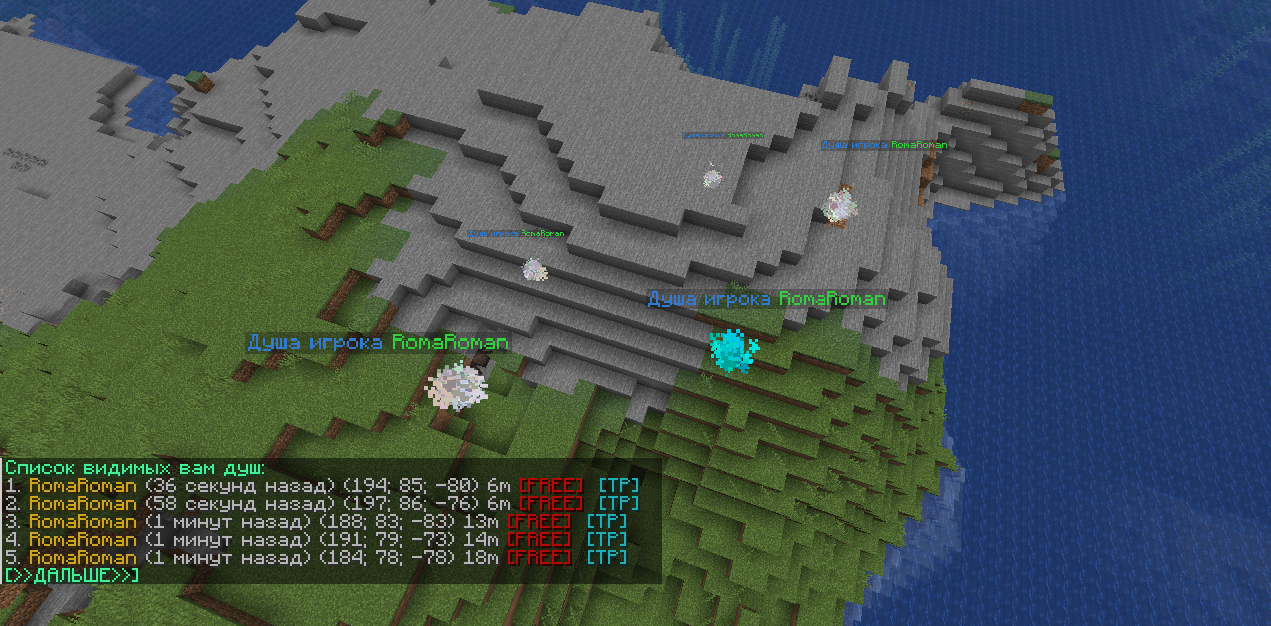
A burst of red particles and a resonant bell signal that your soul has been born. The soul appears as a shimmering particle cloud with a floating nameplate — "Soul of <Your Name>" — right where you fell.
Souls spawned in The End are clamped to a minimum Y so they can never sink into the void.
Picking up a soul
Just walk close — no right-click, no shift, no interaction. As soon as you enter the soul's range, it detects you and begins transferring:
| Signal | Meaning |
|---|---|
| 🔵 Cyan dust particles | Soul holds XP |
| ⚪ White dust particles | Soul holds items |
| 🔔 Beacon ambient sound | Soul is nearby — follow the sound |
| 🟣 Purple smoke + anvil sound | Inventory full — items still remain |
| ✨ Bright flash + extinguish sound | Soul fully collected and gone |
Items flow back inventory-slot by inventory-slot. If your inventory is full, partial pickup works: XP is absorbed, whatever fits goes in, and the soul persists with only what remains — no items are ever dropped or lost because of a full bag.
Soul lifecycle
Death → [PRIVATE] ──── soul_free_after ────▶ [PUBLIC] ──── soul_fade_after ────▶ [DELETED]
           │                                      │
      Only owner                           Any player
      can collect                          can collect
| State | Who can collect | Default timing |
|---|---|---|
| 🔒 Private | Owner only | Immediately after death |
| 🔓 Public | Any player | After soul_free_after (default: 2 days) |
| 💨 Gone | — | After soul_fade_after (default: 14 days) |
Background workers (FreeSoulWorker, DeleteSoulWorker) run on a configurable tick cadence and advance souls through this lifecycle automatically — no cron jobs, no restarts, no admin action needed.
🗃️ Krates — Backup Storage
Every death also writes a Krate: a standalone YAML snapshot of the soul, saved to disk independently of the database.
plugins/SoulKeeper/
  deaths/
    <player-uuid>/
      <epoch-second>_0.yml   ← first krate
      <epoch-second>_1.yml   ← second krate (if retry occurred)
      ...
Krates are a last-resort safety net. Even if the SQLite database is lost, corrupted, or rolled back, an admin can restore any dead player's exact inventory from the krate file — zero database interaction required.
/soulkrate <uuid> <epoch-second> <index>
This reads the matching <epoch>_<index>.yml krate file and deposits its items directly into the requesting player's inventory. Use it when:
- A database failure occurred during a busy session
- A player was rolled back by an external tool
- Items need to be restored from a specific past death
🚀 Features
🔄 Fully non-blocking
Every heavy operation — soul creation, pickup detection, database reads/writes, background worker loops — runs on Kotlin coroutines dispatched to background threads via KotlinDispatchers. The main game thread is never touched for I/O.
🛡️ Safe, explicit failure paths
Database operations return kotlin.Result<T>. Failures are logged at the call site and skipped gracefully — they never crash the server, silently eat items, or leave souls in a broken state. Concurrent DB writes in SoulsDaoImpl, the pickup loop in PickUpWorker, and death event handling in ForgeSoulEvents/BukkitSoulEvents are each guarded by their own Mutex.
📦 Krate safety net
A file-based snapshot is written on every death independently of the database. Items cannot be lost in a catastrophic DB failure.
🎨 Fully customizable effects
Every particle (type, color, size, count) and every sound (ID, volume, pitch) is independently configurable per event type. Six sound cues, five particle effects — all tweakable without touching code.
⏳ Configurable soul lifecycle
soul_free_after and soul_fade_after are plain duration values. Set them to seconds, minutes, hours, or days. Background services poll reactively from a config Flow — changes reload live without a restart.
📈 Partial pickup
If your inventory is full when you reach a soul, XP is collected first, then as many items as fit go in. The soul survives with the remainder. Walk back once you have space — nothing is ever force-dropped.
🏷️ Virtual floating name tags
Floating armor-stand nameplates ("Soul of <Player>") are sent as virtual entities via PacketEvents on Bukkit — no real entities are spawned into the world, so performance is unaffected regardless of soul count.
🔔 Proximity soul calling
A SoulCallWorker tracks every online player's position. When a player enters soul_call_radius blocks of a soul they can collect, ambient sounds and particles begin pulsing — guiding them back even in complete darkness or deep underground.
🌍 End dimension safety
Souls spawned in The End are clamped to endLocationLimitY so they never fall below the island floor and become unreachable.
📑 Paginated soul browser
/souls lists all visible souls with owner name, coordinates, age (formatted as "X days ago"), and item/XP indicators. Admins see clickable [FREE] and [TP] buttons inline. 5 souls per page; prev/next navigation included.
🗄️ Versioned database migrations
DatabaseMigrator carries all schema migration steps. Upgrading the plugin never requires manual SQL — migrations run automatically on startup.
⚙️ Configuration
All settings live in config.yml inside the plugin data folder and are hot-reloadable via /skreload.
# Database file path (SQLite)
database: ...

# Soul becomes publicly collectible after this duration
soul_free_after: 2d

# Soul disappears permanently after this duration
soul_fade_after: 14d

# Radius (blocks) within which a soul emits sounds/particles to guide its owner
soul_call_radius: 100

# Fraction of dropped XP stored in the soul (0.0 – 1.0)
retained_xp: 1.0

# Minimum Y for souls in The End (prevents void loss)
end_location_limit_y: 0.0

# Show floating "Soul of <player>" name tags above souls
display_soul_titles: true

# How PvP deaths are handled
# NONE        – PvP deaths create no soul
# EXP_ONLY    – soul holds XP only
# ITEMS_ONLY  – soul holds items only
# EXP_AND_ITEMS – soul holds everything (same as normal death)
pvp_behaviour: NONE
🎵 Sounds
Every audio cue is independently configurable with id, volume, and pitch:
| Key | Default sound | Trigger |
|---|---|---|
collect_xp |
entity.experience_orb.pickup |
XP absorbed from soul |
collect_item |
item.trident.return |
Items absorbed from soul |
soul_disappear |
entity.generic.extinguish_fire |
Soul fully collected |
soul_dropped |
block.bell.resonate |
Soul created on death |
soul_calling |
block.beacon.ambient |
Soul pulsing near owner |
soul_content_left |
block.anvil.place |
Inventory full, items remain |
🌟 Particles
Every particle effect is independently configurable with key, count, and optional dust_options (RGBA color + size):
| Key | Default color | Trigger |
|---|---|---|
soul_items |
White #FFFFFF |
Soul contains items (continuous) |
soul_xp |
Cyan #00FFFF |
Soul contains XP (continuous) |
soul_created |
Red #eb3437 |
Burst on soul creation |
soul_gone |
Yellow #FFFF00 |
Burst on full collection |
soul_content_left |
Purple #a103fc |
Inventory full warning |
🛠️ Commands
| Command | Description | Permission |
|---|---|---|
/skreload |
Hot-reload config and translations | soulkeeper.reload |
/souls [page] |
List your souls (5 per page) | (none) |
/souls [page] |
List all server souls | soulkeeper.all |
/souls → [FREE] |
Force-free any soul immediately | soulkeeper.free.all |
/souls → [TP] |
Teleport to a soul's location | soulkeeper.teleport |
/soulkrate <uuid> <epoch> <index> |
Restore items from a krate file | soulkeeper.load |
🌐 Multiplatform
SoulKeeper ships a separate fat-jar for each supported platform. All core logic — soul lifecycle, pickup detection, database, background workers, commands — lives in shared platform-agnostic modules. Only event wiring and item serialization are platform-specific.
| Platform | Jar | Minimum version |
|---|---|---|
| Paper / Spigot | soulkeeper-bukkit.jar |
Paper 1.21.1 |
| Forge | soulkeeper-forge.jar |
Forge 1.21.1 |
| NeoForge | soulkeeper-neoforge.jar |
NeoForge 1.21.1 |
Pick the jar for your platform and drop it in — the same soul data, the same commands, the same behaviour everywhere.
🎬 Preview
On death — soul created
https://github.com/user-attachments/assets/ec5f1437-0dab-404f-a4a8-725ee1cd9129
Returning — soul collected
https://github.com/user-attachments/assets/75f58f92-7d13-4c23-a7fb-b2d89476748b
⚠️ Known Incompatibilities
- Plugins that cancel or heavily modify
PlayerDeathEvent(Bukkit) or the equivalent drop events (Forge/NeoForge) may prevent soul creation. Items may not be captured correctly when those plugins are present.
🐛 Support
- Reproduce the issue in a clean environment (no unrelated plugins/mods).
- Collect the full server log from startup through the issue.
- Join our Discord and open a ticket in
#support.
💡 Feature Requests
Open a ticket in #suggestions on our Discord and we'll discuss it before creating a GitHub issue.
More plugins from AstraInteractive
Available Versions
How to Install SoulKeeper on Your Server
Order Server
Order a Minecraft Java server with at least 3 GB RAM (4 GB recommended).
Set bukkit Loader
In the panel under "Egg", select the bukkit loader and matching Minecraft version (1.21.6).
Install Mod
Open the mod browser in the dashboard and search for "SoulKeeper". Click "Install" – done! Alternatively, upload the .jar via SFTP to the /mods folder.
Compatibility
Mod Loaders
Minecraft Versions
1.21.6, 1.21.5, 1.21.4 (+27 more)
Server-side
✗ UnsupportedRecommended RAM
4 GB(min. 3 GB)Frequently Asked Questions
SoulKeeper server crashes on startup – what to do?
Most common cause: wrong bukkit version or insufficient RAM. Check the server log (latest.log) for "OutOfMemoryError" or "Mixin" errors. With Mado Hosting: ensure at least 3 GB RAM is allocated and the loader matches the mod version (1.21.6). You can switch loaders with one click in the panel.
Is SoulKeeper compatible with bukkit and forge and neoforge and paper and purpur and spigot?
SoulKeeper officially supports bukkit, forge, neoforge, paper, purpur, spigot for Minecraft 1.21.6, 1.21.5, 1.21.4. The Mado dashboard automatically detects incompatible loader combinations.
Server lagging with SoulKeeper – how to optimize performance?
Recommended RAM: 4 GB (per 8 players). Use /spark profiler to check if SoulKeeper consumes the most tick time. Common fixes: reduce server view-distance to 8-10, install "performant" or "starlight" as supplementary mods on Forge. With Mado Hosting, your server runs on NVMe SSDs with dedicated CPU cores for minimal latency.
Rent Modded Server
Install SoulKeeper with just one click on your server.