
Screenshots

About this Mod
Sound6
An in-game sound board.
Sound6 adds a simple-to-use menu to play sounds from Minecraft with the intended use of roleplay.

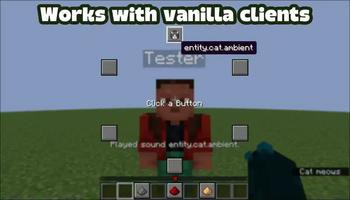
(Above) A vanilla client connected to a host with Sound6 installed
How to use
Keybinds
Pressing v will open the menu. From there pressing the number keys 1-6 will activate the equivilent button, going clockwise from the top. Pressing 7-9 will change volume between 0.5-1.5.
Menu
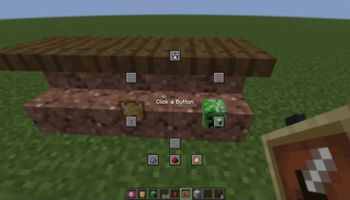
Hovering on the six buttons in the circle will display the ID of the sound it will play. (e.g. minecraft:entity.cat.ambient) Clicking on one of them will play that sound and close the menu. Below the six buttons is another three. These are volume buttons. Hovering over these will display the level they'll set the volume to. (e.g. 1.0) Clicking on one of them will update your volume to that level and close the menu.
Config
To customise the menu launch with the mod once and a file named sound6.json will appear in the config folder. From here you can edit this file and changes will be reflect in game without needing to relaunch.
Under the category soundButtons there are six matching blocks. Each has a number assigned and inside contain four values. The number can be ignored, though do not change it. The four values inside each block customise the appearance and functionality of each button. itemID is the ID of the item displayed on the button, soundID is the ID of the sound played when the button is clicked, xOffset how far right from the centre of the screen the button is placed, and yOffset is how far down from the centre of the screen the button is placed.
"1": {
      "itemID": "minecraft:cat_spawn_egg",
      "soundID": "minecraft:entity.cat.ambient",
      "xOffset": 0,
      "yOffset": -80
    }
Under the category volumeButtons there are three matching blocks. Similar to soundButtons each block contains four values and is assigned a number which should not be changed. The three values identical to soundButtons act the same as before, with the only difference being the volume value. This value controls what your volume will be set to when pressed. This is a float with the range 0.0-2.0.
"1": {
      "itemID": "gunpowder",
      "volume": 0.5,
      "xOffset": -40,
      "yOffset": 110
    }
Below the two categories are a handful of other options. volume is your current volume and has a range of 0.0-2.0, buttonSize controls the height and width of the menu's buttons, closeMenuOnClick controls whether the menu closes automatically when a button or keybind is pressed, sendMessages controls whether a message is sent when a button is pressed (e.g. Volume changed to 1.5. or Played sound minecraft:entity.cat.ambient.), and sendInChat controls whether the send message appears in chat (visible only to you) or above your hotbar, given of course sendMessages is set to true.
"volume": 1.0,
"buttonSize": 20,
"closeMenuOnClick": true,
"sendMessages": true,
"sendInChat": false,
Available Versions
How to Install Sound6 on Your Server
Order Server
Order a Minecraft Java server with at least 3 GB RAM (4 GB recommended).
Set fabric Loader
In the panel under "Egg", select the fabric loader and matching Minecraft version (1.21.9).
Install Mod
Open the mod browser in the dashboard and search for "Sound6". Click "Install" – done! Alternatively, upload the .jar via SFTP to the /mods folder.
Compatibility
Mod Loaders
Minecraft Versions
1.21.9, 25w32a, 25w31a (+1 more)
Server-side
✓ RequiredRecommended RAM
4 GB(min. 3 GB)Frequently Asked Questions
Sound6 server crashes on startup – what to do?
Most common cause: wrong fabric version or insufficient RAM. Check the server log (latest.log) for "OutOfMemoryError" or "Mixin" errors. With Mado Hosting: ensure at least 3 GB RAM is allocated and the loader matches the mod version (1.21.9). You can switch loaders with one click in the panel.
Is Sound6 compatible with fabric and quilt?
Sound6 officially supports fabric, quilt for Minecraft 1.21.9, 25w32a, 25w31a. The Mado dashboard automatically detects incompatible loader combinations.
Server lagging with Sound6 – how to optimize performance?
Recommended RAM: 4 GB (per 8 players). Use /spark profiler to check if Sound6 consumes the most tick time. Common fixes: reduce server view-distance to 8-10, install "performant" or "starlight" as supplementary mods on Forge. With Mado Hosting, your server runs on NVMe SSDs with dedicated CPU cores for minimal latency.
Similar Mods






Rent Modded Server
Install Sound6 with just one click on your server.