SoundBoard
A Fabric mod that adds a client-side Sound Board
Screenshots
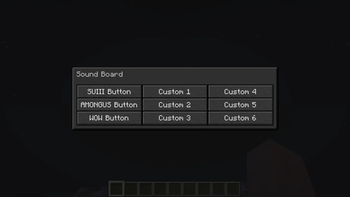
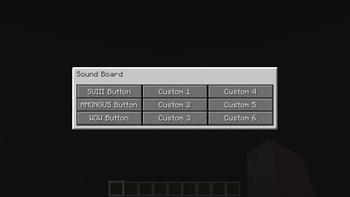
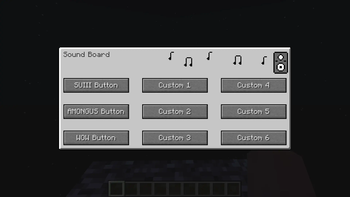
About this Mod


SoundBoard
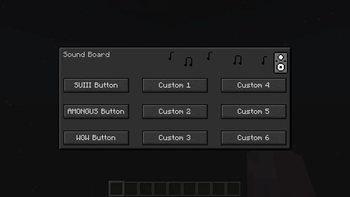
SoundBoard is a must-have mod for Minecraft players using Fabric. It introduces an ingenious client-side sound board that not only enhances your own auditory experience but also transforms multiplayer interactions. When combined with the server-side version, SoundBoard enables you to share your favorite sounds with other players, fostering a vibrant community atmosphere that adds a whole new dimension to your gameplay. Elevate your Minecraft experience to new heights by immersing yourself in the world of customizable sounds and collaborative audio exploration.
Features
- Immerse yourself in either the Light or Dark themes that cater to your style.
- Customize your gameplay with Normal, Compact, and Extended modes to suit your preferences.
- Express yourself by adding your own personalized sounds to the sound board, transforming your Minecraft world into a symphony of creativity.
- And that's not all – discover even more exciting features as you explore the mod!
Getting Started
Embark on your sound adventure with SoundBoard by downloading and installing the version tailored for your Minecraft setup. Find your groove and redefine how you interact with the game. This table that can help you choose the correct versions:
| Minecraft | Client | Server-Mod | Server-Plugin |
|---|---|---|---|
| 1.20.2 | 3.0-1.20.2 | 1.1 | 1.0 |
| 1.20.1 | 3.0.0 | 1.0 | 1.0 |
| 1.19.4 | 2.5.0 | Not Supported | Not Supported |
Configuration
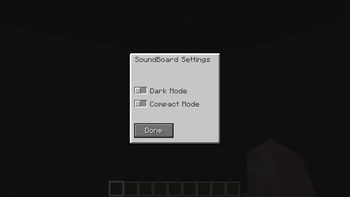
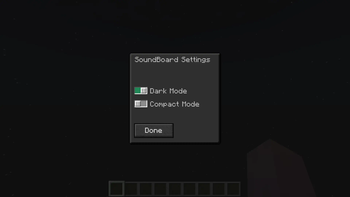
Once you've successfully installed SoundBoard into your Minecraft environment, fine-tune your experience using the user-friendly ModMenu interface. Accessible through the Mods button on the main menu screen, you can effortlessly modify themes and modes to your liking by pressing on the mod's icon.
Custom Sounds
To add custom sounds you must use a resource pack and if you want other to hear your sounds they must also have that resource pack. I have created a template that can be used to easily add sounds.
Guide
- Download the template resource pack and unzip it
- Download a
.mp3file with your desired sound - Convert your
.mp3to.ogg - Rename it
custom1.ogg- To add more sounds just rename them
custom2.ogg,custom3.oggetc. - Six sounds is the limit (8 in Extended Mode)
- To add more sounds just rename them
- Put the sound in
assets\soundboard\sounds - Zip the resource pack and put it in the
resourcesfolder of you Minecraft installation
Note: Make sure that you didn't zip the folder of the resource pack. The path to the
pack.mcmetafile should look like this:ResourcepackName.zip\pack.mcmeta
Subtitles
To add subtitles you can do this:
- Open
assets\soundboard\lang\en_us.json - Add subtitles or change button names
More Sounds
To add a few more custom sounds you can change the default ones. Simply follow the guide for adding sounds but instead of naming the files custom1.ogg, custom2.ogg etc. Name them among.ogg, smg.ogg, sui.ogg and wow.ogg.
Support
For any inquiries or concerns related to the SoundBoard client-mod, navigate to our dedicated issue tracker. If you encounter issues with the server-side mod, you're encouraged to utilize our server-side issue tracker.
Credits
SoundBoard was developed by TheOnlySD12 and is licensed under the MIT License. Special thanks to the following people for their contributions to the project:
- Me (Code Review)
- Myself (Ideas)
- I (Testing)
I hope you enjoy using SoundBoard! Please don't hesitate to use the issue tracker if you have any feedback or suggestions.
Available Versions
How to Install SoundBoard on Your Server
Order Server
Order a Minecraft Java server with at least 3 GB RAM (4 GB recommended).
Set fabric Loader
In the panel under "Egg", select the fabric loader and matching Minecraft version (1.20.4).
Install Mod
Open the mod browser in the dashboard and search for "SoundBoard". Click "Install" – done! Alternatively, upload the .jar via SFTP to the /mods folder.
Compatibility
Mod Loaders
Minecraft Versions
1.20.4, 1.20.3, 1.20.2 (+5 more)
Server-side
✗ UnsupportedRecommended RAM
4 GB(min. 3 GB)Frequently Asked Questions
SoundBoard server crashes on startup – what to do?
Most common cause: wrong fabric version or insufficient RAM. Check the server log (latest.log) for "OutOfMemoryError" or "Mixin" errors. With Mado Hosting: ensure at least 3 GB RAM is allocated and the loader matches the mod version (1.20.4). You can switch loaders with one click in the panel.
Is SoundBoard compatible with fabric and paper and purpur?
SoundBoard officially supports fabric, paper, purpur for Minecraft 1.20.4, 1.20.3, 1.20.2. The Mado dashboard automatically detects incompatible loader combinations.
Server lagging with SoundBoard – how to optimize performance?
Recommended RAM: 4 GB (per 8 players). Use /spark profiler to check if SoundBoard consumes the most tick time. Common fixes: reduce server view-distance to 8-10, install "performant" or "starlight" as supplementary mods on Forge. With Mado Hosting, your server runs on NVMe SSDs with dedicated CPU cores for minimal latency.
Similar Mods






Rent Modded Server
Install SoundBoard with just one click on your server.