
Spawn Distance
Tiny HUD with 3D distance and a directional arrow back to your world spawn — handy when you wander far from base and want a quick way home.
Screenshots
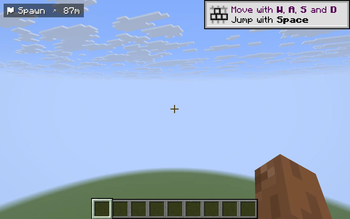
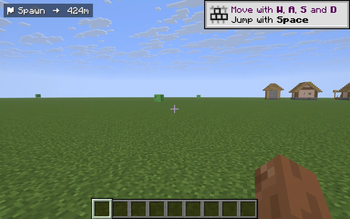
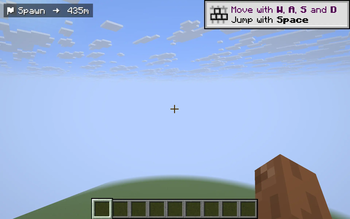
About this Mod
Spawn Distance adds a small, unobtrusive HUD in the top-left corner that shows you the 3D distance to your world spawn point, together with a directional arrow that rotates with your view. When you wander deep into caves, far across the seas, or get lost during night-time exploration, one glance at the HUD tells you both how far home is and which way to walk.
Features
- 3D distance to world spawn (including elevation difference), displayed in meters and switching to kilometers once you cross 1 km.
- Compass arrow that always points back to spawn from your current facing direction — eight cardinal/intercardinal arrows (
up uright right dright down dleft left uleft). - Dimension-aware: in the Nether or the End the HUD says "in Overworld" instead of guessing nonsense coordinates.
- Toggle with the
Okey (single press). - Client-side only — works on any vanilla server, no server install required, doesn't touch gameplay or world data.
- Cross-version: one JAR runs on Minecraft 1.21.8 -> 1.21.11 on Fabric.
Why use it
Vanilla gives you F3 for coordinates, but no quick "how far is home" answer without arithmetic. Dedicated minimaps are overkill if you only want one landmark. Spawn Distance is a single line of HUD text with a directional arrow — minimal, unobtrusive, and exactly enough information to navigate back to base.
Controls
O— toggle the HUD on / off
Compatibility
- Minecraft: 1.21.8, 1.21.9, 1.21.10, 1.21.11
- Mod loader: Fabric (>=0.16.0)
- Fabric API: required
- Side: client (server install not required)
License
MIT — fork, modify, redistribute freely.
Available Versions
How to Install Spawn Distance on Your Server
Order Server
Order a Minecraft Java server with at least 3 GB RAM (4 GB recommended).
Set fabric Loader
In the panel under "Egg", select the fabric loader and matching Minecraft version (1.21.11).
Install Mod
Open the mod browser in the dashboard and search for "Spawn Distance". Click "Install" – done! Alternatively, upload the .jar via SFTP to the /mods folder.
Compatibility
Mod Loaders
Minecraft Versions
1.21.11, 1.21.10, 1.21.9 (+1 more)
Server-side
✗ UnsupportedRecommended RAM
4 GB(min. 3 GB)Frequently Asked Questions
Spawn Distance server crashes on startup – what to do?
Most common cause: wrong fabric version or insufficient RAM. Check the server log (latest.log) for "OutOfMemoryError" or "Mixin" errors. With Mado Hosting: ensure at least 3 GB RAM is allocated and the loader matches the mod version (1.21.11). You can switch loaders with one click in the panel.
Is Spawn Distance compatible with fabric?
Spawn Distance officially supports fabric for Minecraft 1.21.11, 1.21.10, 1.21.9. The Mado dashboard automatically detects incompatible loader combinations.
Server lagging with Spawn Distance – how to optimize performance?
Recommended RAM: 4 GB (per 8 players). Use /spark profiler to check if Spawn Distance consumes the most tick time. Common fixes: reduce server view-distance to 8-10, install "performant" or "starlight" as supplementary mods on Forge. With Mado Hosting, your server runs on NVMe SSDs with dedicated CPU cores for minimal latency.
Rent Modded Server
Install Spawn Distance with just one click on your server.