
Speak No Blocks
A Minecraft mod for destroying blocks by speaking their name
Screenshots
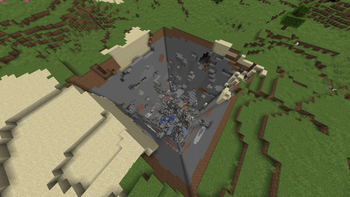
About this Mod
This is a Fabric mod I cooked up in a span of a few days
I originally saw this concept on a few YouTube videos, but none of them had any way to install them, so I made this!
It uses a local offline AI model to process your voice, so no data leaves your computer. It’s fast, private, and works even if your internet dies (unless you were connected to a server).
Enjoy! =)
Requirements
I coded this to work for 1.21.2 because I have no idea how to do versioning
You just need Fabric API and Mod Menu as dependencies (mod menu is for downloading the local AI model)
Setup Guide
This mod must be installed on both the Client and the Server.
After installing the mod, you must go into the mod's mod menu settings and install the 1.8G local AI model
Configuration
The config file is located at config/speak-no-blocks.json.
{
  "radius": 16,
  "voiceCommands": [...]
}
radius is used to determine how far away blocks will break from players.voiceCommands is used to determine what blocks will break when players say what word.
Usage
- Ensure your microphone is set as the default input device in your OS.
- Join the server.
- Speak the name of a block ("wood" destroys all types of wood for example).
- Valid blocks within the radius will be destroyed.
License
MIT
Available Versions
How to Install Speak No Blocks on Your Server
Order Server
Order a Minecraft Java server with at least 3 GB RAM (4 GB recommended).
Set fabric Loader
In the panel under "Egg", select the fabric loader and matching Minecraft version (1.21.11).
Install Mod
Open the mod browser in the dashboard and search for "Speak No Blocks". Click "Install" – done! Alternatively, upload the .jar via SFTP to the /mods folder.
Compatibility
Mod Loaders
Minecraft Versions
1.21.11, 1.21.10, 1.21.9 (+7 more)
Server-side
✓ RequiredRecommended RAM
4 GB(min. 3 GB)Frequently Asked Questions
Speak No Blocks server crashes on startup – what to do?
Most common cause: wrong fabric version or insufficient RAM. Check the server log (latest.log) for "OutOfMemoryError" or "Mixin" errors. With Mado Hosting: ensure at least 3 GB RAM is allocated and the loader matches the mod version (1.21.11). You can switch loaders with one click in the panel.
Is Speak No Blocks compatible with fabric?
Speak No Blocks officially supports fabric for Minecraft 1.21.11, 1.21.10, 1.21.9. The Mado dashboard automatically detects incompatible loader combinations.
Server lagging with Speak No Blocks – how to optimize performance?
Recommended RAM: 4 GB (per 8 players). Use /spark profiler to check if Speak No Blocks consumes the most tick time. Common fixes: reduce server view-distance to 8-10, install "performant" or "starlight" as supplementary mods on Forge. With Mado Hosting, your server runs on NVMe SSDs with dedicated CPU cores for minimal latency.
Similar Mods





Rent Modded Server
Install Speak No Blocks with just one click on your server.