
SpecSpoof
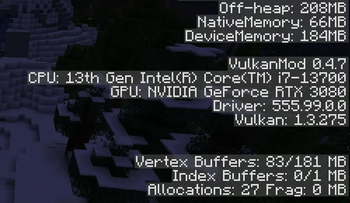
Modify your hardware configuration strings in the F3 Menu with FPS Spoofer built in!
Screenshots
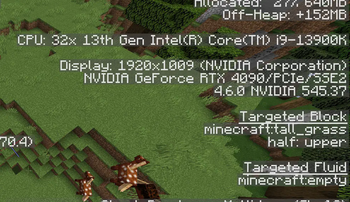
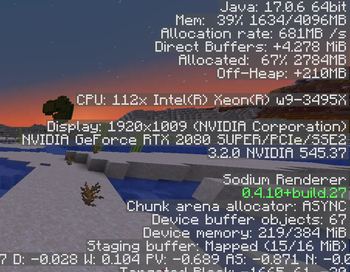
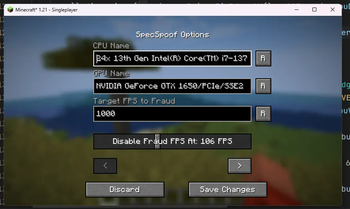
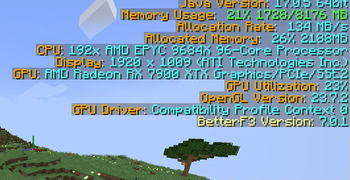
About this Mod
SpecSpoof: A fabric mod to modify the hardware string in the F3 menu!
SpecSpoof is a Fabric mod that allows you to modify the hardware string displayed in the F3 menu. With this mod, you can customize the hardware information shown in the F3 menu to your liking. Whether you want to show off your (fraud) high-end hardware or keep your specs private. Now depends on Roselib!
Compatibility
This mod should be highly compatible with other mods, but if you find any incompatibilities or bugs, just open up an issue in the GitHub repo. I'll probably try to implement a workaround.
Additional Infos:
ModMenu is recommended for easier config modification!
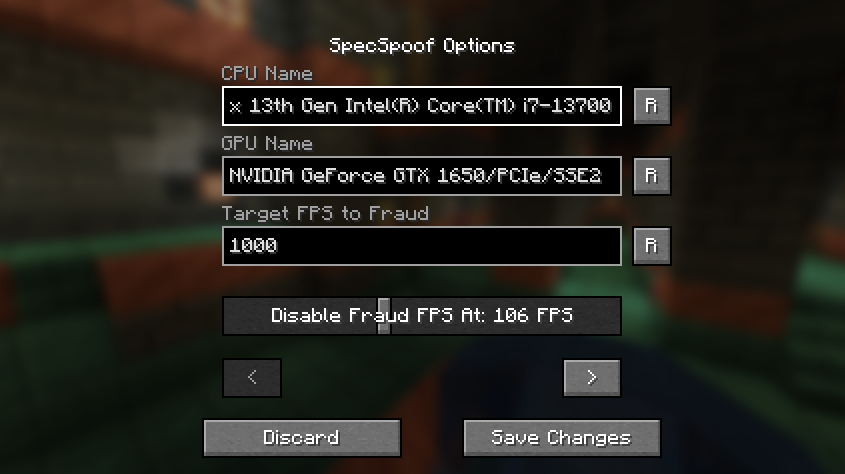
All options should be straightforward, so go nuts!
JSON Instructions (for legacy versions):
Quick Documentation JSON:
{
  "CPU": "your cpu name", //desired fake CPU name
  "GPU": ""your gpu name", // desired fake GPU name
  "FPS": 1000, // desired FPS to be faked as
  "disableFPSThreshold": 100 // The FPS Threshold for the fake fps to be deactivated, you see, to make it more believable, if your frames are dipping, the fps should actually reflect to that. imagine saying you have 1000 fps but your game runs like a slideshow, that just wouldn't work. (set to 999999 if you don't want this feature, set to 0 if you want to always fake your FPS)
  "GPUVendor": "the vendor", // This is what shows in the brackets right beside your resolution, you might want to change this to your desired GPU brand if you want to make it believable.
  "GPUDriver": "the driver" // This is the GPU driver string, which shows below the GPU string, you should also change this if you want to make your fake GPU believable.
}
The formatting is also your choice, you can make it actually believable or just put random nonsense on the string.
Examples:
{
  "CPU": "112x Intel(R) Xeon(R) w9-3495X",
  "GPU": "NVIDIA GeForce RTX 2080 SUPER/PCIe/SSE2",
  "FPS": 3400,
  "disableFPSThreshold": 100
  "GPUVendor": "NVIDIA Corporation",
  "GPUDriver": "3.2.0 NVIDIA 531.37"
}
{
  "CPU": "Rose Flowers",
  "GPU": "Pigeons",
  "FPS": 10,
  "disableFPSThreshold": 0
  "GPUVendor": "Eggs Inc",
  "GPUDriver": "1.2 months"
}
Available Versions
How to Install SpecSpoof on Your Server
Order Server
Order a Minecraft Java server with at least 3 GB RAM (4 GB recommended).
Set fabric Loader
In the panel under "Egg", select the fabric loader and matching Minecraft version (26.1.2).
Install Mod
Open the mod browser in the dashboard and search for "SpecSpoof". Click "Install" – done! Alternatively, upload the .jar via SFTP to the /mods folder.
Compatibility
Mod Loaders
Minecraft Versions
26.1.2, 26.1.1, 26.1 (+41 more)
Server-side
✗ UnsupportedRecommended RAM
4 GB(min. 3 GB)Frequently Asked Questions
SpecSpoof server crashes on startup – what to do?
Most common cause: wrong fabric version or insufficient RAM. Check the server log (latest.log) for "OutOfMemoryError" or "Mixin" errors. With Mado Hosting: ensure at least 3 GB RAM is allocated and the loader matches the mod version (26.1.2). You can switch loaders with one click in the panel.
Is SpecSpoof compatible with fabric?
SpecSpoof officially supports fabric for Minecraft 26.1.2, 26.1.1, 26.1. The Mado dashboard automatically detects incompatible loader combinations.
Server lagging with SpecSpoof – how to optimize performance?
Recommended RAM: 4 GB (per 8 players). Use /spark profiler to check if SpecSpoof consumes the most tick time. Common fixes: reduce server view-distance to 8-10, install "performant" or "starlight" as supplementary mods on Forge. With Mado Hosting, your server runs on NVMe SSDs with dedicated CPU cores for minimal latency.
Similar Mods





Rent Modded Server
Install SpecSpoof with just one click on your server.