
Spell Lib
Adds a bunch of spells for other projects to use, with customization. Makes projects that want to add spells easier to make, with any casting system.
Screenshots
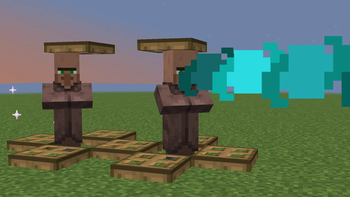
About this Mod
Warning
This is a library, not a content mod. It does not add gameplay functionality alone, and you will need to use commands or install a project that uses it to cast any of the spells it adds.
Description
Adds spells to the game, to aid creators of magic mods and datapacks. Works in vanilla, but there is no casting system built-in, as this is a library and meant to be a base for other projects, not used alone.
To use the spells:
Use /function spell_lib:spells/<spell> {<args>}
Spell list with testing examples
- sonic_boom | Makes a beam similar to the Warden's sonic boom attack. | owner, length, damage
/function spell_lib:spells/sonic_boom {owner:"@p",length:3,damage:5}
- lightning_strike | Strikes lightning after a delay, giving particles as a warning. Take cover to protect you from the lightning. | target, time_until_strike, warning_period (the delay between bursts of particles)
/function spell_lib:spells/lightning_strike {target:"@p",time_until_strike:200,warning_period:10}
- cloud_tp_and_invis | You vanish in a cloud of smoke and go invisible/teleport away from your location. | owner, tp, sound, radius, has_invis, invis_time
/function spell_lib:spells/cloud_tp_and_invis {owner:"@p",tp:true, sound:true,radius:10,has_invis:true,invis_time:3}
(updated in v1.0)
Using the library
If using the library, please add it as a dependency, whether your project is a datapack or mod. Do NOT just copy the files inside. Feel free to use as many of my spells as you want, and add an interesting, unique way to cast them. You can even use them in ways other than spells. Before using it, remember to understand how the command arguments work and interact. For example, it won't work with @s (even when you run it yourself) or a selector without quotes (owner:Name works, owner:@p doesn't work, owner:"@p" works). You also need to run the command with every argument, even if one like has_invis in cloud_tp_and_invis cancels out others (like invis_time). Try the example commands in the spell list to understand each one. Also note that using a spell will cancel out active spells of that type (for example, if one player casts lightning_strike then another casts it before the first player is struck, only the second player will get struck.) However, one command can target multiple entities (owner:"@e" will cast the spell as every entity, but they will all run at the same time and with the same settings.)
Since the library uses function macros, heavy use of spells may cause performance issues. If publishing a project using this, it would be helpful to mention this. Note that these macros are only run when spells are active, and not run every tick (updated in v1.0)
Versions
Supports Java Edition 26.1 - 26.1.2 (older versions untested)
Compatibility
Incompatible with anything with the same filenames. Test the commands in singleplayer before using them, to understand how the commands work.
Casting a second spell of the same type before one has ended will overwrite the old spell and transfer it to the new owner, target, or config.
Uses function macros. May affect performance, although I don't know the extent. Test it on the computer running the datapack, and try things such as many spells targetting many entities to determine the effects. If you're using the library, please add this disclaimer.


Available Versions
How to Install Spell Lib on Your Server
Order Server
Order a Minecraft Java server with at least 3 GB RAM (4 GB recommended).
Set datapack Loader
In the panel under "Egg", select the datapack loader and matching Minecraft version (26.1.2).
Install Mod
Open the mod browser in the dashboard and search for "Spell Lib". Click "Install" – done! Alternatively, upload the .jar via SFTP to the /mods folder.
Compatibility
Mod Loaders
Minecraft Versions
26.1.2, 26.1.1, 26.1
Server-side
✓ RequiredRecommended RAM
4 GB(min. 3 GB)Frequently Asked Questions
Spell Lib server crashes on startup – what to do?
Most common cause: wrong datapack version or insufficient RAM. Check the server log (latest.log) for "OutOfMemoryError" or "Mixin" errors. With Mado Hosting: ensure at least 3 GB RAM is allocated and the loader matches the mod version (26.1.2). You can switch loaders with one click in the panel.
Is Spell Lib compatible with datapack and fabric and forge and neoforge and quilt?
Spell Lib officially supports datapack, fabric, forge, neoforge, quilt for Minecraft 26.1.2, 26.1.1, 26.1. Note: Forge and Fabric mods are NOT cross-compatible – pick one loader and stick with it. The Mado dashboard automatically detects incompatible loader combinations.
Server lagging with Spell Lib – how to optimize performance?
Recommended RAM: 4 GB (per 8 players). Use /spark profiler to check if Spell Lib consumes the most tick time. Common fixes: reduce server view-distance to 8-10, install "performant" or "starlight" as supplementary mods on Forge. With Mado Hosting, your server runs on NVMe SSDs with dedicated CPU cores for minimal latency.
Rent Modded Server
Install Spell Lib with just one click on your server.