
Spiritborne Ascendants
A mod that plans to add Souls-like bosses to Minecraft | The Reaper boss
About this Mod

This mod introduces high-quality, challenging boss encounters to Minecraft.
It is planned to be used with my main mod : Spiritborne RPG. Be sure to check it out!
Status - Work In Progress (WIP - 70% Complete)
| Difficulty - Late-Game
| Base HP - 300
The Reaper is a highly aggressive boss focused on speed and disruptive abilities. Its current moveset includes :
- Standard Melee Attack
- Teleport Attack
- Self-Buffs
- Six additional moves for you to discover
- (Fully functional but many more are planned and currently under development)
Current Loot Drop : The boss currently drops a Reaper Soul and 2-4x Wraithcloth..
How to Summon The Reaper
The Reaper boss is summoned through a dark ritual involving two custom items : the Sacrificial Dagger and the Soul Bottle.
Craft the Sacrificial Dagger.
Holding a Glass Bottle in your offhand, slay a Villager with the Sacrificial Dagger to capture its essence, creating a Soul Bottle.
Right-click on fire with Soul Bottle to summon The Reaper.
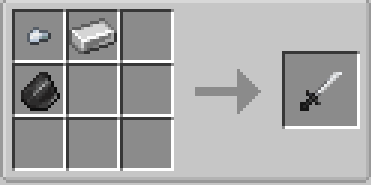
Sacrificial Dagger can be crafted by the following recipe :
Bone Scepter
The Bone Scepter is a magic weapon crafted using boss materials. It inflicts Weakness on hit and can summon a line of Abyssal Ruptures by right-clicking.

- The item first needs to be awakened by right click the scepter while holding Reaper Soul in your offhand.
- 5 Attack Damge, 1.2 Attack Speed, and 256 Durability.
- On Hit : 50% chance to inflict 2 second Weakness.
- On Right Click : Summon a line of Abyssal Ruptures in front of you, consuming 3% durability.
- Can be repaired with Wraithcloth (more ways of reparing are planned in future updates)
🔧Required Dependencies
This mod is also available in Curseforge
Available Versions
How to Install Spiritborne Ascendants on Your Server
Order Server
Order a Minecraft Java server with at least 3 GB RAM (4 GB recommended).
Set forge Loader
In the panel under "Egg", select the forge loader and matching Minecraft version (1.20.6).
Install Mod
Open the mod browser in the dashboard and search for "Spiritborne Ascendants". Click "Install" – done! Alternatively, upload the .jar via SFTP to the /mods folder.
Compatibility
Mod Loaders
Minecraft Versions
1.20.6, 1.20.5, 1.20.4 (+3 more)
Server-side
✓ RequiredRecommended RAM
4 GB(min. 3 GB)Frequently Asked Questions
Spiritborne Ascendants server crashes on startup – what to do?
Most common cause: wrong forge version or insufficient RAM. Check the server log (latest.log) for "OutOfMemoryError" or "Mixin" errors. With Mado Hosting: ensure at least 3 GB RAM is allocated and the loader matches the mod version (1.20.6). You can switch loaders with one click in the panel.
Is Spiritborne Ascendants compatible with forge?
Spiritborne Ascendants officially supports forge for Minecraft 1.20.6, 1.20.5, 1.20.4. The Mado dashboard automatically detects incompatible loader combinations.
Server lagging with Spiritborne Ascendants – how to optimize performance?
Recommended RAM: 4 GB (per 8 players). Use /spark profiler to check if Spiritborne Ascendants consumes the most tick time. Common fixes: reduce server view-distance to 8-10, install "performant" or "starlight" as supplementary mods on Forge. With Mado Hosting, your server runs on NVMe SSDs with dedicated CPU cores for minimal latency.
Similar Mods




Rent Modded Server
Install Spiritborne Ascendants with just one click on your server.