
Sponges Overhaul
This mod adds 7 new sponge types — water, lava, fire, mob, snow, potion, and diamond. Arrange 8 of the same type in a 2×2×2 cube to unleash their full potential.
Screenshots
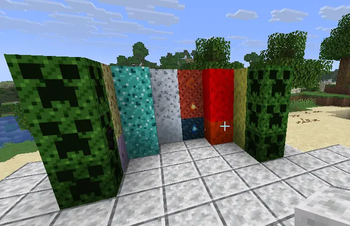
About this Mod
Sponges Overhaul
Sponges Overhaul adds seven new sponge types to Minecraft, each designed to absorb something different. Whether you're dealing with lava lakes, mob invasions, or a cloud of lingering potions, there's a sponge for that.
Getting started
All sponges in this mod replace the vanilla sponge — just drop a vanilla sponge in your crafting table to convert it into the mod's base water sponge. From there, every other type is crafted by surrounding a sponge with 4 of its matching ingredient in a cross pattern. Wet sponges dry out in a furnace as usual. Note that only sponges where it makes sense — water, snow, and diamond — will dry out automatically when placed in the Nether.
The Sponges
Sponge — The classic, now reworked. Absorbs water and underwater plants in a radius around it.
Lava Sponge — Crafted with lava buckets. Works like the water sponge, but for lava. Great for the Nether.
Fire Sponge — Crafted with fire charges. Absorbs fire blocks in a spherical area. If it soaks up soul fire instead, the wet version takes on a blue appearance as a small visual bonus.
Potion Sponge — Crafted with nether wart. Absorbs lingering potion clouds on the ground. Handy for cleaning up after a witch fight.
Undead Sponge — Crafted with bone blocks. Absorbs nearby undead mobs and stores them inside. The wet version slowly releases them back one by one over time — handle it carefully, or smelt it to get your dry sponge back.
Snow Sponge — Crafted with snow blocks. Absorbs snow and powder snow in an area. Perfect for clearing out winter landscapes.
Diamond Sponge — Crafted with diamonds around a water sponge. Absorbs water just like the regular one, but with a dramatically larger range and capacity. Worth the investment when draining an ocean monument.
The 2×2×2 Cube
Every sponge type has a hidden upgrade mechanic: if you place 8 of the same type in a 2×2×2 cube, they link together and act as one supercharged unit with 4× the range and 8× the absorption capacity. Great for large-scale drainage or clearing out massive fires.
Developer API
CustomSponges accepts a fluid class, a block class, or a block tag as the target. Here's a quick example:
Block PETROL_SPONGE = new CustomSponges(
    SpongeBlocks.spongeProperties.setId(
        ResourceKey.create(Registries.BLOCK,
            Identifier.fromNamespaceAndPath("yourmodid", "petrol_sponge"))
    ),
    PetrolFluid.class,
    WET_PETROL_SPONGE
);

SpongeBlocks.spongeBlocks.add(PETROL_SPONGE);
For the full API documentation and more details, see API.md on GitHub.
A note from the author
Hi! If you have an idea for a new sponge type, feel free to suggest it in the comments — I'd be happy to add it and credit you for the idea. Bug reports and feedback are always appreciated.
If you've read this far, you have my gratitude!
Available Versions
How to Install Sponges Overhaul on Your Server
Order Server
Order a Minecraft Java server with at least 3 GB RAM (4 GB recommended).
Set fabric Loader
In the panel under "Egg", select the fabric loader and matching Minecraft version (26.1.2).
Install Mod
Open the mod browser in the dashboard and search for "Sponges Overhaul". Click "Install" – done! Alternatively, upload the .jar via SFTP to the /mods folder.
Compatibility
Mod Loaders
Minecraft Versions
26.1.2
Server-side
✓ RequiredRecommended RAM
4 GB(min. 3 GB)Frequently Asked Questions
Sponges Overhaul server crashes on startup – what to do?
Most common cause: wrong fabric version or insufficient RAM. Check the server log (latest.log) for "OutOfMemoryError" or "Mixin" errors. With Mado Hosting: ensure at least 3 GB RAM is allocated and the loader matches the mod version (26.1.2). You can switch loaders with one click in the panel.
Is Sponges Overhaul compatible with fabric?
Sponges Overhaul officially supports fabric for Minecraft 26.1.2. The Mado dashboard automatically detects incompatible loader combinations.
Server lagging with Sponges Overhaul – how to optimize performance?
Recommended RAM: 4 GB (per 8 players). Use /spark profiler to check if Sponges Overhaul consumes the most tick time. Common fixes: reduce server view-distance to 8-10, install "performant" or "starlight" as supplementary mods on Forge. With Mado Hosting, your server runs on NVMe SSDs with dedicated CPU cores for minimal latency.
Rent Modded Server
Install Sponges Overhaul with just one click on your server.
Details
- License
- Creative Commons Attribution Non Commercial 4.0 International
- Server-side
- Required