
Sqrilizz Headcam
[1.21.1-1.21.8] Revolutionary Minecraft mod that allows you to stream your webcam directly into the game! Show your face to other players in real-time, creating a unique social experience. Perfect for streamers, content creators, and social servers.
Screenshots

About this Mod
🎥 sqrilizz HeadCam
Revolutionary Minecraft mod that allows you to stream your webcam directly into the game!




Right now follow me on telegram for news and if you have issues
✨ Key Features
🎮 Core Functionality
- 📹 Real-time Webcam Streaming - Broadcast your webcam directly into Minecraft
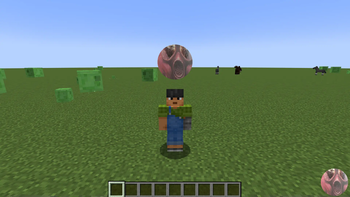
- 🌍 In-Game Display - See webcam feeds floating above players' heads
- ⚡ High Performance - Optimized for smooth 60 FPS streaming
- 🔧 Easy Configuration - Modern settings menu with intuitive controls
🎨 Customization Options
- 📐 Adjustable Position - Move webcam display anywhere around your head
- 🎯 Camera Indicators - Visual indicators for other players' cameras
- 🔇 Mute System - Easily mute/unmute other players' webcams
- ⚙️ Display Modes - Choose between different rendering modes
- 📏 Scale Control - Adjust the size of webcam displays
🌐 Multiplayer Support
- 👥 Server Integration - Works seamlessly with Spigot/Paper servers
- 🔄 Real-time Sync - Webcam data syncs instantly between players
- 🎪 Social Experience - Perfect for streaming and content creation
🎯 Perfect For
- 📺 Streamers - Show your face while streaming Minecraft
- 🎬 Content Creators - Create unique YouTube videos
- 👥 Social Servers - Build communities with face-to-face interaction
- 🎮 Entertainment - Add a new dimension to your server
- 🏗️ Unique Experiences - Stand out from other servers
Performance
- ⚡ Lightweight - Minimal impact on game performance
- 🎯 Optimized - Efficient network usage
- 🔄 Smooth - 60 FPS webcam streaming
- 💾 Low Memory - Efficient resource usage
🎮 How to Use
Basic Controls
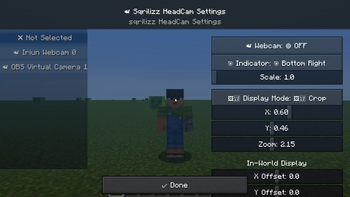
. PERIOD- Open settings menu, COMMA- Open mute menu- Mouse - Adjust webcam position and scale
Settings Menu
- 📹 Webcam Selection - Choose your webcam device
- 🎯 Camera Indicators - Show/hide camera indicators
- 🖼️ Display Mode - Choose rendering mode
- 📐 Position - Adjust X, Y, Z coordinates
- 📏 Scale - Change display size
🌟 Screenshots
🔧 Configuration
Client-Side Settings
{
  "webcamEnabled": true,
  "selectedWebcam": "HD WebCam",
  "cameraIndicator": "CIRCLE",
  "displayMode": "FULL_FRAME",
  "offsetX": 0.0,
  "offsetY": 100.0,
  "offsetZ": 0.0,
  "worldScale": 1.0
}
Server Requirements
- Spigot/Paper server with sqrilizz.headcam plugin
- Network bandwidth for webcam data
- Player permissions for webcam usage
🤝 Community
Support
- 📧 Issues: Report bugs on GitHub
- 💬 Discord: Join our community (soon)
Contributing
We welcome contributions! Whether it's bug reports, feature suggestions, or code contributions, every bit helps make this mod better.
📄 License
This project is licensed under the MIT License. Feel free to use, modify, and distribute as needed.
🎥 Created with ❤️ by sqrilizz
Experience Minecraft like never before with real-time webcam streaming!
Available Versions
How to Install Sqrilizz Headcam on Your Server
Order Server
Order a Minecraft Java server with at least 3 GB RAM (4 GB recommended).
Set bukkit Loader
In the panel under "Egg", select the bukkit loader and matching Minecraft version (1.21.8).
Install Mod
Open the mod browser in the dashboard and search for "Sqrilizz Headcam". Click "Install" – done! Alternatively, upload the .jar via SFTP to the /mods folder.
Compatibility
Mod Loaders
Minecraft Versions
1.21.8, 1.21.7, 1.21.6 (+6 more)
Server-side
✓ RequiredRecommended RAM
4 GB(min. 3 GB)Frequently Asked Questions
Sqrilizz Headcam server crashes on startup – what to do?
Most common cause: wrong bukkit version or insufficient RAM. Check the server log (latest.log) for "OutOfMemoryError" or "Mixin" errors. With Mado Hosting: ensure at least 3 GB RAM is allocated and the loader matches the mod version (1.21.8). You can switch loaders with one click in the panel.
Is Sqrilizz Headcam compatible with bukkit and fabric and paper and spigot?
Sqrilizz Headcam officially supports bukkit, fabric, paper, spigot for Minecraft 1.21.8, 1.21.7, 1.21.6. The Mado dashboard automatically detects incompatible loader combinations.
Server lagging with Sqrilizz Headcam – how to optimize performance?
Recommended RAM: 4 GB (per 8 players). Use /spark profiler to check if Sqrilizz Headcam consumes the most tick time. Common fixes: reduce server view-distance to 8-10, install "performant" or "starlight" as supplementary mods on Forge. With Mado Hosting, your server runs on NVMe SSDs with dedicated CPU cores for minimal latency.
Similar Mods






Rent Modded Server
Install Sqrilizz Headcam with just one click on your server.