
SquidServers Server-mod
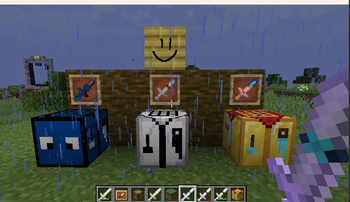
A server side mod/plugin for custom item content and planks that can be drawn on
Screenshots
About this Mod
SquidServers Server-Mod
Server-side Custom Content
Key Features
Cosmetic Item and Blocks: Adds recipies for skinned vanilla items, chose per player visual variants at "squidservers.com/itemshop".
Paintable Planks: Craftable planks for every wood type. Use dyes on the painted face to draw on a 128x128 surface. This system is backed by vanilla maps, using stroke-based painting for a consistent UX across both Fabric and Paper.
Platform Support
The same engine drives both versions to ensure your server behavior remains identical regardless of your choice of software.
| Platform | Technical Foundation | Compatibility |
|---|---|---|
| Fabric | Polymer + Fabric API | Fabric 1.20+ |
| Paper | Bukkit API | Paper 1.20+ |
Setup Guide
Fabric: Install the mod directly into your
mods/folder (requires Fabric API).Paper: Drop the plugin
.jarinto theplugins/folder.(required resource pack is automatiaclly applied and merged with others if needed)
License and Credits
- Branding: "SquidServers" and related assets are unique branding for this pack.
- Disclaimer: Not affiliated with Mojang or Microsoft. Minecraft is a trademark of Mojang Synergies AB.
Available Versions
How to Install SquidServers Server-mod on Your Server
Order Server
Order a Minecraft Java server with at least 3 GB RAM (4 GB recommended).
Set fabric Loader
In the panel under "Egg", select the fabric loader and matching Minecraft version (26.1.2).
Install Mod
Open the mod browser in the dashboard and search for "SquidServers Server-mod". Click "Install" – done! Alternatively, upload the .jar via SFTP to the /mods folder.
Compatibility
Mod Loaders
Minecraft Versions
26.1.2, 26.1.1, 26.1 (+19 more)
Server-side
✗ UnsupportedRecommended RAM
4 GB(min. 3 GB)Frequently Asked Questions
SquidServers Server-mod server crashes on startup – what to do?
Most common cause: wrong fabric version or insufficient RAM. Check the server log (latest.log) for "OutOfMemoryError" or "Mixin" errors. With Mado Hosting: ensure at least 3 GB RAM is allocated and the loader matches the mod version (26.1.2). You can switch loaders with one click in the panel.
Is SquidServers Server-mod compatible with fabric and paper?
SquidServers Server-mod officially supports fabric, paper for Minecraft 26.1.2, 26.1.1, 26.1. The Mado dashboard automatically detects incompatible loader combinations.
Server lagging with SquidServers Server-mod – how to optimize performance?
Recommended RAM: 4 GB (per 8 players). Use /spark profiler to check if SquidServers Server-mod consumes the most tick time. Common fixes: reduce server view-distance to 8-10, install "performant" or "starlight" as supplementary mods on Forge. With Mado Hosting, your server runs on NVMe SSDs with dedicated CPU cores for minimal latency.
Rent Modded Server
Install SquidServers Server-mod with just one click on your server.