
SSHook
Flexible screenshot uploader utilizing discord webhooks
Screenshots

About this Mod

Screenshot Uploader using Discord Webhooks
WARNING: This mod uses an insecure way to transmit webhook information (URLs) between the client and server. This means users could gain unintentional access to the webhook URL. This is by design. This mod is intended for small groups of friends who want an easy and lightweight way to upload their screenshots to various channels in Discord. A leaked webhook URL could be used to post malicious messages or attachments in a specific channel. USE AT YOUR OWN RISK.
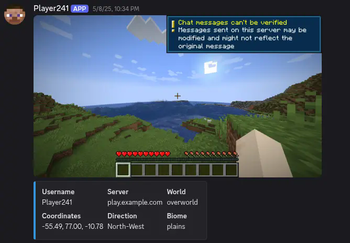
SSHook is an easy way for users to upload screenshots to Discord using the webhook integration feature. Every time a user takes a screenshot, they will be prompted with a configurable list of webhooks (Discord channels) to upload the screenshot. The webhooks are synced between the client and server if the client has the 'enableServerOverride' config option set. This means that only the server owner has to define the webhooks; the mod handles syncing them. If a player decides to upload, it sends a discord message that looks like:
CLIENTS:
All users can define client-side webhooks and use a toggle config option to display the upload prompt. If the user connects to a server with the mod installed (and enableServerOverride is set on the client), the server will send applicable webhooks to the client to use instead. By default, this option is enabled.
SERVERS:
Servers do not need this mod for clients to upload screenshots, but each client must define the webhooks individually in the config (and therefore, manually share the webhook URLs). If the mod is installed on the server, a separate config file will be created where the server owner can define webhooks to be shared with the clients.
CONFIG:
CLIENTS: See sshook.json for details on what each option does. You can also visit the in-game configuration through the Cloth API.
SERVERS: sshook-server.json is generated with server installations, it has three options:
- enableBotNameOverride: This will replace the webhook (bot) name with the Minecraft username of the person who uploaded and their avatar.
- webhooks: This is where you can define the name and URL of the webhook.
- customServerName: This configures the 'Server' category in the embed. If left blank, the server IP will be defaulted.
Available Versions
How to Install SSHook on Your Server
Order Server
Order a Minecraft Java server with at least 3 GB RAM (4 GB recommended).
Set fabric Loader
In the panel under "Egg", select the fabric loader and matching Minecraft version (1.21.10).
Install Mod
Open the mod browser in the dashboard and search for "SSHook". Click "Install" – done! Alternatively, upload the .jar via SFTP to the /mods folder.
Compatibility
Mod Loaders
Minecraft Versions
1.21.10, 1.21.5, 1.21.4
Server-side
✗ UnsupportedRecommended RAM
4 GB(min. 3 GB)Frequently Asked Questions
SSHook server crashes on startup – what to do?
Most common cause: wrong fabric version or insufficient RAM. Check the server log (latest.log) for "OutOfMemoryError" or "Mixin" errors. With Mado Hosting: ensure at least 3 GB RAM is allocated and the loader matches the mod version (1.21.10). You can switch loaders with one click in the panel.
Is SSHook compatible with fabric?
SSHook officially supports fabric for Minecraft 1.21.10, 1.21.5, 1.21.4. The Mado dashboard automatically detects incompatible loader combinations.
Server lagging with SSHook – how to optimize performance?
Recommended RAM: 4 GB (per 8 players). Use /spark profiler to check if SSHook consumes the most tick time. Common fixes: reduce server view-distance to 8-10, install "performant" or "starlight" as supplementary mods on Forge. With Mado Hosting, your server runs on NVMe SSDs with dedicated CPU cores for minimal latency.
Similar Mods






Rent Modded Server
Install SSHook with just one click on your server.