
Energy Bar Indicator
Turn your world into a RPG game adding the Stamina Bar
Screenshots
About this Mod

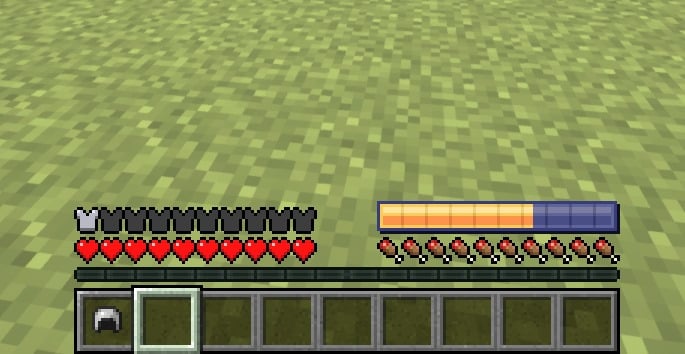
The Data Pack / Mod adds a stamina system for the player, which can be viewed via a custom HUD.
When the player runs, stamina is progressively worn out. After 20 s of continuous running, stamina is depleted, causing fatigue effects (e.g., Slowness).
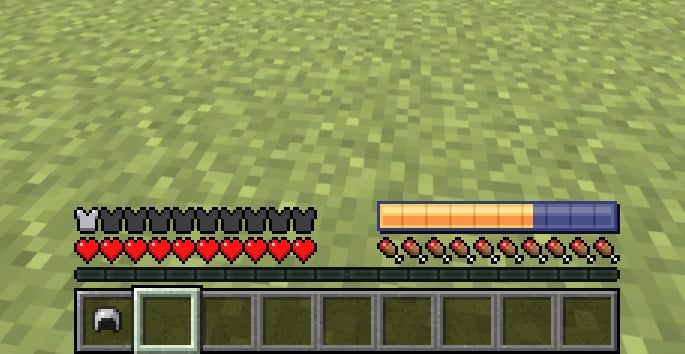

Stamina HUD: A bar visible on the bottom of the screen or above the Hotbar.
Stamina exhaustion: After 20 seconds of continuous running, debuffs are applied that slow down the player.
Stamina regeneration: It regenerates automatically when walking or standing still.
Configurability: Maximum run time, regeneration speed and duration of debuff can be customized.
Website
If you have any questions, need assistance, or simply want to share your thoughts or feedback, feel free to reach out. We're always here to help and would love to hear from you – whether you're looking for answers, suggestions, or just want to let us know how we're doing.

Available Versions
How to Install Energy Bar Indicator on Your Server
Order Server
Order a Minecraft Java server with at least 3 GB RAM (4 GB recommended).
Set datapack Loader
In the panel under "Egg", select the datapack loader and matching Minecraft version (1.21.3).
Install Mod
Open the mod browser in the dashboard and search for "Energy Bar Indicator". Click "Install" – done! Alternatively, upload the .jar via SFTP to the /mods folder.
Compatibility
Mod Loaders
Minecraft Versions
1.21.3, 1.21.2, 1.21.1 (+6 more)
Server-side
✓ RequiredRecommended RAM
4 GB(min. 3 GB)Frequently Asked Questions
Energy Bar Indicator server crashes on startup – what to do?
Most common cause: wrong datapack version or insufficient RAM. Check the server log (latest.log) for "OutOfMemoryError" or "Mixin" errors. With Mado Hosting: ensure at least 3 GB RAM is allocated and the loader matches the mod version (1.21.3). You can switch loaders with one click in the panel.
Is Energy Bar Indicator compatible with datapack and fabric and forge and neoforge and quilt?
Energy Bar Indicator officially supports datapack, fabric, forge, neoforge, quilt for Minecraft 1.21.3, 1.21.2, 1.21.1. Note: Forge and Fabric mods are NOT cross-compatible – pick one loader and stick with it. The Mado dashboard automatically detects incompatible loader combinations.
Server lagging with Energy Bar Indicator – how to optimize performance?
Recommended RAM: 4 GB (per 8 players). Use /spark profiler to check if Energy Bar Indicator consumes the most tick time. Common fixes: reduce server view-distance to 8-10, install "performant" or "starlight" as supplementary mods on Forge. With Mado Hosting, your server runs on NVMe SSDs with dedicated CPU cores for minimal latency.
Similar Mods




Rent Modded Server
Install Energy Bar Indicator with just one click on your server.