
Stamp
Client-side Fabric mod for repeating sign texts.
About this Mod
Features
- Client-Side Commands: Commands (
.stamp on,.stamp off,.stamp) are intercepted inside the client's network handler before packets are constructed, making them completely invisible to server-side chat logs or plugins. - Vanilla-Compliant Packet Flow: Stamp modifies the GUI's native
messagesarray during initialization. The text is submitted using Minecraft's ownfinishEditingpipeline, maintaining perfect vanilla packet compliance to bypass strict anti-cheat heuristics. - Cooldown-Based Auto-Submit: Once the sign screen opens pre-filled, the mod waits 500ms before triggering submission. This delay prevents rapid-packet rate-limit kicks on high-frequency server filters.
- Survival Hand Detection: Intelligently handles survival placing where placing the last sign in a stack leaves the hand empty before the GUI initializes, ensuring the auto-signer does not deactivate prematurely.
Usage
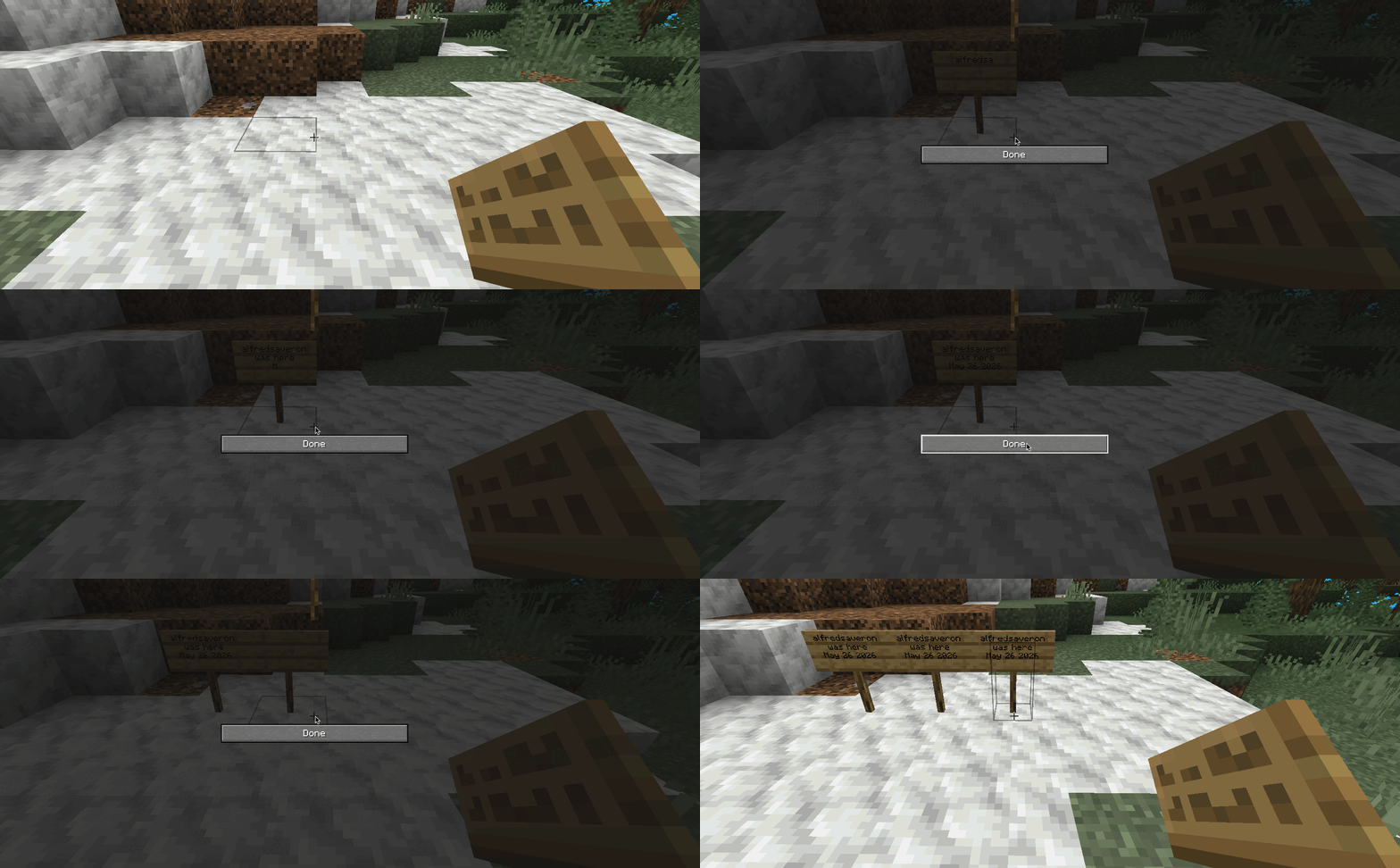
- Type
.stamp onin chat to enable the utility. - Place a sign and write your text manually. Pressing Done caches the lines.
- Every next sign placed will open pre-filled with the cached text and automatically submit after a 500ms delay.
- Type
.stamp offto disable the mod and clear the cache. Re-enabling starts with a fresh cache.
Chat Commands
.stamp on- Enables the mod and readies the cache..stamp off- Disables the mod and clears the active cache..stamp- Prints the help usage locally.
Available Versions
How to Install Stamp on Your Server
Order Server
Order a Minecraft Java server with at least 3 GB RAM (4 GB recommended).
Set fabric Loader
In the panel under "Egg", select the fabric loader and matching Minecraft version (1.21.11).
Install Mod
Open the mod browser in the dashboard and search for "Stamp". Click "Install" – done! Alternatively, upload the .jar via SFTP to the /mods folder.
Compatibility
Mod Loaders
Minecraft Versions
1.21.11, 1.21.10, 1.21.9 (+8 more)
Server-side
✗ UnsupportedRecommended RAM
4 GB(min. 3 GB)Frequently Asked Questions
Stamp server crashes on startup – what to do?
Most common cause: wrong fabric version or insufficient RAM. Check the server log (latest.log) for "OutOfMemoryError" or "Mixin" errors. With Mado Hosting: ensure at least 3 GB RAM is allocated and the loader matches the mod version (1.21.11). You can switch loaders with one click in the panel.
Is Stamp compatible with fabric?
Stamp officially supports fabric for Minecraft 1.21.11, 1.21.10, 1.21.9. The Mado dashboard automatically detects incompatible loader combinations.
Server lagging with Stamp – how to optimize performance?
Recommended RAM: 4 GB (per 8 players). Use /spark profiler to check if Stamp consumes the most tick time. Common fixes: reduce server view-distance to 8-10, install "performant" or "starlight" as supplementary mods on Forge. With Mado Hosting, your server runs on NVMe SSDs with dedicated CPU cores for minimal latency.
Similar Mods






Rent Modded Server
Install Stamp with just one click on your server.