
Starshadow Config
Starshadow configuration building mod
Screenshots

About this Mod
★ Starshadow Config
Beautiful config screens from plain Java classes.
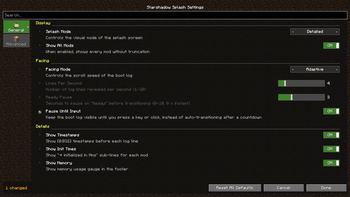
Starshadow Config is an annotation-driven configuration library for Fabric mods. Define your settings as a simple Java class, annotate the fields, and get a polished config screen — complete with tabs, sections, sliders, toggles, and enum dropdowns — with zero boilerplate UI code.
"Config screens shouldn't require a PhD in GUI programming."
🪄 How It Works
For Mod Developers
- Add the dependency to your
build.gradle.kts - Create a config class with annotated fields
- Done — Starshadow Config generates the entire screen
@StarConfig(modId = "mymod")
public class MyConfig {
    @Tab(id = "general", icon = "minecraft:crafting_table")
    @Section("scanning")
    @Range(min = 1, max = 64)
    @DefaultValue("16")
    private int scanRange = 16;

    @Section("display")
    @DefaultValue("true")
    private boolean showOverlay = true;
}
That's it. No screen builder class. No widget positioning. No layout math. Just your config fields with annotations.
For Players
If a mod uses Starshadow Config, you get:
- A tabbed settings screen accessible via Mod Menu
- Clean, consistent UI across all mods that use the library
- Sliders, toggles, and dropdowns instead of raw text fields
- Reset buttons to restore defaults
✨ Features
📝 Annotation-Driven API
Annotate your config POJO and the screen builds itself:
@StarConfig— marks the class as a config@Tab— groups fields into tabs with icons@Section— organizes fields into labeled sections@Range— sets min/max for numeric fields@DefaultValue— defines the default value@EnabledWhen— conditionally enables fields based on other values@Hidden— excludes fields from the generated screen@Widget— overrides the default widget type
🔨 Fluent Builder API
Need more control? Use StarConfigBuilder for a fully programmatic approach:
StarConfigBuilder.create("mymod")
    .parent(parentScreen)
    .tab("general", tab -> tab
        .icon(Items.CRAFTING_TABLE)
        .section("scanning", section -> section
            .intSlider("scanRange", b -> b
                .range(1, 64).defaultValue(16)
                .binding(() -> config.scanRange,
                         v -> config.scanRange = v))
        )
    )
    .onSave(() -> serializer.save())
    .build();
💾 JSON Persistence
GsonConfigSerializer handles loading and saving config files as readable JSON. Files are stored in config/<mod-id>.json following Fabric conventions.
🎛️ Rich Widget Types
- Toggles for booleans
- Sliders for numbers with ranges
- Steppers for integer values
- Enum cycles for enum selections
- String fields for text input
- Description entries for informational text
🔗 Mod Menu Integration
Register your config screen with a single class:
public class MyModMenuIntegration implements ModMenuApi {
    @Override
    public ConfigScreenFactory<?> getModConfigScreenFactory() {
        return ModMenuConfigFactory.create("mymod", MyConfig.class, MyConfig::get);
    }
}
🧩 Conditional Fields
Use @EnabledWhen to create dependent settings that gray out when their condition isn't met:
@EnabledWhen(field = "pacingMode", notEquals = "ADAPTIVE")
private int linesPerSecond = 4;
📦 Installation
For Mod Developers
Add to your build.gradle.kts:
dependencies {
    modstitchModImplementation("com.starshadow:starshadow-config:${property("starshadow_version")}")
    modstitchModImplementation("com.starshadow:starshadow-lib:${property("starshadow_version")}")
    include("com.starshadow:starshadow-config:${property("starshadow_version")}")
    include("com.starshadow:starshadow-lib:${property("starshadow_version")}")
}
For Players
Starshadow Config is bundled inside mods that use it — you typically don't need to install it separately. If a mod requires it as an external dependency:
- Install Fabric Loader for your Minecraft version
- Install Fabric API
- Drop the Starshadow Config and Starshadow Lib
.jarfiles into yourmods/folder - Launch Minecraft
Supported: Minecraft 1.20.1 · 1.20.4 · 1.21.1 — Fabric only
🧩 Compatibility
| Mod | Compatibility |
|---|---|
| Fabric API | ✅ Required |
| Mod Menu | ✅ Optional — config screen registration (not needed if Starshadow Menu is installed) |
| Starshadow Menu | ✅ Optional — config screen discovery |
| Cloth Config | ✅ Can coexist — different config systems |
📋 Requirements
| Dependency | Required? |
|---|---|
| Fabric Loader | ✅ Yes |
| Fabric API | ✅ Yes |
| Starshadow Lib | ✅ Yes |
| Mod Menu or Starshadow Menu | Optional — either provides config screen access |
🌟 Config Made Simple
Stop writing hundreds of lines of config screen code. Starshadow Config turns your config class into a beautiful, functional settings screen — automatically.
Made with ❤️ by Ghent Starshadow
Licensed under MPL-2.0 — free to use, share, and modify.
Available Versions
How to Install Starshadow Config on Your Server
Order Server
Order a Minecraft Java server with at least 3 GB RAM (4 GB recommended).
Set fabric Loader
In the panel under "Egg", select the fabric loader and matching Minecraft version (1.20.6).
Install Mod
Open the mod browser in the dashboard and search for "Starshadow Config". Click "Install" – done! Alternatively, upload the .jar via SFTP to the /mods folder.
Compatibility
Mod Loaders
Minecraft Versions
1.20.6, 1.20.5, 1.20.4 (+3 more)
Server-side
✓ RequiredRecommended RAM
4 GB(min. 3 GB)Frequently Asked Questions
Starshadow Config server crashes on startup – what to do?
Most common cause: wrong fabric version or insufficient RAM. Check the server log (latest.log) for "OutOfMemoryError" or "Mixin" errors. With Mado Hosting: ensure at least 3 GB RAM is allocated and the loader matches the mod version (1.20.6). You can switch loaders with one click in the panel.
Is Starshadow Config compatible with fabric?
Starshadow Config officially supports fabric for Minecraft 1.20.6, 1.20.5, 1.20.4. The Mado dashboard automatically detects incompatible loader combinations.
Server lagging with Starshadow Config – how to optimize performance?
Recommended RAM: 4 GB (per 8 players). Use /spark profiler to check if Starshadow Config consumes the most tick time. Common fixes: reduce server view-distance to 8-10, install "performant" or "starlight" as supplementary mods on Forge. With Mado Hosting, your server runs on NVMe SSDs with dedicated CPU cores for minimal latency.
Rent Modded Server
Install Starshadow Config with just one click on your server.