
Statistiques
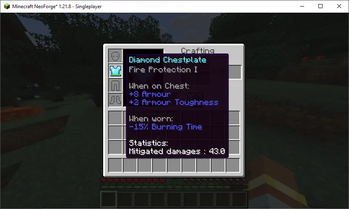
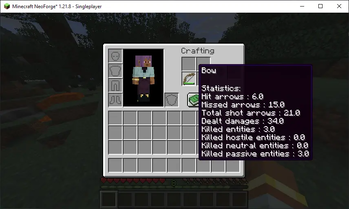
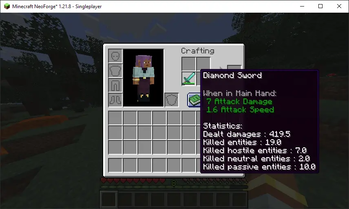
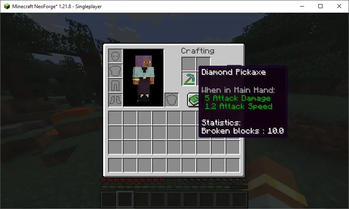
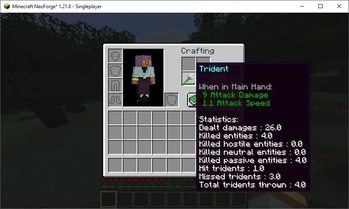
Statistiques is a mod that allows you to track statistics related to your armours, your tools and your weapons.
Screenshots
About this Mod
Welcome to Statistiques
Statistiques
From the French word statistique (statistic), itself derived from the German Statistik, coined in 1749 by economist Gottfried Achenwall. The term ultimately traces back to the Italian statista, meaning "statesman".
Originally, it referred to the knowledge required to govern a state, but it quickly evolved to describe the collection and analysis of measurable data across many fields.
Today, statistics are everywhere—and incredibly useful. That’s exactly what Statistiques brings into Minecraft.
Statistiques is a mod that tracks detailed, equipment-based data across your entire gear setup. Weapons, tools, and armor all come with their own dedicated statistics, giving you deep insight into how you actually use them. From blocks mined and damage dealt to arrows fired, missed shots, and beyond—every action is recorded and turned into meaningful data.
Analyze Your Gameplay
This mod is built for players who love digging into the numbers. Whether you want to optimize your resource gathering, analyze your combat efficiency, or simply track the wear and tear of your favorite tools, Statistiques provides the comprehensive data you need. Stop guessing about your progress and start measuring it—let the raw data reveal exactly how you play and how your equipment performs over time.
Draft by Rift, final version refined with Perplexity AI.
Brouillon par Rift, version finale affinée with Perplexity AI.
Available Versions
How to Install Statistiques on Your Server
Order Server
Order a Minecraft Java server with at least 3 GB RAM (4 GB recommended).
Set neoforge Loader
In the panel under "Egg", select the neoforge loader and matching Minecraft version (1.21.8).
Install Mod
Open the mod browser in the dashboard and search for "Statistiques". Click "Install" – done! Alternatively, upload the .jar via SFTP to the /mods folder.
Compatibility
Mod Loaders
Minecraft Versions
1.21.8
Server-side
✓ RequiredRecommended RAM
4 GB(min. 3 GB)Frequently Asked Questions
Statistiques server crashes on startup – what to do?
Most common cause: wrong neoforge version or insufficient RAM. Check the server log (latest.log) for "OutOfMemoryError" or "Mixin" errors. With Mado Hosting: ensure at least 3 GB RAM is allocated and the loader matches the mod version (1.21.8). You can switch loaders with one click in the panel.
Is Statistiques compatible with neoforge?
Statistiques officially supports neoforge for Minecraft 1.21.8. The Mado dashboard automatically detects incompatible loader combinations.
Server lagging with Statistiques – how to optimize performance?
Recommended RAM: 4 GB (per 8 players). Use /spark profiler to check if Statistiques consumes the most tick time. Common fixes: reduce server view-distance to 8-10, install "performant" or "starlight" as supplementary mods on Forge. With Mado Hosting, your server runs on NVMe SSDs with dedicated CPU cores for minimal latency.
Similar Mods




![[TaCZ] Timeless and Classics Zero](https://cdn.modrinth.com/data/SzzJttH8/fd27766d2bb8390d284696b1dbd358f87e081439_96.webp)

Rent Modded Server
Install Statistiques with just one click on your server.