
¿Still There? AFK Screen
Automatically detects when you are AFK, blurring the screen and limiting the game to 10 FPS to save PC resources and lower temperatures.
Screenshots
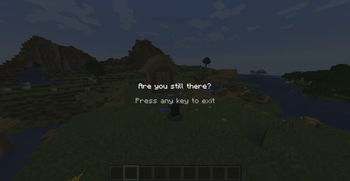
About this Mod
REQUIRED ARCHITECTURY API
Still There? (AFK Screen) is a 100% Client-Side Quality of Life (QoL) mod designed to protect your computer's performance and temperature when you step away from the keyboard.
Main Features:
Smart Detection: Automatically monitors mouse and keyboard activity.
Extreme Resource Saving: After a configurable period of inactivity (5 minutes by default), the mod opens a blurred cinematic screen and throttles the game down to 10 FPS. This allows your CPU and GPU to rest, drastically reducing power consumption and heat.
Instant Restoration: click, or press any key. The mod will close instantly and restore your exact original framerate so you can continue playing smoothly.
Highly Configurable: Includes a config file (pausescreen-client.toml) that lets you decide exactly how many minutes must pass before the screen triggers.
Multilingual Support: Fully translated into English, Spanish, Portuguese, French, Russian, and Chinese.
Descripción en Español:
Still There? (AFK Screen) es un mod de Calidad de Vida (QoL) 100% del lado del cliente (Client-Side), diseñado para proteger el rendimiento y la temperatura de tu computadora cuando te alejas del teclado.
Características principales:
Detección Inteligente: Monitorea de forma constante la actividad del ratón y el teclado para saber si sigues ahí.
Ahorro de Recursos Extremo: Tras un periodo de inactividad configurable (5 minutos por defecto), el mod activa una pantalla cinemática con desenfoque y "estrangula" el rendimiento del juego a solo 10 FPS. Esto permite que tu CPU y GPU descansen, reduciendo drásticamente el consumo eléctrico y el calor generado.
Restauración Instantánea: No pierdas ni un segundo. Solo haz clic o presiona cualquier tecla; el mod se cerrará al instante y devolverá el juego a tus FPS originales.
Totalmente Configurable: Incluye un archivo de configuración (pausescreen-client.toml) para que elijas exactamente cuántos minutos de espera prefieres.
Soporte Multilingüe: Totalmente traducido al Inglés, Español (España, México y Argentina), Portugués, Francés, Ruso y Chino.
Available Versions
How to Install ¿Still There? AFK Screen on Your Server
Order Server
Order a Minecraft Java server with at least 3 GB RAM (4 GB recommended).
Set fabric Loader
In the panel under "Egg", select the fabric loader and matching Minecraft version (1.21.1).
Install Mod
Open the mod browser in the dashboard and search for "¿Still There? AFK Screen". Click "Install" – done! Alternatively, upload the .jar via SFTP to the /mods folder.
Compatibility
Mod Loaders
Minecraft Versions
1.21.1, 1.20.1
Server-side
✗ UnsupportedRecommended RAM
4 GB(min. 3 GB)Frequently Asked Questions
¿Still There? AFK Screen server crashes on startup – what to do?
Most common cause: wrong fabric version or insufficient RAM. Check the server log (latest.log) for "OutOfMemoryError" or "Mixin" errors. With Mado Hosting: ensure at least 3 GB RAM is allocated and the loader matches the mod version (1.21.1). You can switch loaders with one click in the panel.
Is ¿Still There? AFK Screen compatible with fabric and forge and neoforge?
¿Still There? AFK Screen officially supports fabric, forge, neoforge for Minecraft 1.21.1, 1.20.1. Note: Forge and Fabric mods are NOT cross-compatible – pick one loader and stick with it. The Mado dashboard automatically detects incompatible loader combinations.
Server lagging with ¿Still There? AFK Screen – how to optimize performance?
Recommended RAM: 4 GB (per 8 players). Use /spark profiler to check if ¿Still There? AFK Screen consumes the most tick time. Common fixes: reduce server view-distance to 8-10, install "performant" or "starlight" as supplementary mods on Forge. With Mado Hosting, your server runs on NVMe SSDs with dedicated CPU cores for minimal latency.
Rent Modded Server
Install ¿Still There? AFK Screen with just one click on your server.