
Stockpile
Adds 7 enchants, a rework and an axe to Arsenal
Screenshots
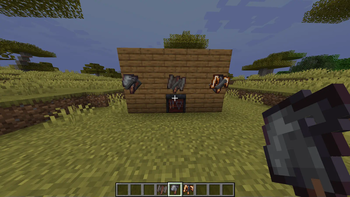
About this Mod
Twas is an addon for Arsenal'
Scythe enchants
Infectious:
Applies a debuff both to you and the enemy,
The debuff increases the next damage taken by 50% (excluding using it for Spewing)
Clutch:
is this some kind of anton, blast?
Using the Scythe will increase your speed and make you dash forward
Repeated uses need timing, indicated by 2 exclamation marks appearing on your GUI
Throwing axe
Can be found on husks. Gets thrown in an arc.
You can retrieve the axe by hitting it with an anchorblade or getting near it.
Recall:
The axe now gets thrown in a straight line and turns back after a certain point. It also now pierces enemies instead of bouncing off of them.
Sanguine:
Axe (the item) no longer gets thrown when using it. Instead, the player gains 3 regeneration debt.
Anchorblade enchants
Unchained:
Upon hitting a block or reaching it's distance limit, instead of returning to you, the anchor will turn into a separate bouncing projectile.
Also, it pierces enemies.
Revolving:
Instead of immidiately throwing the anchor, it first spins around you
Like a beyblade hehehoho
It'll also lower your gravity
After 8 seconds or if you try to recall the anchor, it will be thrown as usual.
Whirling:
Like whirling in rags from Disco elysium, , .,..
The anchor drags everything it hits along with it when going forward.
And backward.
Spewing Rework
Spewing now gives you 5 regeneration debt instead of dealing 3 damage.
You cannot regenerate until the debt is 0. Any and all healing before that will lower the debt.
All debt taken after 20 will instead deal damage.
Available Versions
How to Install Stockpile on Your Server
Order Server
Order a Minecraft Java server with at least 3 GB RAM (4 GB recommended).
Set fabric Loader
In the panel under "Egg", select the fabric loader and matching Minecraft version (1.20.1).
Install Mod
Open the mod browser in the dashboard and search for "Stockpile". Click "Install" – done! Alternatively, upload the .jar via SFTP to the /mods folder.
Compatibility
Mod Loaders
Minecraft Versions
1.20.1
Server-side
✓ RequiredRecommended RAM
4 GB(min. 3 GB)Frequently Asked Questions
Stockpile server crashes on startup – what to do?
Most common cause: wrong fabric version or insufficient RAM. Check the server log (latest.log) for "OutOfMemoryError" or "Mixin" errors. With Mado Hosting: ensure at least 3 GB RAM is allocated and the loader matches the mod version (1.20.1). You can switch loaders with one click in the panel.
Is Stockpile compatible with fabric?
Stockpile officially supports fabric for Minecraft 1.20.1. The Mado dashboard automatically detects incompatible loader combinations.
Server lagging with Stockpile – how to optimize performance?
Recommended RAM: 4 GB (per 8 players). Use /spark profiler to check if Stockpile consumes the most tick time. Common fixes: reduce server view-distance to 8-10, install "performant" or "starlight" as supplementary mods on Forge. With Mado Hosting, your server runs on NVMe SSDs with dedicated CPU cores for minimal latency.
Similar Mods




Rent Modded Server
Install Stockpile with just one click on your server.