
Screenshots
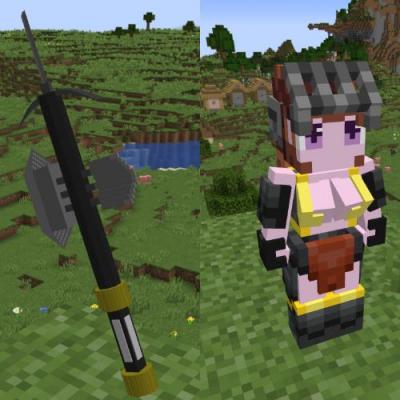
About this Mod
The Stonemultitool is a versatile instrument that integrates a pickaxe, axe, shovel, hoe, and sword, and can transform into an entity called "Golem" to assist players in combating monsters. It notably grants the player the ability to attack monsters with the right-click, ensuring that the Stonemultitool has powerful digging capabilities without the risk of mistakenly mining blocks while targeting monsters.
The recipe for the Stonemultitool consists of a stone pickaxe, axe, shovel, hoe, sword, and two stones.(No fixed order)
The specific usage methods of the Stonemultitool are as follows (all apply when the Stonemultitool is the item in the main hand):
1.When the current health is greater than or equal to half of the maximum health, right-clicking to attack will deal damage as a percentage of the maximum health to both the target and oneself. When the current health is less than half of the maximum health, right-clicking to attack will have a lifesteal effect.
2.Press the "V" key to transform the Stonemultitool into Golem.
3.Press the "B" key to instantly return to the spawn point, regardless of the dimension the player is in.(At the cost of half of maximum health)
4.Press the "C" key to teleport to the nearest Golem within the same dimension.
5.Press the "O" key to open a GUI that allows the destruction of unwanted items.
6.Press the "X" key to vertically teleport the player to a location above their head that can accommodate them.(At the cost of half of maximum health)
7.When left-clicking to break blocks, if the armour value is less than or equal to 15, it simultaneously breaks the target block and the surrounding 8 blocks; if the armour value is greater than 15, it has the effect of Silk Touch.
8.Right-clicking on dirt or grass blocks turns them into farmland blocks ready for cultivation.
9.Right-clicking on a block causes any fluid block above the target block to disappear.
10.When the player is attacked, the source of damage will be teleported to the front of the player.
11.Right-clicking on the ground will clear nearby weeds.
12.When the off-hand item is a compass, the current coordinates will automatically display above the inventory.
13.When the block in front and below the target is air, and the player has the same block in their inventory, right-clicking on the target block will automatically place the block forward.
Tip: When the item in the main hand is not a Stonemultitool, right-clicking on Golem will transform it into a Stonemultitool.
Available Versions
How to Install stonemultitool on Your Server
Order Server
Order a Minecraft Java server with at least 3 GB RAM (4 GB recommended).
Set neoforge Loader
In the panel under "Egg", select the neoforge loader and matching Minecraft version (1.21.4).
Install Mod
Open the mod browser in the dashboard and search for "stonemultitool". Click "Install" – done! Alternatively, upload the .jar via SFTP to the /mods folder.
Compatibility
Mod Loaders
Minecraft Versions
1.21.4, 1.21.1
Server-side
✓ RequiredRecommended RAM
4 GB(min. 3 GB)Frequently Asked Questions
stonemultitool server crashes on startup – what to do?
Most common cause: wrong neoforge version or insufficient RAM. Check the server log (latest.log) for "OutOfMemoryError" or "Mixin" errors. With Mado Hosting: ensure at least 3 GB RAM is allocated and the loader matches the mod version (1.21.4). You can switch loaders with one click in the panel.
Is stonemultitool compatible with neoforge?
stonemultitool officially supports neoforge for Minecraft 1.21.4, 1.21.1. The Mado dashboard automatically detects incompatible loader combinations.
Server lagging with stonemultitool – how to optimize performance?
Recommended RAM: 4 GB (per 8 players). Use /spark profiler to check if stonemultitool consumes the most tick time. Common fixes: reduce server view-distance to 8-10, install "performant" or "starlight" as supplementary mods on Forge. With Mado Hosting, your server runs on NVMe SSDs with dedicated CPU cores for minimal latency.
Similar Mods




Rent Modded Server
Install stonemultitool with just one click on your server.