
Stress Ball
Adds two auto‑attacking baubles inspired by Terraria.
Screenshots
About this Mod
Stress Ball - Auto-Attack Baubles
This mod adds two new baubles inspired by Terraria: the Stress Ball and its upgraded version, the Pressure Ball. Both items require the Baubles mod as a dependency and are designed for Minecraft 1.12.2.
Features
Stress Ball
- Automatically performs a left-click attack every 0.5 seconds when the player stands still and has no GUI open (e.g., inventory, chests, crafting tables).
- Attack respects the weapon's attack speed: if the weapon's cooldown is longer than 0.5 seconds, attacks occur at the weapon's natural rate; if shorter, a 0.5‑second minimum interval prevents exceeding the invincibility frame limit.
- Attack range is fixed at 3 blocks (same as default player reach).
- Configurable item blacklist: if the player holds a blacklisted item in the main hand, no automatic attacks occur.
Pressure Ball
- An upgraded version of the Stress Ball.
- Also attacks automatically when standing still, but without any GUI restriction and includes a brief cooldown after moving.
- In addition to the standard left-click attack, it can be configured to trigger right‑click actions for specific items (e.g., Tinkers' Construct shurikens, TConEvo spectres, PlusTIC laser guns).
- Features a configurable entity blacklist (e.g., item frames, paintings, armor stands) to prevent accidental attacks.
- Inherits the same attack range, cooldown mechanics, and item blacklist as the Stress Ball.
Crafting Recipes
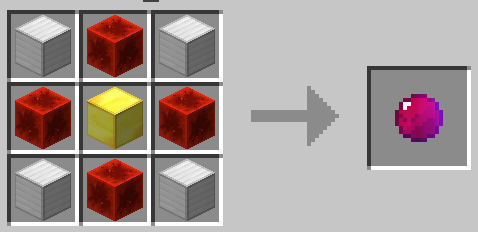
Stress Ball
- Pattern:
- Iron blocks (I) in the corners
- Redstone blocks (R) in cardinal directions
- Gold block (G) in the center
- Result: 1 Stress Ball
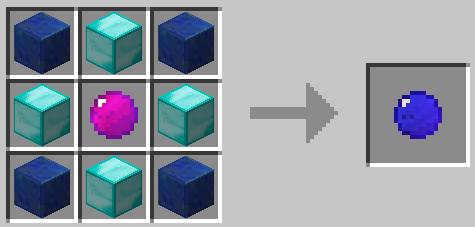
Pressure Ball
- Pattern:
- Lapis lazuli blocks (L) in the corners
- Diamond blocks (D) in cardinal directions
- Stress Ball (S) in the center
- Result: 1 Pressure Ball
All recipes are shapeless and can be viewed in-game with JEI.
Configuration
A JSON configuration file is generated at config/stressball.json after the first run. You can edit it to customize:
{
  "itemBlacklist": ["cyclicmagic:storage_bag"],
  "entityBlacklist": ["minecraft:item_frame", "minecraft:painting", "minecraft:armor_stand", "minecraft:item"],
  "rightClickItems": ["tconstruct:shuriken", "tconevo:tool_sceptre", "plustic:laser_gun"]
}
- itemBlacklist: Items in this list will not trigger automatic attacks when held.
- entityBlacklist: Entities in this list will not be attacked.
- rightClickItems (Pressure Ball only): When holding any item from this list, the Pressure Ball will trigger its right‑click action instead of a left‑click attack.
Notes
- This mod was created with the assistance of AI.
- Requires Minecraft 1.12.2, Forge, and Baubles.
Credits
Inspired by the Stress Ball item from Terraria.
License: MIT. All versions are MIT-licensed. v0.0.3+ includes LICENSE.txt inside the JAR.
Available Versions
How to Install Stress Ball on Your Server
Order Server
Order a Minecraft Java server with at least 3 GB RAM (4 GB recommended).
Set forge Loader
In the panel under "Egg", select the forge loader and matching Minecraft version (1.12.2).
Install Mod
Open the mod browser in the dashboard and search for "Stress Ball". Click "Install" – done! Alternatively, upload the .jar via SFTP to the /mods folder.
Compatibility
Mod Loaders
Minecraft Versions
1.12.2
Server-side
✓ RequiredRecommended RAM
4 GB(min. 3 GB)Frequently Asked Questions
Stress Ball server crashes on startup – what to do?
Most common cause: wrong forge version or insufficient RAM. Check the server log (latest.log) for "OutOfMemoryError" or "Mixin" errors. With Mado Hosting: ensure at least 3 GB RAM is allocated and the loader matches the mod version (1.12.2). You can switch loaders with one click in the panel.
Is Stress Ball compatible with forge?
Stress Ball officially supports forge for Minecraft 1.12.2. The Mado dashboard automatically detects incompatible loader combinations.
Server lagging with Stress Ball – how to optimize performance?
Recommended RAM: 4 GB (per 8 players). Use /spark profiler to check if Stress Ball consumes the most tick time. Common fixes: reduce server view-distance to 8-10, install "performant" or "starlight" as supplementary mods on Forge. With Mado Hosting, your server runs on NVMe SSDs with dedicated CPU cores for minimal latency.
Similar Mods




Rent Modded Server
Install Stress Ball with just one click on your server.