
Improved Structure Blocks
Create and place large structures much simpler. Easier to use GUI. Automatic backups. The structure size is only limited by your RAM. (former name "Structure Saver")
Screenshots

About this Mod
Backstube - Improved Structure Blocks Mod
Designed to stream-line frequent changes to minecraft structures when developing them.
Warning: The items are only available via the "/give @p ..." command
Required on Server AND Client to work properly!
This mod adds:
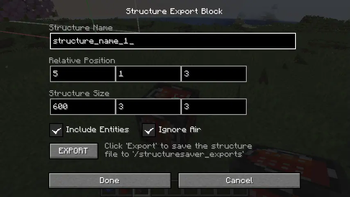
the Structure Export Block
- a simplified and unlimited version of the Vanilla Structure Block
- unlimited blocks (make sure you have enough RAM)
- when exporting a structure e.g. "name1" it creates a backup of the previous version "name1_DATE_AND_TIME" automatically
/give @p structuresaver:structure_export_blockitem
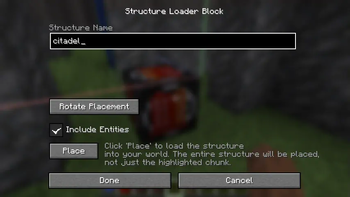
the Structure Loader
- simplified placing/loading of structures
- does not load structure details before placing, therefore, requires less RAM to place large structures
- rotate with 1-click
- unlimited blocks (make sure you have enough RAM)
/give @p structuresaver:structure_loader_blockitem
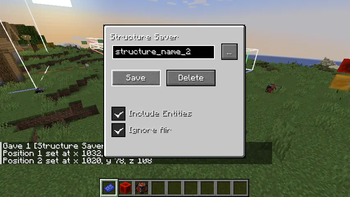
the Structure Saver Item
- quickly select two corners
- export the structure (unlimited blocks)
/give @p structuresaver:structure_saver
- (based on the Structure Saver Item from the skyblock map builder mod)
This mod was created to supply one of my upcoming mods with a more convenient toolset to create Minecraft structures with no block limit.
However, the mod is independent and can be used standalone as well.
Available Versions
How to Install Improved Structure Blocks on Your Server
Order Server
Order a Minecraft Java server with at least 4 GB RAM (6 GB recommended).
Set fabric Loader
In the panel under "Egg", select the fabric loader and matching Minecraft version (1.20.6).
Install Mod
Open the mod browser in the dashboard and search for "Improved Structure Blocks". Click "Install" – done! Alternatively, upload the .jar via SFTP to the /mods folder.
Compatibility
Mod Loaders
Minecraft Versions
1.20.6, 1.20.4
Server-side
✓ RequiredRecommended RAM
6 GB(min. 4 GB)Frequently Asked Questions
Improved Structure Blocks server crashes on startup – what to do?
Most common cause: wrong fabric version or insufficient RAM. Check the server log (latest.log) for "OutOfMemoryError" or "Mixin" errors. With Mado Hosting: ensure at least 4 GB RAM is allocated and the loader matches the mod version (1.20.6). You can switch loaders with one click in the panel.
Is Improved Structure Blocks compatible with fabric?
Improved Structure Blocks officially supports fabric for Minecraft 1.20.6, 1.20.4. The Mado dashboard automatically detects incompatible loader combinations.
Server lagging with Improved Structure Blocks – how to optimize performance?
Recommended RAM: 6 GB (per 5 players). Use /spark profiler to check if Improved Structure Blocks consumes the most tick time. Common fixes: reduce server view-distance to 8-10, install "performant" or "starlight" as supplementary mods on Forge. With Mado Hosting, your server runs on NVMe SSDs with dedicated CPU cores for minimal latency.
Similar Mods






Rent Modded Server
Install Improved Structure Blocks with just one click on your server.