
Structures Médiévales
A mod that adds medieval structures.
Screenshots
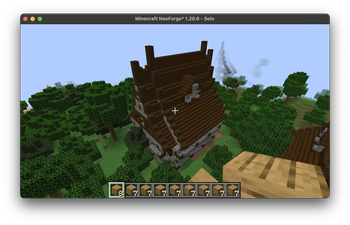
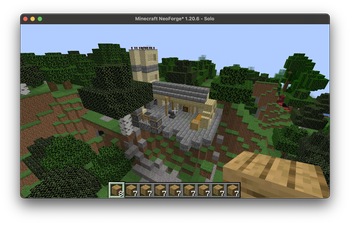

About this Mod
Medieval Structure Mod for Minecraft
This mod adds a series of automatically generated structures to your Minecraft world, making your gameplay more vibrant, immersive, and story-rich. Included in the mod:
🏠 Chic House – A refined and stylish home that may appear in villages or deep in nature.
🏚 Medieval Inn – A large, Middle Ages-inspired building, perfect for deepening your exploration.
🏘 Blue Emblemed House – A distinct aesthetic variation to diversify village architecture.
🏠 Blacksmith’s House – A fully equipped forge workshop, ideal for a medieval atmosphere.
🏨 Creper Inn – A mysterious little inn with hidden stories.
🏰 Nether Portal Structure – A pre-built portal to help you access the Nether quickly and immersively.
🏙 Tavernedumoyen... – Likely a medieval tavern, perfect for imagining quests, meetings, or secrets.
Each structure is generated automatically based on predefined conditions, which ensures that every world you create is unique, coherent, and full of surprises.
💡 Why should you download this mod?
Because it doesn’t just add buildings—it breathes life into your world. It encourages imagination, storytelling, and exploration. If you’ve ever dreamed of a Minecraft world filled with detailed villages and realistic medieval architecture, this mod is a solid starting point for immersive adventures.
🙌 Support and feedback
Creating this mod takes time, motivation, and support. If you’d like to help me continue developing and improving it:
☕ You can support me on Ko-fi (but only if you feel like it!):
https://ko-fi.com/moddon/goal%20?%20G=0
💬 You can share your comments or suggestions here:
or join the community on Discord (https://discord.com/invite/xBG9h93m)
💻 Curious about how the mod works? You can view or contribute to the source code on GitHub:
https://github.com/Arth3321/Code-source-mod-minecraft-Structure-M-di-vale
Available Versions
How to Install Structures Médiévales on Your Server
Order Server
Order a Minecraft Java server with at least 4 GB RAM (6 GB recommended).
Set neoforge Loader
In the panel under "Egg", select the neoforge loader and matching Minecraft version (1.21.8).
Install Mod
Open the mod browser in the dashboard and search for "Structures Médiévales". Click "Install" – done! Alternatively, upload the .jar via SFTP to the /mods folder.
Compatibility
Mod Loaders
Minecraft Versions
1.21.8, 1.21.7, 1.21.6 (+7 more)
Server-side
✓ RequiredRecommended RAM
6 GB(min. 4 GB)Frequently Asked Questions
Structures Médiévales server crashes on startup – what to do?
Most common cause: wrong neoforge version or insufficient RAM. Check the server log (latest.log) for "OutOfMemoryError" or "Mixin" errors. With Mado Hosting: ensure at least 4 GB RAM is allocated and the loader matches the mod version (1.21.8). You can switch loaders with one click in the panel.
Is Structures Médiévales compatible with neoforge?
Structures Médiévales officially supports neoforge for Minecraft 1.21.8, 1.21.7, 1.21.6. The Mado dashboard automatically detects incompatible loader combinations.
Server lagging with Structures Médiévales – how to optimize performance?
Recommended RAM: 6 GB (per 5 players). Use /spark profiler to check if Structures Médiévales consumes the most tick time. Common fixes: reduce server view-distance to 8-10, install "performant" or "starlight" as supplementary mods on Forge. With Mado Hosting, your server runs on NVMe SSDs with dedicated CPU cores for minimal latency.
Similar Mods




Rent Modded Server
Install Structures Médiévales with just one click on your server.