
Suffocation
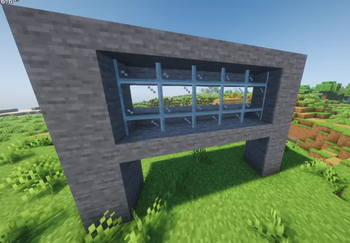
Suffocation is a revolutionary building and utility mod that allows you to compress, combine, and merge multiple blocks into a single block space.
Screenshots
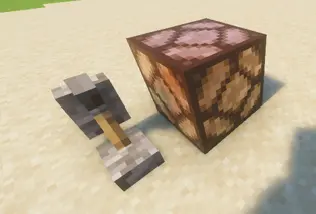
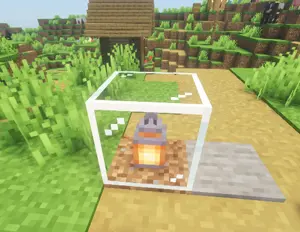
About this Mod
📦 Suffocation
The Ultimate Multi-Block Compression & Building Mod
Tested, Stable, and Ready for Minecraft Forge 1.20.1
🌟 What is Suffocation?
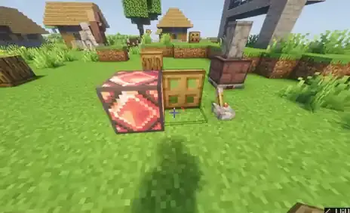
Have you ever wanted to put a Chest, a Furnace, and a Crafting Table into the exact same block space? Are your redstone contraptions taking up too much room? Enter Suffocation.
Suffocation is a revolutionary building and utility mod that allows you to compress, combine, and merge multiple blocks into a single block space. But this isn't just a visual trick—every single block inside the "Multi-Block" retains 100% of its functionality, interactions, block entities, and redstone capabilities!

Combine completely different blocks into one physical space!
🎮 How to Use (Controls)
Suffocation uses intuitive keybinds combined with standard mouse clicks to manage your dense block spaces. (Keys can be changed in the Minecraft Controls menu).
- 🟢 Add Block (
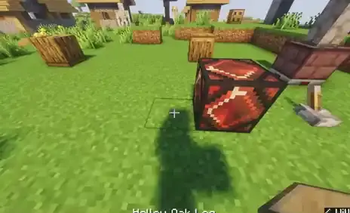
Left Shift+Right Click): Look at an existing block and Right-Click while holding Left Shift to shove your held block into the exact same space. - 🔴 Pop Block (
E+Left Click): Made a mistake? Hold E and Left Click the Multi-Block to safely pop out the last block you added. - 🔵 Extend Block (
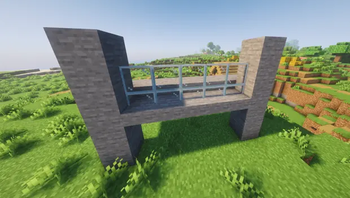
X+Right Click): Force-places your held block into the adjacent block space as a Multi-Block, allowing you to build compressed structures outward.
✨ Key Features
Perfect Visual Merging (No Z-Fighting!)
Most mods that combine blocks suffer from ugly flickering textures (Z-fighting). Suffocation uses an advanced Constructive Solid Geometry (CSG) rendering engine to dynamically split, slice, and stitch block meshes together in real-time. Overlapping flat surfaces are mathematically stripped away, giving you a flawless, merged visual experience.
Fully Functional Block Entities
You can interact with chests, furnaces, hoppers, and modded machines even when they are sharing a space! The mod uses an advanced proxy system, meaning you can open a chest's GUI while a furnace smelts items right inside it.
Redstone & Lighting Compatible
The Multi-Block dynamically calculates the strongest redstone signal, the highest light emission, and the highest light blocking from all of its internal blocks. Wires will connect, observers will observe, and glowstone will shine—all from within the same block.
Mod Compatibility
Because of how deeply Suffocation proxies interactions and block states, it boasts massive compatibility with most Modded blocks, machines, and cables!

Redstone components behaving perfectly in a shared space.
⚠️ Limitations & Known Quirks (Flaws)
Due to the incredibly complex nature of forcing Minecraft to do something it was never designed to do, there are a few intentional limitations designed to keep your world safe from corruption:
- Immovable by Pistons: Multi-Blocks cannot be pushed or pulled by pistons. This prevents horrific data corruption and duplication glitches.
- Highly Indestructible: To protect your stored items and machines, Multi-Blocks have Bedrock-level resistance to Explosions (TNT/Creepers) and Wither attacks. They also cannot burn. (You can still mine them normally to get all your blocks back!).
- Slime/Honey Blocks: Sticky blocks placed inside a Multi-Block will not pull adjacent blocks if the Multi-Block is somehow moved by external mods.
- Extremely Complex Renderers: While standard blocks and vanilla Block Entities (like chests/bells) render perfectly, highly complex animated machines from other mods might have slight visual overlapping.
- Complex Blocks: There is tiny 0.001% chance of crash, if some random block does some random logic especially modded blocks, if you came across such issues report them to me, and also don't worry it won't corrupt your world, in worst case cenario remove the mod and rejoin to break the ghost block, but this should never happen.
🛠️ Compatibility & Installation
- Minecraft Version: 1.20.1
- Mod Loader: Forge
- Multiplayer: Fully supported! Both Client and Server need the mod installed.
Developer Note: This mod has been rigorously tested for 4 months to ensure stability. However, as it heavily manipulates core Minecraft rendering and block entity systems, it is always recommended to back up your world before adding it to a massive existing modpack, and it doesn't impact performance or memory too much, it bakes the model as if its a new block. And yes you can put it in modpacks.
Ready to break the laws of physics? Download Suffocation today!
Available Versions
How to Install Suffocation on Your Server
Order Server
Order a Minecraft Java server with at least 3 GB RAM (4 GB recommended).
Set forge Loader
In the panel under "Egg", select the forge loader and matching Minecraft version (1.20.1).
Install Mod
Open the mod browser in the dashboard and search for "Suffocation". Click "Install" – done! Alternatively, upload the .jar via SFTP to the /mods folder.
Compatibility
Mod Loaders
Minecraft Versions
1.20.1
Server-side
✓ RequiredRecommended RAM
4 GB(min. 3 GB)Frequently Asked Questions
Suffocation server crashes on startup – what to do?
Most common cause: wrong forge version or insufficient RAM. Check the server log (latest.log) for "OutOfMemoryError" or "Mixin" errors. With Mado Hosting: ensure at least 3 GB RAM is allocated and the loader matches the mod version (1.20.1). You can switch loaders with one click in the panel.
Is Suffocation compatible with forge?
Suffocation officially supports forge for Minecraft 1.20.1. The Mado dashboard automatically detects incompatible loader combinations.
Server lagging with Suffocation – how to optimize performance?
Recommended RAM: 4 GB (per 8 players). Use /spark profiler to check if Suffocation consumes the most tick time. Common fixes: reduce server view-distance to 8-10, install "performant" or "starlight" as supplementary mods on Forge. With Mado Hosting, your server runs on NVMe SSDs with dedicated CPU cores for minimal latency.
Similar Mods





Rent Modded Server
Install Suffocation with just one click on your server.