
Sun Compass
A vanilla-friendly survival tool that uses the sun's position and time to find North
Screenshots

About this Mod
Sun Compass

A vanilla-friendly survival tool for finding your way.
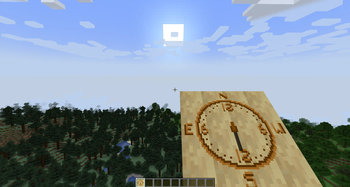
The Sun Compass is a utility item that uses the position of the sun to cast a shadow on the board, helping you navigate during the day without relying on "magic" coordinate systems or debug screens.

🧭 Manual & Usage Guide
The Sun Compass is not a magic item. Unlike a standard compass that points to World Spawn, the Sun Compass works similarly to a real-world sun dial. It is a navigational tool that requires you to understand the position of the sun and the time of day.
The Core Concept
The compass displays a shadow cast by the central stick. This shadow is fixed to the world's sun position. As you turn or as time passes, the shadow moves around the board. To find North, you must align the shadow correctly based on the current time.
How to Find North
1. The Sunrise Baseline (6:00 AM / Tick 0)
Vanilla Minecraft days start at 6:00 AM. At this specific time:
- The Sun is rising in the East.
- Instruction: Rotate yourself until the shadow points to the East marker on the compass board.
- Result: You are now facing North.
2. Compensating for Time (The Clockwise Shift)
As the day progresses, the sun moves across the sky. To keep finding North, you must manually compensate for the time passed since 6:00 AM.
- The Rule: For every in-game hour that passes, you must shift the compass by 1 hour clockwise.
- Example:
- Time: 8:00 AM (2 hours after sunrise).
- Action: Align the shadow to East, then rotate yourself (and the compass) roughly 30 degrees clockwise (2 "hours" on a clock face) to find True North.
Summary Table
| In-Game Time | Shadow Alignment for North |
|---|---|
| 6:00 AM (Sunrise) | Align shadow to left 6 hour mark or East (E) |
| 12:00 PM (Noon) | 6 hours has passed, so align shadow to the upper 12 hour mark, or North (N) |
| 6:00 PM (Sunset) | 12 hours has passed, so align shadow to right 6 hour mark or West (W) |
Note: This tool requires practice. Direction accuracy is entirely based on time estimation. To find other directions than north, simply rotate by some degrees after finding north. For example, west would be 90 degrees, or 6 hours right, from north.
📦 Obtaining
There is 4 ways to craft this item in survival
To craft the Sun Compass, align any of these 4 different layouts from bottom to top:
- Any plank + torch
- Any plank + coal + stick
- Any plank + charcoal + stick
- Any plank + ink sac + stick
Why is East and West swapped?
This serves the function of time shifting easier than if it was the other way around. For example, at noon (tick time 6000, or 12 PM), to find North you simply point to N (or the upper 12) then to find west you would also simply move the shadow to point W (or the right 6).
This way, shifting clockwise perserves directionality. Having it the "correct" way around would introduce extra mental calculations for no reason.
⚠️ Compatibility & Status
- Version: 0.2.0 (Pre-release)
- Loader: NeoForge (1.21.1)
- Possible issues: potentially might fail in situations where there is no sun or otherwise time logic has been modified.
- Mod Compatibility: There has no tests with other mods yet. Please suggest mods to pair this with and I will do my best to add compatibility (currently looking to add compatibility with TerraFirmaCraft).
🤝 Acknowledgements
Special thanks to David Canterbury for the original concept and for naming the "Sun Compass.".
- This is the video by him that specifically inspired this project: https://www.youtube.com/watch?v=7EfDYFDCl14&t=131s
Final note
I'm new to modding, github, and while I'm familiar with programming, this is an entirely new level for me. But I'm looking to improve and hopefully keep adding new mods in the future!
Built with NeoForge for Minecraft 1.21.
Available Versions
How to Install Sun Compass on Your Server
Order Server
Order a Minecraft Java server with at least 3 GB RAM (4 GB recommended).
Set neoforge Loader
In the panel under "Egg", select the neoforge loader and matching Minecraft version (1.21.1).
Install Mod
Open the mod browser in the dashboard and search for "Sun Compass". Click "Install" – done! Alternatively, upload the .jar via SFTP to the /mods folder.
Compatibility
Mod Loaders
Minecraft Versions
1.21.1
Server-side
✓ RequiredRecommended RAM
4 GB(min. 3 GB)Frequently Asked Questions
Sun Compass server crashes on startup – what to do?
Most common cause: wrong neoforge version or insufficient RAM. Check the server log (latest.log) for "OutOfMemoryError" or "Mixin" errors. With Mado Hosting: ensure at least 3 GB RAM is allocated and the loader matches the mod version (1.21.1). You can switch loaders with one click in the panel.
Is Sun Compass compatible with neoforge?
Sun Compass officially supports neoforge for Minecraft 1.21.1. The Mado dashboard automatically detects incompatible loader combinations.
Server lagging with Sun Compass – how to optimize performance?
Recommended RAM: 4 GB (per 8 players). Use /spark profiler to check if Sun Compass consumes the most tick time. Common fixes: reduce server view-distance to 8-10, install "performant" or "starlight" as supplementary mods on Forge. With Mado Hosting, your server runs on NVMe SSDs with dedicated CPU cores for minimal latency.
Similar Mods




Rent Modded Server
Install Sun Compass with just one click on your server.