
Super Factory Manager
A programming language for moving stuff around in Minecraft
Screenshots
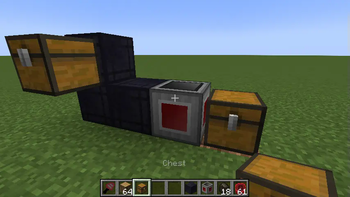
About this Mod
Super Factory Manager 4
SuperFactoryManager 4 brings a whole new way to use SFM. Instead of using flowchart GUIs, a new scripting language has been added.
Getting Started
You will need:
1x Factory Manager
1x Program Disk
1x Label Gun
(optional) Inventory Cables
Place your Factory Manager in the world, and connect it to your inventories using Inventory Cables
Place the Program Disk inside the Manager's GUI
Paste your script into the manager GUI using the buttons or by using Ctrl+V
The manager should tell you that the script was loaded
Hover over the disk to see the warnings and errors for your program
Shift-right-click the manager with the label gun in your hand to load the labels from your program
You can now use the scroll wheel while holding shift to change the active label.
Right click blocks in the world to apply or remove the label.
There is also a right-click menu for entering a custom label that may not be in your program yet.
Once you've assigned the labels, right click the manager while NOT holding shift to save the labels to the Program Disk
Your program should now be running without any issues
Original textures by VSWE
Available Versions
How to Install Super Factory Manager on Your Server
Order Server
Order a Minecraft Java server with at least 3 GB RAM (4 GB recommended).
Set forge Loader
In the panel under "Egg", select the forge loader and matching Minecraft version (26.1.2).
Install Mod
Open the mod browser in the dashboard and search for "Super Factory Manager". Click "Install" – done! Alternatively, upload the .jar via SFTP to the /mods folder.
Compatibility
Mod Loaders
Minecraft Versions
26.1.2, 1.21.1, 1.21 (+7 more)
Server-side
✓ RequiredRecommended RAM
4 GB(min. 3 GB)Frequently Asked Questions
Super Factory Manager server crashes on startup – what to do?
Most common cause: wrong forge version or insufficient RAM. Check the server log (latest.log) for "OutOfMemoryError" or "Mixin" errors. With Mado Hosting: ensure at least 3 GB RAM is allocated and the loader matches the mod version (26.1.2). You can switch loaders with one click in the panel.
Is Super Factory Manager compatible with forge and neoforge?
Super Factory Manager officially supports forge, neoforge for Minecraft 26.1.2, 1.21.1, 1.21. The Mado dashboard automatically detects incompatible loader combinations.
Server lagging with Super Factory Manager – how to optimize performance?
Recommended RAM: 4 GB (per 8 players). Use /spark profiler to check if Super Factory Manager consumes the most tick time. Common fixes: reduce server view-distance to 8-10, install "performant" or "starlight" as supplementary mods on Forge. With Mado Hosting, your server runs on NVMe SSDs with dedicated CPU cores for minimal latency.
Similar Mods


Rent Modded Server
Install Super Factory Manager with just one click on your server.