
Super Pickaxe Mod
Adds a powerful super pickaxe with enhanced mining abilities.
Screenshots
About this Mod
Super Pickaxe Mod - Build & Installation Instructions

What This Mod Does
This mod adds a Super Pickaxe to Minecraft that:
- Mines in a 3x3x3 area instead of just one block
- Has the same durability and mining level as a diamond pickaxe
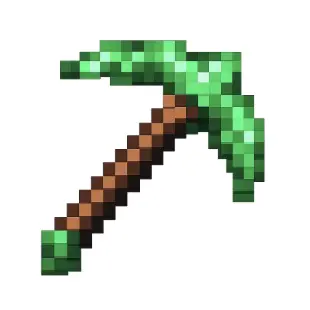
- Features a bright green texture
- Has a custom crafting recipe (1 cobblestone, 1 stone, 1 smooth stone on top, 2 sticks below)
- Gives you torches as you mine (1 torch per 18 blocks mined)
Download
Prerequisites
You need Java 17 installed on your Mac. Check with:
java -version
If you don't have Java 17, download it from: https://adoptium.net/
How to Compile the Mod
Open Terminal and navigate to the mod directory:
cd /Users/<user>/Desktop/Projects/minecraft/super-pickaxeBuild the mod using Gradle:
./gradlew buildThis will take several minutes the first time as it downloads dependencies.
Once complete, your mod JAR file will be located at:
build/libs/superpickaxe-1.0.jar
How to Install the Mod
Step 1: Install Minecraft Forge
- Go to https://files.minecraftforge.net/
- Download Forge 1.20.1 (version 47.2.0 or higher)
- Run the installer and select "Install client"
- Launch Minecraft and select the "forge" profile
Step 2: Install Your Mod
Locate your Minecraft mods folder:
- On Mac:
~/Library/Application Support/minecraft/mods
- On Mac:
If the
modsfolder doesn't exist, create it:mkdir -p ~/Library/Application\ Support/minecraft/modsCopy your compiled mod to the mods folder:
cp build/libs/superpickaxe-1.0.jar ~/Library/Application\ Support/minecraft/mods/
Step 3: Enable and Use the Mod
- Launch Minecraft
- Select the "forge" profile from the launcher
- Click "Play"
- Once in-game, the mod is automatically enabled!
How to Craft the Super Pickaxe
Open a crafting table and arrange:
[Cobblestone] [Stone] [Smooth Stone]
              [Stick]
              [Stick]
This requires cobblestone, stone, and smooth stone, making it progressively more expensive but worth the 3x3x3 mining power!
Using the Super Pickaxe
- Equip the bright green Super Pickaxe
- Mine any block that a diamond pickaxe can mine
- It will automatically mine a 3x3x3 area (27 blocks total) around the block you mine
- Every 18 blocks you mine, you'll receive a torch automatically
Troubleshooting
Build fails?
- Ensure Java 17 is installed
- Try:
./gradlew clean build
Mod doesn't appear in game?
- Check you're using Forge 1.20.1
- Verify the JAR is in the correct mods folder
- Check logs at:
~/Library/Application Support/minecraft/logs/latest.log
Super Pickaxe has missing texture?
- The texture should be bright green
- If it appears purple/black, rebuild the mod:
./gradlew clean build
Development
To modify the mod:
- Edit the source files in
src/main/java/com/example/superpickaxe/ - Rebuild:
./gradlew build - Copy the new JAR to the mods folder
- Restart Minecraft
Key files:
SuperPickaxeItem.java- The pickaxe logic and 3x3x3 miningsrc/main/resources/data/superpickaxe/recipes/- Crafting recipesrc/main/resources/assets/superpickaxe/textures/item/- Bright green texture
Enjoy your new 3x3x3 mining pickaxe! 🟢⛏️
Available Versions
How to Install Super Pickaxe Mod on Your Server
Order Server
Order a Minecraft Java server with at least 3 GB RAM (4 GB recommended).
Set forge Loader
In the panel under "Egg", select the forge loader and matching Minecraft version (1.20.6).
Install Mod
Open the mod browser in the dashboard and search for "Super Pickaxe Mod". Click "Install" – done! Alternatively, upload the .jar via SFTP to the /mods folder.
Compatibility
Mod Loaders
Minecraft Versions
1.20.6, 1.20.5, 1.20.4 (+3 more)
Server-side
✓ RequiredRecommended RAM
4 GB(min. 3 GB)Frequently Asked Questions
Super Pickaxe Mod server crashes on startup – what to do?
Most common cause: wrong forge version or insufficient RAM. Check the server log (latest.log) for "OutOfMemoryError" or "Mixin" errors. With Mado Hosting: ensure at least 3 GB RAM is allocated and the loader matches the mod version (1.20.6). You can switch loaders with one click in the panel.
Is Super Pickaxe Mod compatible with forge?
Super Pickaxe Mod officially supports forge for Minecraft 1.20.6, 1.20.5, 1.20.4. The Mado dashboard automatically detects incompatible loader combinations.
Server lagging with Super Pickaxe Mod – how to optimize performance?
Recommended RAM: 4 GB (per 8 players). Use /spark profiler to check if Super Pickaxe Mod consumes the most tick time. Common fixes: reduce server view-distance to 8-10, install "performant" or "starlight" as supplementary mods on Forge. With Mado Hosting, your server runs on NVMe SSDs with dedicated CPU cores for minimal latency.
Similar Mods



![[TaCZ] Timeless and Classics Zero](https://cdn.modrinth.com/data/SzzJttH8/fd27766d2bb8390d284696b1dbd358f87e081439_96.webp)


Rent Modded Server
Install Super Pickaxe Mod with just one click on your server.