
Survival Challenges
一个生存挑战数据包 A survival challenges datapack
Screenshots
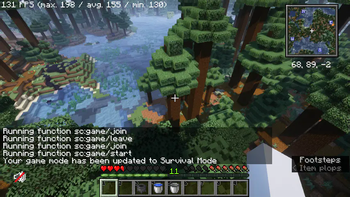
About this Mod
一个支持多人游玩的生存挑战数据包
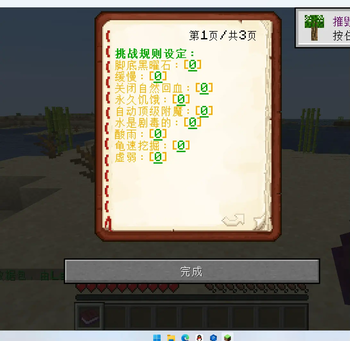
玩家选择加入游玩队伍或者留在旁观队伍,在规则书第三页点击数字可开始游戏
(每一项的配置都由点击数字更改)
若想要所有人都可以修改生存挑战设定,需要全员op或者使用诸如luckperms等模组开放function指令的使用权限
A survival challenges datapack that supports multiplayers
Each player can choose to join or leave the ingame party, press the number in page 3 of the rule book to start the game
(To switch between enabled and disabled for the rules, you should press the number behind the rules)
If you want to make everybody able to change the rules, you should op everybody or give everybody the permission of using /function by luckperms etc.
Available Versions
How to Install Survival Challenges on Your Server
Order Server
Order a Minecraft Java server with at least 3 GB RAM (4 GB recommended).
Set datapack Loader
In the panel under "Egg", select the datapack loader and matching Minecraft version (1.20.4).
Install Mod
Open the mod browser in the dashboard and search for "Survival Challenges". Click "Install" – done! Alternatively, upload the .jar via SFTP to the /mods folder.
Compatibility
Mod Loaders
Minecraft Versions
1.20.4
Server-side
✓ RequiredRecommended RAM
4 GB(min. 3 GB)Frequently Asked Questions
Survival Challenges server crashes on startup – what to do?
Most common cause: wrong datapack version or insufficient RAM. Check the server log (latest.log) for "OutOfMemoryError" or "Mixin" errors. With Mado Hosting: ensure at least 3 GB RAM is allocated and the loader matches the mod version (1.20.4). You can switch loaders with one click in the panel.
Is Survival Challenges compatible with datapack and fabric and forge and neoforge and quilt?
Survival Challenges officially supports datapack, fabric, forge, neoforge, quilt for Minecraft 1.20.4. Note: Forge and Fabric mods are NOT cross-compatible – pick one loader and stick with it. The Mado dashboard automatically detects incompatible loader combinations.
Server lagging with Survival Challenges – how to optimize performance?
Recommended RAM: 4 GB (per 8 players). Use /spark profiler to check if Survival Challenges consumes the most tick time. Common fixes: reduce server view-distance to 8-10, install "performant" or "starlight" as supplementary mods on Forge. With Mado Hosting, your server runs on NVMe SSDs with dedicated CPU cores for minimal latency.
Similar Mods




Rent Modded Server
Install Survival Challenges with just one click on your server.