
SurvivalPlus
A quality-of-life client-side Fabric mod designed to enhance your vanilla Minecraft survival experience. It brings a collection of highly useful utilities and a fully-featured, informative HUD directly into your game.
Screenshots
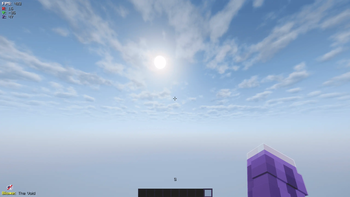
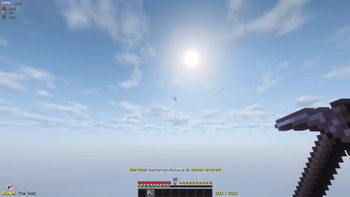
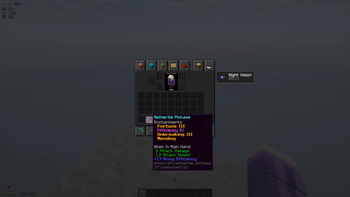
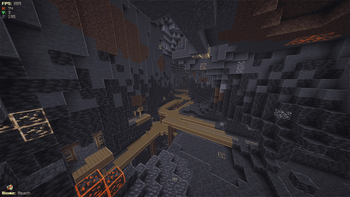
About this Mod
🌟 SurvivalPlus
SurvivalPlus is the ultimate client-side Quality-of-Life mod for Fabric, designed to seamlessly enhance your vanilla Minecraft experience. Instead of installing half a dozen different mods for basic utilities, SurvivalPlus bundles the most essential survival tools into one lightweight, highly polished package.
Whether you are a hardcore survival player, a builder, or an explorer, this mod provides you with the information and visual tweaks you need—without cluttering your screen or feeling like a cheat.
✨ Main Features
📊 Clean & Informative HUD
Tired of opening the massive F3 debug screen just to check your coordinates or biome? SurvivalPlus introduces a clean, modular, and non-intrusive Heads-Up Display (HUD) that gives you exactly what you need at a glance.
Coordinates & Compass: Always know exactly where you are and which direction you are facing.
Biome Detection: Instantly see the biome you are currently standing in.
Target Block Indicator: Look at any block in the world to immediately see its name—perfect for identifying unfamiliar blocks while exploring or building.
FPS Counter: Keep an eye on your game's performance without the F3 menu.
🛡️ Durability Protection & Warnings
Never accidentally break your favorite enchanted Pickaxe or Elytra again! The Durability Warning System monitors your equipped items and armor. When a tool's durability drops to a critical level, the mod will display a prominent on-screen warning, giving you the chance to swap it out or repair it before it shatters forever.
💡 Fullbright Toggle
Exploring deep caves or building at night can be frustrating when you run out of torches. With the built-in Fullbright module, you can light up your world with a single key press. It smoothly maximizes your gamma, allowing you to see perfectly in the dark without needing night vision potions.
🔍 Zoom Functionality
Need to scout a distant Pillager Outpost or get a closer look at a detail on your build? SurvivalPlus includes a smooth, built-in Zoom feature. No need for external performance mods just to get that classic zoom-in ability!
🔮 Enchantment Utilities
SurvivalPlus also features an Enchantment Manager that improves how you interact with enchanted gear, making it easier to read and manage your valuable items and their magical properties.
⚙️ Client-Side Only
Because SurvivalPlus is completely client-side, you can install it on your local machine and use it on any multiplayer server (including vanilla servers, Realms, or large public networks) without the server needing to have the mod installed!
⌨️ Easy to Use & Configurable
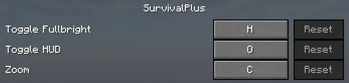
The mod features dedicated keybindings (found in their own SurvivalPlus category in the controls menu), allowing you to toggle modules like Fullbright and Zoom on the fly.
(Optional: If you have a config menu integrated, you can add here that players can toggle specific HUD elements on and off through the mod's configuration settings.)
Available Versions
How to Install SurvivalPlus on Your Server
Order Server
Order a Minecraft Java server with at least 3 GB RAM (4 GB recommended).
Set fabric Loader
In the panel under "Egg", select the fabric loader and matching Minecraft version (1.21.11).
Install Mod
Open the mod browser in the dashboard and search for "SurvivalPlus". Click "Install" – done! Alternatively, upload the .jar via SFTP to the /mods folder.
Compatibility
Mod Loaders
Minecraft Versions
1.21.11, 1.21.10, 1.21.9 (+9 more)
Server-side
✗ UnsupportedRecommended RAM
4 GB(min. 3 GB)Frequently Asked Questions
SurvivalPlus server crashes on startup – what to do?
Most common cause: wrong fabric version or insufficient RAM. Check the server log (latest.log) for "OutOfMemoryError" or "Mixin" errors. With Mado Hosting: ensure at least 3 GB RAM is allocated and the loader matches the mod version (1.21.11). You can switch loaders with one click in the panel.
Is SurvivalPlus compatible with fabric?
SurvivalPlus officially supports fabric for Minecraft 1.21.11, 1.21.10, 1.21.9. The Mado dashboard automatically detects incompatible loader combinations.
Server lagging with SurvivalPlus – how to optimize performance?
Recommended RAM: 4 GB (per 8 players). Use /spark profiler to check if SurvivalPlus consumes the most tick time. Common fixes: reduce server view-distance to 8-10, install "performant" or "starlight" as supplementary mods on Forge. With Mado Hosting, your server runs on NVMe SSDs with dedicated CPU cores for minimal latency.
Similar Mods




Rent Modded Server
Install SurvivalPlus with just one click on your server.