Sushi's Create Portal Integration
A datapack intended to integrate some popular dimension mods that didn't support Create trains
Screenshots
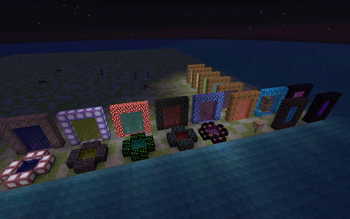
About this Mod
I was tired of having so many dimension mods, where the portals didn't work with trains from Create. I couldn't figure out how to make them compatible, so I did the next best thing and recreated all the portals with Datapack Portals (custom portal API) to use the Train integration addon.
All portals require a bucket of Dimensional Tears (aka Portal Fluid) from Spelunkery to activate.
Current supported dimensions:
- The Bumblezone
- Exotelcraft
- Liroth Revamped (Curseforge Link: Forge,Fabric)
- The Nether (a new alternate portal that can be lit with a bucket of dimensional tears like the others, for consistency). Requires Rechiseled.
- I have designed a train-compatible end portal as well, but portals to the End are currently buggy, so it is disabled.
Please note that this is not a replacement for the existing portals! All portal frames are made of blocks only found within their dimension, so you will still need to go exploring and find them before you can send in trains.
The only exception is the Nether, because so many Nether blocks can be automated that the restriction would be pointless.
It has come to my attention that the Bumblezone train portal uses blocks that are not obtainable in survival. I'll be fixing this with a new recipe in a future update
Available Versions
How to Install Sushi's Create Portal Integration on Your Server
Order Server
Order a Minecraft Java server with at least 4 GB RAM (6 GB recommended).
Set datapack Loader
In the panel under "Egg", select the datapack loader and matching Minecraft version (1.20.1).
Install Mod
Open the mod browser in the dashboard and search for "Sushi's Create Portal Integration". Click "Install" – done! Alternatively, upload the .jar via SFTP to the /mods folder.
Compatibility
Mod Loaders
Minecraft Versions
1.20.1
Server-side
✓ RequiredRecommended RAM
6 GB(min. 4 GB)Frequently Asked Questions
Sushi's Create Portal Integration server crashes on startup – what to do?
Most common cause: wrong datapack version or insufficient RAM. Check the server log (latest.log) for "OutOfMemoryError" or "Mixin" errors. With Mado Hosting: ensure at least 4 GB RAM is allocated and the loader matches the mod version (1.20.1). You can switch loaders with one click in the panel.
Is Sushi's Create Portal Integration compatible with datapack and fabric and forge and quilt?
Sushi's Create Portal Integration officially supports datapack, fabric, forge, quilt for Minecraft 1.20.1. Note: Forge and Fabric mods are NOT cross-compatible – pick one loader and stick with it. The Mado dashboard automatically detects incompatible loader combinations.
Server lagging with Sushi's Create Portal Integration – how to optimize performance?
Recommended RAM: 6 GB (per 5 players). Use /spark profiler to check if Sushi's Create Portal Integration consumes the most tick time. Common fixes: reduce server view-distance to 8-10, install "performant" or "starlight" as supplementary mods on Forge. With Mado Hosting, your server runs on NVMe SSDs with dedicated CPU cores for minimal latency.
Rent Modded Server
Install Sushi's Create Portal Integration with just one click on your server.