
SVVideo
SVVideo is a powerful Fabric mod for Minecraft 1.21.1 that lets you play videos, music, GIFs, and media directly inside the game. Perfect for events, cinematics, and immersive servers.
Screenshots
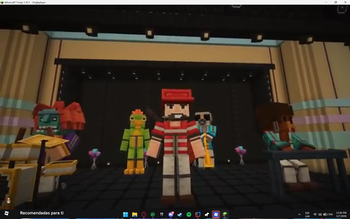
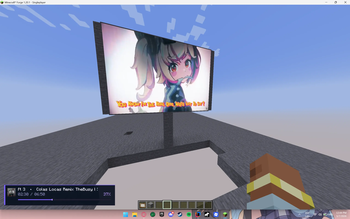
About this Mod
🎬 SVVideo
**SVVideo is a powerful multimedia mod for Minecraft Fabric 1.21.1 that allows server operators and map creators to play videos, music, GIFs, and local media directly inside the game.
Designed for performance and flexibility, SVVideo lets you create immersive cinematic experiences, in-game events, and dynamic environments with full control over playback and rendering.**
🔥 Features
🎥 Fullscreen video and music playback
🖥️ Block-based video screens placed in the world
📏 Customizable display size (width & height)
📁 Local media playback from /svvideo folder
🌐 Support for direct media URLs
🎵 Music HUD (title, duration, progress, thumbnail/logo)
⚙️ Per-display render quality control
🔊 Distance-based audio system
🛠️ Operator commands for full control
**🎮 Use Cases
Perfect for:
Events
Roleplay servers
Minigames
Lobbies
Cinematic maps
In-game presentations**
🧾 Commands
/svvideo stop <targets>

/svvideo volume <targets> <0-100>

/svvideo video <targets> <0-100> <url>

/svvideo music <targets> <0-100> <url>

/svvideo file <targets> <0-100> <file>

/svvideo gif url <targets> <0-100> <position> <url>

/svvideo gif file <targets> <0-100> <position> <file>

/svvideo playblock <x> <y> <z> <targets> <0-100> <file>

/svvideo playblock <x> <y> <z> <targets> <0-100> <file> <width> <height>
📍 GIF Positions
fullscreen
center
top-center
actionbar
bottom-left
bottom-right
top-right
top-left
💡 Examples
/svvideo stop @a
/svvideo volume @a 50

/svvideo video @a 100 https://example.com/video.mp4
/svvideo music @a 100 https://example.com/music.mp3

/svvideo file @a 100 intro.mp4

/svvideo gif url @a 100 center https://example.com/anim.gif
/svvideo gif file @a 100 top-right anim.gif

/svvideo playblock 19 -58 7 @a 100 3.mp4
/svvideo playblock 19 -58 7 @a 100 3.mp4 8 8
🔒 Permissions
All commands require Operator (permission level 2).
🔧 Dependencies
Fabric API
WATERMEDIA: Multimedia Binaries (Required)
WATERMeDIA: Multimedia API (Version 3.0.0.15 required)
WATERMeDIA: Youtube Extension (Optional, required to play YouTube videos — client-side only)
Available Versions
How to Install SVVideo on Your Server
Order Server
Order a Minecraft Java server with at least 3 GB RAM (4 GB recommended).
Set fabric Loader
In the panel under "Egg", select the fabric loader and matching Minecraft version (1.21.1).
Install Mod
Open the mod browser in the dashboard and search for "SVVideo". Click "Install" – done! Alternatively, upload the .jar via SFTP to the /mods folder.
Compatibility
Mod Loaders
Minecraft Versions
1.21.1, 1.20.1
Server-side
✓ RequiredRecommended RAM
4 GB(min. 3 GB)Frequently Asked Questions
SVVideo server crashes on startup – what to do?
Most common cause: wrong fabric version or insufficient RAM. Check the server log (latest.log) for "OutOfMemoryError" or "Mixin" errors. With Mado Hosting: ensure at least 3 GB RAM is allocated and the loader matches the mod version (1.21.1). You can switch loaders with one click in the panel.
Is SVVideo compatible with fabric and forge?
SVVideo officially supports fabric, forge for Minecraft 1.21.1, 1.20.1. Note: Forge and Fabric mods are NOT cross-compatible – pick one loader and stick with it. The Mado dashboard automatically detects incompatible loader combinations.
Server lagging with SVVideo – how to optimize performance?
Recommended RAM: 4 GB (per 8 players). Use /spark profiler to check if SVVideo consumes the most tick time. Common fixes: reduce server view-distance to 8-10, install "performant" or "starlight" as supplementary mods on Forge. With Mado Hosting, your server runs on NVMe SSDs with dedicated CPU cores for minimal latency.
Similar Mods



Rent Modded Server
Install SVVideo with just one click on your server.