
Switcheroo
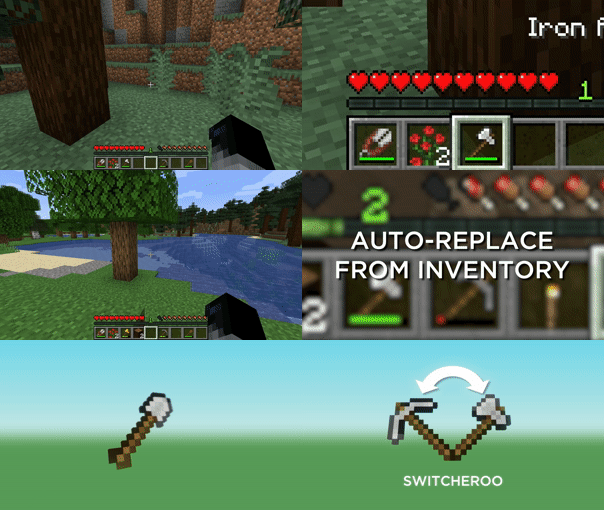
Switch your currently held item for an effective item when clicking on a block.
Screenshots

About this Mod
Switcheroo






Switch your currently held item for an effective item when clicking on a block.
Usage
- Click on a block or entity to switch to the appropriate item
- Press Sneak to prevent the switch from happening
- Press Sprint to use the most effective item
Switcheroo will use the least effective tool that's still effective to break blocks and the most damaging item per seconds to attack entities.
Features
- Switcheroo when clicking blocks
- Switcheroo when clicking mobs
- Uses max damage per seconds for mobs
- Uses max attack damage for players
- Blacklist
- Accessible via
/switcheroo blacklist blocksand/switcheroo blacklist mobs - Compatible with ModMenu
- Accessible via
- Doesn't consider items when they have 5 durability or less
- Prefer Silk Touch on certain blocks
/switcheroo prefer silk_touch/switcheroo prefer silk_touch add dirt_path/switcheroo prefer silk_touch remove dirt_path
- The Silk Touch selection is really shaky, though. Use at your own risk.
- Enable or disable it with
/switcheroo enableand/switcheroo disable
Installation



Downloads are available in Releases. You can also test development builds by downloading them form the Actions.
Available Versions
How to Install Switcheroo on Your Server
Order Server
Order a Minecraft Java server with at least 3 GB RAM (4 GB recommended).
Set fabric Loader
In the panel under "Egg", select the fabric loader and matching Minecraft version (1.21.7).
Install Mod
Open the mod browser in the dashboard and search for "Switcheroo". Click "Install" – done! Alternatively, upload the .jar via SFTP to the /mods folder.
Compatibility
Mod Loaders
Minecraft Versions
1.21.7, 1.21.6, 1.21.5 (+16 more)
Server-side
✗ UnsupportedRecommended RAM
4 GB(min. 3 GB)Frequently Asked Questions
Switcheroo server crashes on startup – what to do?
Most common cause: wrong fabric version or insufficient RAM. Check the server log (latest.log) for "OutOfMemoryError" or "Mixin" errors. With Mado Hosting: ensure at least 3 GB RAM is allocated and the loader matches the mod version (1.21.7). You can switch loaders with one click in the panel.
Is Switcheroo compatible with fabric?
Switcheroo officially supports fabric for Minecraft 1.21.7, 1.21.6, 1.21.5. The Mado dashboard automatically detects incompatible loader combinations.
Server lagging with Switcheroo – how to optimize performance?
Recommended RAM: 4 GB (per 8 players). Use /spark profiler to check if Switcheroo consumes the most tick time. Common fixes: reduce server view-distance to 8-10, install "performant" or "starlight" as supplementary mods on Forge. With Mado Hosting, your server runs on NVMe SSDs with dedicated CPU cores for minimal latency.
Similar Mods




![[TaCZ] Timeless and Classics Zero](https://cdn.modrinth.com/data/SzzJttH8/fd27766d2bb8390d284696b1dbd358f87e081439_96.webp)

Rent Modded Server
Install Switcheroo with just one click on your server.