
Sword Storm
The Sword Storm Enchantment for Minecraft 1.21 Fabric Mod adds wind-element abilities to all types of swords (Diamond Sword, Netherite Sword, etc.) with levels ranging from I to V. In Survival Mode, it can be obtained via Enchanting Table (consuming 50% mo
Screenshots
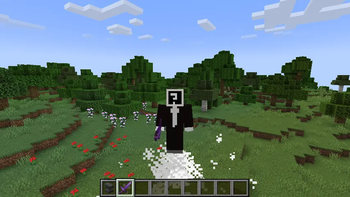
About this Mod
Sword Storm Enchantment (1.21 Fabric Mod)
When the power of steel merges with that of wind, it gives birth to this experience-redefining sword enchantment – Sword Storm. Tailored for all types of swords (Diamond Sword, Netherite Sword, etc.), it unlocks five core wind-manipulating abilities as you progress from Level I to V, turning every sword swing into a wild rhapsody of wind.
**

Basic Info
Applicable Weapons: All types of swords
Level Range: Level I to V; the higher the level, the more violent the wind power
Acquisition Methods:
Survival Mode: Obtain via Enchanting Table (costs 50% more XP than "Sharpness" of the same level) or villager trading.
Creative Mode: Directly take from the "Enchanted Books" category, or acquire via commands.
Five Wind Abilities
- Wind Projectile Barrage
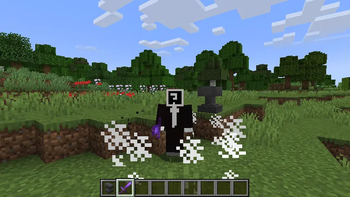
Lightly right-click with the enchanted sword equipped, and a translucent white wind projectile will howl forward (speed: 0.8 blocks per tick). It deals 3 base damage, increasing with each level (up to 5 damage at Level V), and inflicts an additional 20% damage to undead mobs. The projectile can also pierce 1 entity.
As the level rises, the firing interval shortens significantly – from 1.2 seconds (24 ticks) at Level I to 0.1 seconds (2 ticks) at Level V. This near-machine-gun-like wind pressure suppression leaves enemies nowhere to hide.
**

- Area Charged Burst
Hold the right mouse button to enter the charging state: the player is forced to crouch (unable to move or turn), and circular wind particles spawn around the sword (particle density and rotation speed increase with charging, featuring 3 levels of visual effects). A gradually intensifying wind sound plays every 0.3 seconds.
The charging duration extends with the level (from 1.5 seconds at Level I to 3.5 seconds at Level V). You can release the burst early by letting go of the right-click, or it will trigger automatically when fully charged.
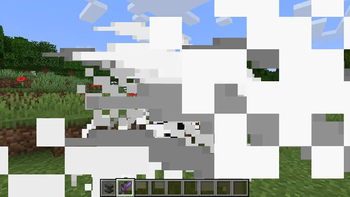
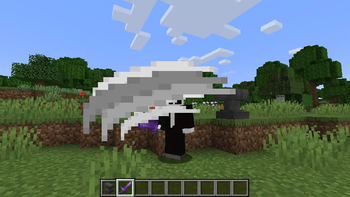
Upon burst, the area of effect, damage, and knockback surge with the level and charge phase: At Level V + Full Charge (Level 3), it covers a 4-block radius, deals 24 damage, and knocks enemies back 3 blocks. Non-solid blocks (leaves, glass, etc.) will be blown away by the wind, creating a spectacular "wind sweeping away the clouds" visual.
**

- Aerial Multi-Jump
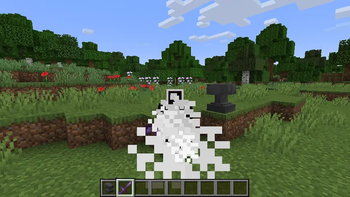
When in the air (before landing), right-click on empty space to trigger an extra jump using wind power (white wind particles spawn under your feet, accompanied by a wind sound). Level I allows double jumps, while Level V unlocks up to six jumps – letting you move as freely in the sky as on the ground.
After each extra jump, you need to wait 0.2 seconds (4 ticks) to trigger another. The jump count resets when you land, enabling flexible movement across terrain.
**

- Charged Sword Qi
Hold Left Ctrl + Right-Click to enter the charging state, during which you can move slowly. The charging duration increases from 1.0 second (20 ticks) at Level I to 3.0 seconds (60 ticks) at Level V. Damage is linked to the charge progress – at Level V with full charge, it deals 20 base damage.
It also features an 11-block range (with an extra 20% range at full charge) and a 3×3 cone-shaped area of effect. Wherever the wind blade passes, enemies will be knocked back up to 5.4 blocks, showcasing the overwhelming power of cutting wind pressure. After release, it only has a 0.5-second (10-tick) cooldown, which is independent of the wind projectile’s cooldown.
**

- Projectile Immunity & Reflection
When holding the enchanted sword in your main hand or offhand, you automatically gain projectile immunity (arrows, snowballs, fire charges, tridents, etc., have no effect) and can reflect projectiles: When a projectile touches your hitbox, it will bounce back at a random angle within ±30° of your line of sight. The reflected projectile retains its original properties (e.g., a fire arrow still ignites targets) and travels at 70% of its original speed. This combines offense and defense, nullifying long-range threats entirely.
From precise wind projectile suppression to large-area storm bursts, from aerial mobility to long-range sword qi, and even perfect defense against projectiles – the Sword Storm enchantment uses wind as its brush, painting diverse combat possibilities for your sword. With each level up, the power of wind becomes purer. Now, it’s time to unleash your very own Sword Storm in the blocky world of Minecraft.
Available Versions
How to Install Sword Storm on Your Server
Order Server
Order a Minecraft Java server with at least 3 GB RAM (4 GB recommended).
Set fabric Loader
In the panel under "Egg", select the fabric loader and matching Minecraft version (1.21.10).
Install Mod
Open the mod browser in the dashboard and search for "Sword Storm". Click "Install" – done! Alternatively, upload the .jar via SFTP to the /mods folder.
Compatibility
Mod Loaders
Minecraft Versions
1.21.10, 1.21.9, 1.21.8 (+8 more)
Server-side
✓ RequiredRecommended RAM
4 GB(min. 3 GB)Frequently Asked Questions
Sword Storm server crashes on startup – what to do?
Most common cause: wrong fabric version or insufficient RAM. Check the server log (latest.log) for "OutOfMemoryError" or "Mixin" errors. With Mado Hosting: ensure at least 3 GB RAM is allocated and the loader matches the mod version (1.21.10). You can switch loaders with one click in the panel.
Is Sword Storm compatible with fabric?
Sword Storm officially supports fabric for Minecraft 1.21.10, 1.21.9, 1.21.8. The Mado dashboard automatically detects incompatible loader combinations.
Server lagging with Sword Storm – how to optimize performance?
Recommended RAM: 4 GB (per 8 players). Use /spark profiler to check if Sword Storm consumes the most tick time. Common fixes: reduce server view-distance to 8-10, install "performant" or "starlight" as supplementary mods on Forge. With Mado Hosting, your server runs on NVMe SSDs with dedicated CPU cores for minimal latency.
Similar Mods




![[TaCZ] Timeless and Classics Zero](https://cdn.modrinth.com/data/SzzJttH8/fd27766d2bb8390d284696b1dbd358f87e081439_96.webp)

Rent Modded Server
Install Sword Storm with just one click on your server.