
swrpgtrees
Chop down entire trees instantly by sneaking and breaking the bottom log with an axe. Configurable to support different log and leaf types.
Screenshots
About this Mod
SW RPG TREES - Tree Chopping Sneak
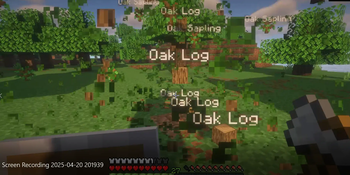
This mod streamlines tree chopping in Minecraft! Simply sneak and break the bottom log of a tree with an axe, and the entire tree will fall instantly. This dramatically speeds up resource gathering and makes clearing forests much more efficient. The mod is also highly configurable, allowing you to define which blocks are considered logs and leaves.
1.0.1 update
Features:
Instant Tree Felling: Break the bottom log of a tree while sneaking with an axe to fell the whole tree.
Configurable Log and Leaf Blocks: Customize which blocks are recognized as logs and leaves via the config file. This allows compatibility with modded trees.
Efficient Resource Gathering: Quickly harvest wood and clear areas.
How to Use:
Equip an axe.
Sneak (hold shift by default).
Break the bottom-most log block of the tree.
The entire tree above will be destroyed.
Configuration:
The mod's behavior is defined in the config/swrpgtrees.json file. You can edit this file to specify:
Log Blocks: A list of block IDs that the mod should consider as logs.
Leaf Blocks: A list of block IDs that the mod should consider as leaves.
Default Configuration:
By default, the mod includes the following vanilla Minecraft logs:
Oak Log
Spruce Log
Birch Log
Jungle Log
Acacia Log
Dark Oak Log
And the following vanilla leaves:
Oak Leaves
Spruce Leaves
Birch Leaves
Jungle Leaves
Acacia Leaves
Dark Oak Leaves
Cherry Tree - added in 1.0.1 config.
Pale Oak - added in 1.0.1 config.
Warped Tree - added in 1.0.1 config.
Crimson Tree - added in 1.0.1 config.
Important Notes:
This mod requires the Fabric Loader.
The config file is located at config/swrpgtrees.json.
Available Versions
How to Install swrpgtrees on Your Server
Order Server
Order a Minecraft Java server with at least 3 GB RAM (4 GB recommended).
Set fabric Loader
In the panel under "Egg", select the fabric loader and matching Minecraft version (1.21.6).
Install Mod
Open the mod browser in the dashboard and search for "swrpgtrees". Click "Install" – done! Alternatively, upload the .jar via SFTP to the /mods folder.
Compatibility
Mod Loaders
Minecraft Versions
1.21.6, 1.21.5
Server-side
~ OptionalRecommended RAM
4 GB(min. 3 GB)Frequently Asked Questions
swrpgtrees server crashes on startup – what to do?
Most common cause: wrong fabric version or insufficient RAM. Check the server log (latest.log) for "OutOfMemoryError" or "Mixin" errors. With Mado Hosting: ensure at least 3 GB RAM is allocated and the loader matches the mod version (1.21.6). You can switch loaders with one click in the panel.
Is swrpgtrees compatible with fabric?
swrpgtrees officially supports fabric for Minecraft 1.21.6, 1.21.5. The Mado dashboard automatically detects incompatible loader combinations.
Server lagging with swrpgtrees – how to optimize performance?
Recommended RAM: 4 GB (per 8 players). Use /spark profiler to check if swrpgtrees consumes the most tick time. Common fixes: reduce server view-distance to 8-10, install "performant" or "starlight" as supplementary mods on Forge. With Mado Hosting, your server runs on NVMe SSDs with dedicated CPU cores for minimal latency.
Similar Mods




Rent Modded Server
Install swrpgtrees with just one click on your server.