
Sylcurity
Polymer-based security mod.
Screenshots
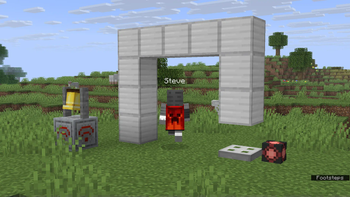
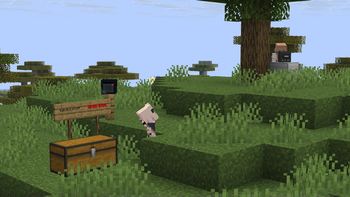
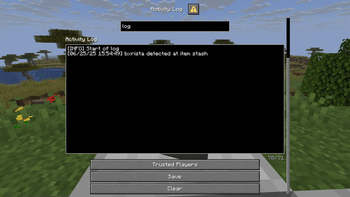
About this Mod
Sylcurity
Polymer-based security mod.

WARNING!!!!! This mod was made in a few days, so don't expect immediate perfection until it's been updated for a while.
Usage
For server owners
Simply drop this mod into the mods folder and it will work as expected. However, custom textures for the Event Receiver (and future textured blocks/items) can be applied by also installing Polymer and configuring resource pack hosting.
The mod should work fine with Geyser players once 1.21.6 is released, though dialogs will be a bit weird due to Bedrock form limitations.
For players
See the features section below. You'll probably want to start with a Security Terminal and an Activity Log.
Features
Security Terminal
The security terminal, when interacted with, opens a GUI that gives access to cameras on your network. It will emit a Security Access event on all groups it is in when opened.
Activity Log
The activity log keeps track of events on the network (as long as it is in loaded chunks). It will receive events from any group it is in.
Camera
The camera allows for long-range visual monitoring, though it is only accessible when the chunk it's in is loaded. Only players that are trusted can access the camera, even if they are trusted by the access terminal.
Bedrock players will face issues using them due to differences in spectator mechanics.
Player Detector
The player detector works like an invisible tripwire with a range of 32 blocks. They do not go through blocks or trusted players (more on that later). They have 16 rotation states and will detect on the angle they are placed at. They emit a Player Detection event when a player enters its line of sight that is not trusted, and all groups it is in will receive it.
Event Receiver
The event receiver will emit a redstone signal when it receives the event it is configured for. It will receive events from any group it is in.
Mechanics
Trusted Players
Each device keeps a list of trusted players which can interact with it/be ignored by it.
Events/Messages
Currently there are only two events, Security Access and Player Detection. Devices will send their events to every device in every group they are in, and likewise devices will receive messages from any group they are in. (this means if you have two devices both in the same two groups, they will send/receive messages twice)
Cameras
Players using a camera will be teleported to the camera in a fake "spectator" state while a stand-in NPC takes their place. Players may crouch to exit the camera. When the NPC is damaged, it will kick the player out of the camera and apply the damage as expected. The player is not allowed to interact with any blocks or entities while using the camera, nor can they move their camera. The mod tries its best to prevent any teleportation or state persistence if the server crashes mid-camera-view, but it may happen anyway if the crash is severe enough. (tl;dr, if the server crashes disgracefully the player may be teleported to the camera they are using.)
Available Versions
How to Install Sylcurity on Your Server
Order Server
Order a Minecraft Java server with at least 3 GB RAM (4 GB recommended).
Set fabric Loader
In the panel under "Egg", select the fabric loader and matching Minecraft version (1.21.11).
Install Mod
Open the mod browser in the dashboard and search for "Sylcurity". Click "Install" – done! Alternatively, upload the .jar via SFTP to the /mods folder.
Compatibility
Mod Loaders
Minecraft Versions
1.21.11, 1.21.10, 1.21.9 (+3 more)
Server-side
✓ RequiredRecommended RAM
4 GB(min. 3 GB)Frequently Asked Questions
Sylcurity server crashes on startup – what to do?
Most common cause: wrong fabric version or insufficient RAM. Check the server log (latest.log) for "OutOfMemoryError" or "Mixin" errors. With Mado Hosting: ensure at least 3 GB RAM is allocated and the loader matches the mod version (1.21.11). You can switch loaders with one click in the panel.
Is Sylcurity compatible with fabric?
Sylcurity officially supports fabric for Minecraft 1.21.11, 1.21.10, 1.21.9. The Mado dashboard automatically detects incompatible loader combinations.
Server lagging with Sylcurity – how to optimize performance?
Recommended RAM: 4 GB (per 8 players). Use /spark profiler to check if Sylcurity consumes the most tick time. Common fixes: reduce server view-distance to 8-10, install "performant" or "starlight" as supplementary mods on Forge. With Mado Hosting, your server runs on NVMe SSDs with dedicated CPU cores for minimal latency.
Similar Mods






Rent Modded Server
Install Sylcurity with just one click on your server.