
Synchronised Blockstates
A mod to synchronise the list of blockstates from server to client to prevent mismatches
About this Mod
Synchronised Blockstates
Modded multiserver setups can be... complicated.
When you have multiple connected servers that all have different modlists, it's not uncommon for different servers to have mismatched blocks, leaving you with sights like this: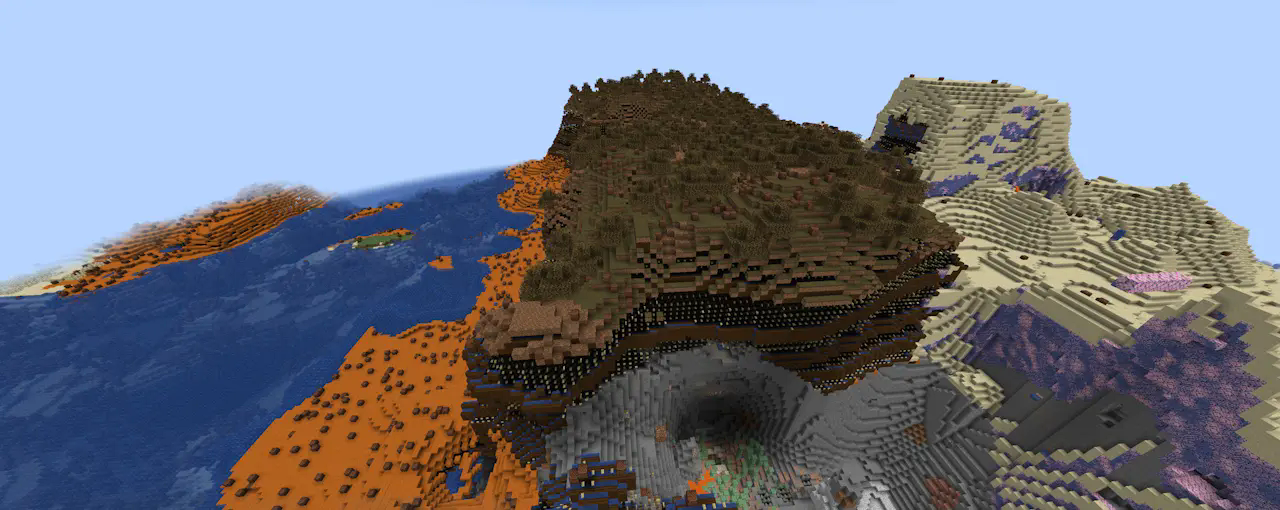
Obviously this isn't ideal, so this mod takes the approach of synchronising all of the blockstates from the server to the client side when the player joins, allowing the client to compensate.
For example, that same image with synchronised blockstates enabled:
Note: if the client doesn't receive blockstate info from the server, it'll fall back to using vanilla states.
This mod is still a W.I.P. and there are plenty of improvements yet to be made, but it should function for the time being.
Configuration
In lieu of a proper config at this point in time, Synchronised Blockstates has several behaviours that can be enabled or customised using JVM arguments or environment variables:
-Dmod.synchronisedblockstates.dumpAllStates- Client-only.
- Accepted values:
true,1,yes,on. - On startup, encodes all blockstates (using the same format as if it were sending a single, unchunked, state registry packet) and writes it to
<minecraft run directory>/synchronized_blockstates/vanillablockstates.dat(note: not necessarily only vanilla blockstates, will also include modded blockstates if there are any modded blocks).
-Dmod.synchronisedblockstates.ouputMissingStates- Client-only.
- Accepted values:
true,1,yes,on. - When the client recieves a packet and remaps its local registry, outputs any mismatches between the client and server registries to
<minecraft run directory>/synchronized_blockstates/missing-states-<current time>.dat
-Dmod.synchronisedblockstates.propertyChunkingThreshold- Logical Server only.
- Accepted values: any integer, default
1024. - Max limit on properties before the server starts chunking data before sending it to the client. Additionally, the maximum number of properties that can be sent in a single property chunk.
-Dmod.synchronisedblockstates.blockChunkingThreshold- Logical Server only.
- Accepted values: any integer, default
4096. - Max limit on blocks before the server starts chunking data before sending it to the client. Additionally, the maximum number of blocks there can be sent in a single blockstate chunk.
-Dmod.synchronisedblockstates.stateChunkingThreshold- Logical Server only.
- Accepted values: any integer, default
32768. - Max limit on blockstates before the server starts chunking data before sending it to the client.
Available Versions
How to Install Synchronised Blockstates on Your Server
Order Server
Order a Minecraft Java server with at least 3 GB RAM (4 GB recommended).
Set fabric Loader
In the panel under "Egg", select the fabric loader and matching Minecraft version (1.21.1).
Install Mod
Open the mod browser in the dashboard and search for "Synchronised Blockstates". Click "Install" – done! Alternatively, upload the .jar via SFTP to the /mods folder.
Compatibility
Mod Loaders
Minecraft Versions
1.21.1, 1.20.1
Server-side
~ OptionalRecommended RAM
4 GB(min. 3 GB)Frequently Asked Questions
Synchronised Blockstates server crashes on startup – what to do?
Most common cause: wrong fabric version or insufficient RAM. Check the server log (latest.log) for "OutOfMemoryError" or "Mixin" errors. With Mado Hosting: ensure at least 3 GB RAM is allocated and the loader matches the mod version (1.21.1). You can switch loaders with one click in the panel.
Is Synchronised Blockstates compatible with fabric?
Synchronised Blockstates officially supports fabric for Minecraft 1.21.1, 1.20.1. The Mado dashboard automatically detects incompatible loader combinations.
Server lagging with Synchronised Blockstates – how to optimize performance?
Recommended RAM: 4 GB (per 8 players). Use /spark profiler to check if Synchronised Blockstates consumes the most tick time. Common fixes: reduce server view-distance to 8-10, install "performant" or "starlight" as supplementary mods on Forge. With Mado Hosting, your server runs on NVMe SSDs with dedicated CPU cores for minimal latency.
Rent Modded Server
Install Synchronised Blockstates with just one click on your server.